Blue Iris UI3

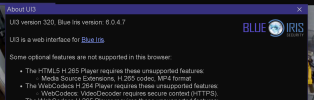
Man, I wish I had just a fraction of your understanding and patience to explain this to people like me :) FWIW, is it safe to assume my 320 install didn't take? I copied the contents of the zip files to the programfiles/blueiris5/www directory and overwrote what was there. But even after restarting the service, and reloading the page, I'm still showing 319 on my browser.
:)

Yes if it shows 319 on the about page, then you didn't put the update in the correct place.

There's no need to restart the Blue Iris service when updating UI3. Just reload the UI3 page.

I am guessing you extracted to the wrong path. Make sure login.htm and ui3.htm go into www, and overwrite everything when prompted.
 
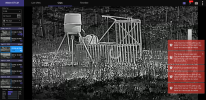
Ok, it took a lot longer for the stall to happen on 320, but, alas, it did. check out this video of a coyote prowling a turkey... The player delay time seems to float between 80 and 120ms, until about 25 seconds in. Then the image freezes, and the player delay takes off. It eventually starts playing (after 21 seconds of player delay)... Does this provide any more data points?
 

Attachments

  • Like
Reactions: bp2008
Ok, it took a lot longer for the stall to happen on 320, but, alas, it did. check out this video of a coyote prowling a turkey... The player delay time seems to float between 80 and 120ms, until about 25 seconds in. Then the image freezes, and the player delay takes off. It eventually starts playing (after 21 seconds of player delay)... Does this provide any more data points?
Ahhh man I don't know.
In that one, the video player ACTUALLY stalled and the stall detection did not kick in. The stall detection code that shows the yellow toast message "Detected HTML5 video player stall. Reopening video stream" is not user-configurable, and it looks for very specific conditions I was getting all the time on my Android phone many years ago. Probably the reason it did not trigger there is because the video player never entered its "waiting" state which is one of the preconditions for this particular stall detection.

It kinda just looks like a less frequent symptom of whatever underlying problem is causing this mess.
 
  • Like
Reactions: erkme73
Well, whatever it is, it must be a rather recent trigger because I didn't have these issues about a month ago. I wonder if I can roll back my Brave/Chrome updates and verify... I'll explore and report.

And fwiw, 320 definitely is playing more robustly than the 319, so whatever you modified seems to help. TY!
 
  • Like
Reactions: bp2008
Well, whatever it is, it must be a rather recent trigger because I didn't have these issues about a month ago. I wonder if I can roll back my Brave/Chrome updates and verify... I'll explore and report.

And fwiw, 320 definitely is playing more robustly than the 319, so whatever you modified seems to help. TY!
I rolled back to Feb 2026 on Chrome and I could not get any of the playback to stall. Granted it was 320, but still no glitching. Hopefully, as you said, some bigger fish are feeling whatever change there was and will help get it resolved. Thank again...
 
  • Like
Reactions: bp2008
I'm happy to report that I have had zero issues with UI3 320. And believe me I tried my hardest to get it puke. I then accessed my daughters BI which she is still running UI3 319 and it threw up the dreaded yellow html5 error almost immediately.

Thanks again Bryan for fixing your great UI3, or I should say making it work with the bad chromium update. :clap:
 
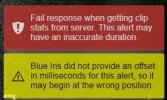
FYG: In Blue Iris 6.0.4.8 UI3 Playback had issues and indicated messages as in the attached.
Reverting to BI 6.0.4.7 allowed playback to function normally

Failed response when getting clip stats from server. The alert may have an inaccurate duration.
Blue Iris did not provide an offset duration in milliseconds for this alert, so it may begin at the wrong position


BIplayback_20260422.jpgBIplayback_20260422.jpg
 
  • Like
Reactions: Techie007L
FYG: In Blue Iris 6.0.4.8 UI3 Playback had issues and indicated messages as in the attached.
Reverting to BI 6.0.4.7 allowed playback to function normally

Failed response when getting clip stats from server. The alert may have an inaccurate duration.
Blue Iris did not provide an offset duration in milliseconds for this alert, so it may begin at the wrong position


View attachment 242430View attachment 242430
Hmmm, I have tried everything on reviewing clips of multiple cameras and I can't produce this error running 6.0.4.8 and UI3 320.
 
Can anyone help me figure out why I cannot access UI3 from my mobile phone but I can access it from a laptop connected the the same VPN? Here is the story

Recently moved
BI PC is at old house still on same internet/ISP/DNS/VPN
ATT Fiber at new house
Can connect to VPN on iPhone but UI3 will not load
Can connect to VPN on laptop and UI3 will load
I have tried port forwarding 81 for UI3 on the ATT gateway as a last resort and still cannot connect to UI3 on any iPhone

As soon as I disconnect from the ATT Fiber/WiFi and go on 5G, I can use the VPN and UI3 the same as before.

It doesn't make sense to me that the laptop, on the same ATT Fiber, can connect to the VPN and access UI3 but either iPhone cannot
 
Can anyone help me figure out why I cannot access UI3 from my mobile phone but I can access it from a laptop connected the the same VPN? Here is the story

Recently moved
BI PC is at old house still on same internet/ISP/DNS/VPN
ATT Fiber at new house
Can connect to VPN on iPhone but UI3 will not load
Can connect to VPN on laptop and UI3 will load
I have tried port forwarding 81 for UI3 on the ATT gateway as a last resort and still cannot connect to UI3 on any iPhone

As soon as I disconnect from the ATT Fiber/WiFi and go on 5G, I can use the VPN and UI3 the same as before.

It doesn't make sense to me that the laptop, on the same ATT Fiber, can connect to the VPN and access UI3 but either iPhone cannot
Out of curiosity, are you accessing BI via Hostname?
Could it be that VPN on the iPhone is using a different DNS server and therefore not resolving the hostname correctly?
 
Out of curiosity, are you accessing BI via Hostname?
Could it be that VPN on the iPhone is using a different DNS server and therefore not resolving the hostname correctly?
I am accessing it by connecting to OpenVPN and then web browser to 192.168.1.239:81
 
Did you OpenVPN client recently update? I had issues in the past where updates would bork it for a bit. I eventually gave up and went with tailscale... it's free, and it just works. Keeps my kids' phones, wife's laptop, and all other portable devices on my home network no matter where they are. Look it up if you can't get it working again. Simple setup.
 
Did you OpenVPN client recently update? I had issues in the past where updates would bork it for a bit. I eventually gave up and went with tailscale... it's free, and it just works. Keeps my kids' phones, wife's laptop, and all other portable devices on my home network no matter where they are. Look it up if you can't get it working again. Simple setup.
Doesn't make sense as it works fine on cellular, it must be an issue with the new ATT Fiber/Gateway. Also works fine from my business, on a different WiFi network/ISP