


Blue Iris UI3
- Thread starter bp2008
- Start date
You are using an out of date browser. It may not display this or other websites correctly.
You should upgrade or use an alternative browser.
You should upgrade or use an alternative browser.

Just to help clarify the issue, my video does not stop as well. This video shows Edge on left and Pale Moon on right. Both are using the HTML5. Notice that even though the error message pops up the video keeps going.
So you're experiencing this on LIVE as well? So far, I've only seen it on playback - and then only if it's 1x. If play back on anything other than normal, it doesn't happen. Interesting.

The videos so far have told me it probably is not i-frame related because it breaks after a different number of frames each time.
I checked myself, Blue Iris did not suddenly start supporting Direct-to-Wire in clips.
Lets check on a few more basics. These questions are for everyone repeatedly having the issue with HTML5 player stalls being detected, FPS readout dropping to 0, playback progress bar stopping moving, etc (all these things happen as a consequence of the same problem).
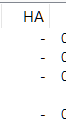
1. Are you using hardware accelerated decoding in Blue Iris on any of the cameras? (check status window > Cameras to be sure. The "HA" column should be all hyphens.
2. Are you using hardware accelerated encoding? (in BI Settings > Web server > Advanced > Streaming 0 (or 1 or 2) > Configure.
3. Is direct-to-disk being used on affected cameras?
4. Does it only affect some cameras (and not others)?
5. Does it affect group streaming (multi-camera views)?
6. Did anyone try downgrading Blue Iris to a version that was not affected, to see if it is still not affected? This would help rule out if Blue Iris is doing something different to cause the issue. Please do not feel compelled to perform this test if you haven't done so already.
I checked myself, Blue Iris did not suddenly start supporting Direct-to-Wire in clips.
Lets check on a few more basics. These questions are for everyone repeatedly having the issue with HTML5 player stalls being detected, FPS readout dropping to 0, playback progress bar stopping moving, etc (all these things happen as a consequence of the same problem).
1. Are you using hardware accelerated decoding in Blue Iris on any of the cameras? (check status window > Cameras to be sure. The "HA" column should be all hyphens.
2. Are you using hardware accelerated encoding? (in BI Settings > Web server > Advanced > Streaming 0 (or 1 or 2) > Configure.
3. Is direct-to-disk being used on affected cameras?
4. Does it only affect some cameras (and not others)?
5. Does it affect group streaming (multi-camera views)?
6. Did anyone try downgrading Blue Iris to a version that was not affected, to see if it is still not affected? This would help rule out if Blue Iris is doing something different to cause the issue. Please do not feel compelled to perform this test if you haven't done so already.

OK,The videos so far have told me it probably is not i-frame related because it breaks after a different number of frames each time.
I checked myself, Blue Iris did not suddenly start supporting Direct-to-Wire in clips.
Lets check on a few more basics. These questions are for everyone repeatedly having the issue with HTML5 player stalls being detected, FPS readout dropping to 0, playback progress bar stopping moving, etc (all these things happen as a consequence of the same problem).
1. Are you using hardware accelerated decoding in Blue Iris on any of the cameras? (check status window > Cameras to be sure. The "HA" column should be all hyphens.
View attachment 242197
2. Are you using hardware accelerated encoding? (in BI Settings > Web server > Advanced > Streaming 0 (or 1 or 2) > Configure.
3. Is direct-to-disk being used on affected cameras?
4. Does it only affect some cameras (and not others)?
5. Does it affect group streaming (multi-camera views)?
6. Did anyone try downgrading Blue Iris to a version that was not affected, to see if it is still not affected? This would help rule out if Blue Iris is doing something different to cause the issue. Please do not feel compelled to perform this test if you haven't done so already.
#1 No HA on any of my cams
#2 No
#3 Yes on all my cams
#4 No, affects all my cams
#5 No, multi groups and all cameras index works fine. ( update: it does give error on the all cam index view as well)
#6 Yes, I went back to 6.0.4.2 and still had issue. But I did have an EDGE update just the other day.
Pale Moon runs html5 just fine on UI3 and running 6.0.4.7 BI
Last edited:
Mine does it on both live or playbackSo you're experiencing this on LIVE as well? So far, I've only seen it on playback - and then only if it's 1x. If play back on anything other than normal, it doesn't happen. Interesting.
So I tested my demo Bi machine on a older version of BI 6.0.2.6 and it still has the issue. Notice it does do this on my "all camera index" as well. Also Tried my daughters via wan and it also does it. I also tried using 2 other computers, all have the issue AND all are running the latest Edge.
Ok I just made sure my Edge and Chrome are both fully updated and neither has this issue yet. Tried on two physical machines with Nvidia graphics and one virtual machine. Both Chrome and Edge latest versions.
Chrome Version 147.0.7727.102 (Official Build) (64-bit)
Microsoft Edge Version 147.0.3912.72 (Official build) (64-bit)
Chrome Version 147.0.7727.102 (Official Build) (64-bit)
Microsoft Edge Version 147.0.3912.72 (Official build) (64-bit)
Sorry for delayed response to your questions, Bryan...The videos so far have told me it probably is not i-frame related because it breaks after a different number of frames each time.
I checked myself, Blue Iris did not suddenly start supporting Direct-to-Wire in clips.
Lets check on a few more basics. These questions are for everyone repeatedly having the issue with HTML5 player stalls being detected, FPS readout dropping to 0, playback progress bar stopping moving, etc (all these things happen as a consequence of the same problem).
1. Are you using hardware accelerated decoding in Blue Iris on any of the cameras? (check status window > Cameras to be sure. The "HA" column should be all hyphens.
View attachment 242197
2. Are you using hardware accelerated encoding? (in BI Settings > Web server > Advanced > Streaming 0 (or 1 or 2) > Configure.
3. Is direct-to-disk being used on affected cameras?
4. Does it only affect some cameras (and not others)?
5. Does it affect group streaming (multi-camera views)?
6. Did anyone try downgrading Blue Iris to a version that was not affected, to see if it is still not affected? This would help rule out if Blue Iris is doing something different to cause the issue. Please do not feel compelled to perform this test if you haven't done so already.
1) 100% are no HA, and all are H265
2) No HA under streaming profile:
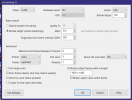
3) I used D2D on ALL cameras, however, I have not (as of now) seen this issue with live streams - only playback.
4) I have not checked all 82 cameras, but it appears to happen on all the ones I've worked with recently.
5) I do not have any groups recorded, and live streams - whether individual or group - do not exhibit this stalling.
6) I have not attempted to downgrade recently - but my brother's separate system is doing the same thing and he did try to resolve with downgrade - to no avail.
Please try UI3-320 from here: Releases · bp2008/ui3
I've added that new frame rendered detection method. Please let me know if the stalling issue continues.
I've added that new frame rendered detection method. Please let me know if the stalling issue continues.
Well @erkme73 your live streams (of single cameras only) are using direct-to-wire so the video is coming from an entirely different encoder which can have serious compatibility effects. I did not ask about direct-to-wire though because you were reporting this for clips (which do not support direct-to-wire) and others have reported it for live view and group views as well!
It is possible that if you turned off direct-to-wire you might start getting the stalling effect in live streams. It would be good to know if so because that would suggest something related to Blue Iris's video encoding is helping to cause the issue.
It is possible that if you turned off direct-to-wire you might start getting the stalling effect in live streams. It would be good to know if so because that would suggest something related to Blue Iris's video encoding is helping to cause the issue.
If I am not mistaken I've seen both H.264 and H.265 being used (via stats for nerds in screen recordings that have been shared here). Things are pointing at this being a new bug in Chromium that is not codec-specific, but rather more generalized to the HTML video rendering pipeline. I have no idea what other circumstances are required to trigger the bug though!
I'll switch to a non D2W profile and report back momentarily. In the interim, I applied the 320 files (though my browser info page still shows 319, so I'm not entirely sure the update took). I've been hitting my playback pretty hard, and so far I've not seen the stalling. Maybe it's a placebo effect 
ETA: I didn't wait long enough. It's still doing it. And to your point, when I disable D2W, my live stream almost immediately begins to stall. But, as before the video itself seems unaffected.
ETA: I didn't wait long enough. It's still doing it. And to your point, when I disable D2W, my live stream almost immediately begins to stall. But, as before the video itself seems unaffected.
Attachments
Last edited:
Ok, I think I have found something. I went in and checked under : see pic
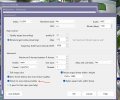 I did not have direct to wire checked there.
I did have it checked each camera's settings here:
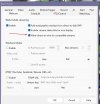
When i do check it enabled in the BI settings I cannot not produce the error. But, I know i have been running this unchecked before as I always see the time in UI3, with direct to wire I do not as I don't use the camera's time overlay.
Have to get yard mowed, but just wanted to share that. Also here are just a few of the cams encoder settings :
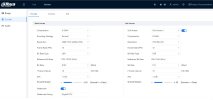
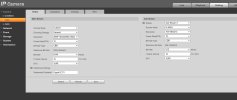
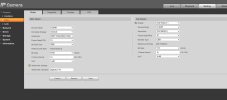
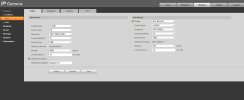
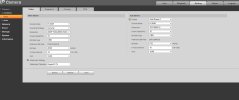
When I get back I will try the UI3 bp2008 want us to try.
I did not have direct to wire checked there.I did have it checked each camera's settings here:
When i do check it enabled in the BI settings I cannot not produce the error. But, I know i have been running this unchecked before as I always see the time in UI3, with direct to wire I do not as I don't use the camera's time overlay.
Have to get yard mowed, but just wanted to share that. Also here are just a few of the cams encoder settings :
When I get back I will try the UI3 bp2008 want us to try.
I'm pretty sure the D2W avoids the problem by sending the stream straight from the camera to the browser - bypassing all encoding that BI does. As in my case, with D2W enabled, all single-camera live streams works great. But even with that enabled, any playback (or composite/group cameras) will still have the issue, as those are re-encoded by BI in a way that doesn't play nice with the HTML5 player in chromium (which apparently includes Edge).Ok, I think I have found something. I went in and checked under : see pic
View attachment 242241 I did not have direct to wire checked there.
I did have it checked each camera's settings here:
View attachment 242242
When i do check it enabled in the BI settings I cannot not produce the error. But, I know i have been running this unchecked before as I always see the time in UI3, with direct to wire I do not as I don't use the camera's time overlay.
Have to get yard mowed, but just wanted to share that. Also here are just a few of the cams encoder settings :
View attachment 242243View attachment 242244View attachment 242245View attachment 242246View attachment 242247
When I get back I will try the UI3 bp2008 want us to try.
So, D2W only papers over the underlying issue, and does nothing to prevent the stalling during playback, unfortunately. It does make me wonder what is different in the way the direct camera streams encode compared to what BI pushes on non-D2W streams.
Alright, Bryan I think you fixed it. I cannot get the error message to come up and I have tried my best for the last 10 minutes. The one cam would almost always puke, so your the man as always! I will keep hammering it and will let you know. Also I am running it without direct to wire.
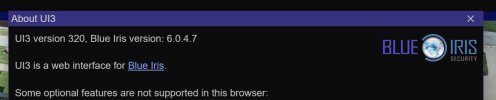
I'll switch to a non D2W profile and report back momentarily. In the interim, I applied the 320 files (though my browser info page still shows 319, so I'm not entirely sure the update took). I've been hitting my playback pretty hard, and so far I've not seen the stalling. Maybe it's a placebo effect
ETA: I didn't wait long enough. It's still doing it. And to your point, when I disable D2W, my live stream almost immediately begins to stall. But, as before the video itself seems unaffected.

Thanks for testing. I'm not sure what to do at this point.
It is possible I could detect frame rendering by (very inefficiently) copying the
<video> element to a canvas at every screen refresh and comparing all the pixels with the previous frame to see if they changed. This would only tell me that the frame changed and not which frame was rendered, which breaks UI3's ability to compute player delay and makes the timestamp and seek/scrub bar inaccurate at the very least. I'm not going to do that.I think I never answered your earlier question about adding an option to suppress the stall detection and reload behavior. I'm not sure that is a good idea. Because when the video player is in this bad state, all kinds of stuff is broken. Including the seek/scrub bar. I'll add it if necessary but it feels wrong.
An AI suggested setting the playback position to 1 millisecond after its current position, as it might force the video player to do a seek operation which could (maybe) get it to resume sending progress updates. But it would also cause a stutter I am quite sure. Not just a little stutter either. More like rewinding to the point where the player stopped reporting progress updates, if we do that as an alternative to restarting the stream the way it does now.
Here's something else you could try. Find the Enable Max Delay Limit setting in Video Player (Advanced), enable it, and try setting the max delay to low values both above and below where your player delay would normally sit. This will trigger when UI3 thinks the player delay has exceeded your set value. With luck it could get the video player back out of its bad state. We can hope. It might also cause a pretty bad stutter; you'll have to try to find out.
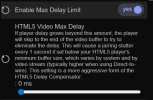
Another possibility. I suppose it is possible that keyframes arriving in the stream will cause the player to resume reporting progress correctly again (it could explain why direct to wire is preventing the issue for you).
BI web server streaming normally uses a very long keyframe interval for efficiency. But if a short keyframe interval works, it could be the best workaround for this issue right now.
Create a new streaming profile in UI3:
- Variable Bit Rate or Constant Bit Rate. Doesn't really matter which.
- Assign a very high max bit rate like 24000 Kbps to mitigate the quality loss of having a low Keyframe Interval.
- Set Keyframe Interval to 10 or something else low like that.
I hope this issue is affecting bigger fish than Blue Iris and UI3. Someone with the resources to get it fixed (like Hulu, Netflix, Youtube).
Last edited:
Ok, I think I have found something. I went in and checked under : see pic
I did not have direct to wire checked there.
I did have it checked each camera's settings here:
View attachment 242242
The direct to wire checkbox in camera settings > Webcast tab is only there to allow you to prevent direct-to-wire working with particular cameras (in case that camera specifically won't play nicely with direct to wire).
Your camera encoder settings all look fine except you didn't turn off the watermark text. At least you didn't turn it off on that page, which I always do.
I hope UI3-320 continues to have the issue solved for you. If it does for you, it likely will for some others too. If the issue comes back, then refer to the same suggestions I gave @erkme73 just above.
Man, I wish I had just a fraction of your understanding and patience to explain this to people like me
Thanks for testing. I'm not sure what to do at this point.
It is possible I could detect frame rendering by (very inefficiently) copying the<video>element to a canvas at every screen refresh and comparing all the pixels with the previous frame to see if they changed. This would only tell me that the frame changed and not which frame was rendered, which breaks UI3's ability to compute player delay and makes the timestamp and seek/scrub bar inaccurate at the very least. I'm not going to do that.
I think I never answered your earlier question about adding an option to suppress the stall detection and reload behavior. I'm not sure that is a good idea. Because when the video player is in this bad state, all kinds of stuff is broken. Including the seek/scrub bar. I'll add it if necessary but it feels wrong.
An AI suggested setting the playback position to 1 millisecond after its current position, as it might force the video player to do a seek operation which could (maybe) get it to resume sending progress updates. But it would also cause a stutter I am quite sure. Not just a little stutter either. More like rewinding to the point where the player stopped reporting progress updates, if we do that as an alternative to restarting the stream the way it does now.
Here's something else you could try. Find the Enable Max Delay Limit setting in Video Player (Advanced), enable it, and try setting the max delay to low values both above and below where your player delay would normally sit. This will trigger when UI3 thinks the player delay has exceeded your set value. With luck it could get the video player back out of its bad state. We can hope. It might also cause a pretty bad stutter; you'll have to try to find out.
View attachment 242250
Another possibility. I suppose it is possible that keyframes arriving in the stream will cause the player to resume reporting progress correctly again (it could explain why direct to wire is preventing the issue for you).
BI web server streaming normally uses a very long keyframe interval for efficiency. But if a short keyframe interval works, it could be the best workaround for this issue right now.
Create a new streaming profile in UI3:
- Variable Bit Rate or Constant Bit Rate. Doesn't really matter which.
- Assign a very high max bit rate like 24000 Kbps to mitigate the quality loss of having a low Keyframe Interval.
- Set Keyframe Interval to 10 or something else low like that.
I hope this issue is affecting bigger fish than Blue Iris and UI3. Someone with the resources to get it fixed (like Hulu, Netflix, Youtube).
FWIW, is it safe to assume my 320 install didn't take? I copied the contents of the zip files to the programfiles/blueiris5/www directory and overwrote what was there. But even after restarting the service, and reloading the page, I'm still showing 319 on my browser.
Last edited: