Ok so this is a tricky issue with a long history.
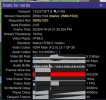
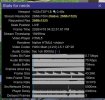
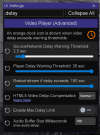
Years and years ago (surely 5+ years) I would have the video randomly freeze when using the HTML5 player, mainly in Android Chrome. Nobody ever complained about this issue to me so I don't think it was super widespread, but I had it happen all the time, got fed up, and programmed UI3 to detect when the HTML5 video player stops firing "timeupdate" events, which allowed me to work around the issue by restarting the video stream. That is why you get the popup message about the stall, and the stream keeps pausing to buffer (that is the stream restarting). It is also why the "Player delay" item in Stats for nerds begins rising.
Trouble is, lately I have been seeing these video player stall detections actually be a false positive. That is where the video has not actually frozen, but UI3 doesn't know it because the video element just stopped indicating that it was making progress and leaves UI3 figuratively in the dark about any video playback progress that is actually happening. This seems to be what happens in
@erkme73's video. I happens very infrequently for me and usually on Android Chrome where I can't really do anything about it. If I could reproduce the issue reliably I could probably find another workaround. But I can't reproduce it on demand.
What it boils down to is that HTML5 video implementations vary wildly depending which web browser you use, its version, which operating system you are on, what hardware acceleration is available, what drivers are installed, etc. It is a very complex system with many opportunities for problems that can appear in various ways. Being able to track down most bugs in that system is way beyond my pay grade. So I just do my best to provide multiple H.264 video player options so that people have choices if one isn't working right.
If you use the JavaScript player, it is less efficient for sure, but I've never seen it stall like the HTML5 player does and generally it is just less problematic because it never gets updated and it relies on much less of the complex software stacks that video on the web is built upon.
WebCodecs as I recently described above, is a more modern more efficient alternative to the JavaScript player but in my experience it is slighly more buggy in general. If it works reliably on systems where the HTML5 player does not, then it is absolutely worth using it.
I do have a lead on a possibly (maybe) more reliable way to detect video player progress. There's a relatively new API method for code to be notified when a video frame is rendered:
HTMLVideoElement: requestVideoFrameCallback() method - Web APIs | MDN But I don't know when I will have time to implement anything with it and there's no guarantee it will help with this issue.