TheWaterbug
Known around here
Ok, this is weird. One of my ancient Reolink RLC-420 units doesn't appear to have an Other setting for NTP server:Does your camera by chance have internet access? Mine is isolated on my camera network. All other cameras are syncing with my NTP server, but this one. Searching around, it looks like this a fairly common problem with Reolink in general. The settings allow you input custom NTP server, but those settings are ignored.
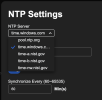
and my DHCP server gives it a bogus gateway to keep it from getting out to the Internet:
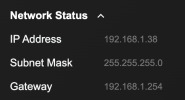
But the other day I had some electrical work done, and I got to watch as it came back online with its default date/time, and then sync itself with something (?????) after a few seconds:
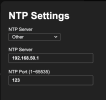
Back OT, my POE Reolink Doorbell (on my other network) does have an "other" setting:Electricians turned the power off at 11:15:59, then back on around 14:08. The camera comes up with its factory default date/time of 12/31/99, 16:00, and then syncs up with a time server at 14:08:34. I sped up the middle 30 seconds by 5x, but that was in post-processing, not from the camera. The odd thing is that this ancient camera doesn't have a setting to allow a local NTP server, so it's set to the default of time.windows.com, but it shouldn't be able to sync to that server, because I gave it a bogus default gateway of 192.168.1.254 (actual gateway on the LAN is 192.168.1.1, and there is nothing at 192.168.1.254), to keep it off the internet. I do have an NTP server running on my router at 192.168.1.1, but the camera shouldn't know that.
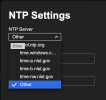
so I can point it at my pfsense router's NTP: