

If you use Home Assistant and install this integration Reolink, you get alot of sensors and switches for your Reolink doorbell to be used in HA dashboards and automations, including when someone press the doorbell button. No Shelly required.
New Reolink Wired POE Doorbell Cam ?
- Thread starter Elton Noway
- Start date
You are using an out of date browser. It may not display this or other websites correctly.
You should upgrade or use an alternative browser.
You should upgrade or use an alternative browser.


So you are just using their Relay, correct?Huge strides were made, now I just need to get it all off the bench and installed.
When the doorbell is pressed, the Shelly is triggered which also ding dongs the chime. Hubitat sees the trigger from the Shelly and then sends an HTTP command trigger to BI. Then, with that external trigger, BI sends a Pushover notification with a still of who the ding donger is.
It looks like I will be sending the Reolink back because this is a much better solution.

Smart doorbell - Shelly USA
 us.shelly.com

So are you getting rid of the spy on your door, the RIng?Yea, just this one.
Yea, going to just use the 54IR above the door bell, triggered by the Shelly.So are you getting rid of the spy on your door, the RIng?

I have Android phone, was using OpenVPN Connect App but switched to OpenVPN for Android (more features and works better) since it will automatically reconnect when you reboot your phone.
We leave our phones connected to 24/7 to our local VPN. Don't remember turning anything off on the phone to keep connected.
I know this does not help you with your iPhone.
What are you using OpenVPN or WireGuard? Are you setting up VPN in your network settings on your iPhone, I don't do that on my phone...
Just sharing...
We leave our phones connected to 24/7 to our local VPN. Don't remember turning anything off on the phone to keep connected.
I know this does not help you with your iPhone.
What are you using OpenVPN or WireGuard? Are you setting up VPN in your network settings on your iPhone, I don't do that on my phone...
Just sharing...
I have a Unifi gateway, so I was able to use Teleport (Wireguard) through their Wifiman app. All I did was generate a link in the settings on my gateway, emailed that to my phone, then the app did the rest. I didn't need to set anything up, and there aren't really any settings in their app, just On/Off. iPhone settings for VPN seem to be non-existent too, just On/Off.

Arjun
IPCT Contributor
Yeah...its all profile basedI have a Unifi gateway, so I was able to use Teleport (Wireguard) through their Wifiman app. All I did was generate a link in the settings on my gateway, emailed that to my phone, then the app did the rest. I didn't need to set anything up, and there aren't really any settings in their app, just On/Off. iPhone settings for VPN seem to be non-existent too, just On/Off.
Your next option is Android, but we all know that Android is not really privacy oriented despite the settings they portray within their O/S
Have you tried Wireguard on iPhone?
I have not. I took the path of least resistance and effort.Yeah...its all profile based
Your next option is Android, but we all know that Android is not really privacy oriented despite the settings they portray within their O/S
Have you tried Wireguard on iPhone?
My NTP setting on the Doorbell syncs fine to my NTP local Server on pfSense...as do my other cameras...Perhaps this is already documented, but I can't get my doorbell camera to sycn with my local time server (all of my Dahua and Amcrest cameras seem to be syncing fine). Is this a known issue or is there a work around?
Thank you for this post, reminded me to change the DST to 1st Sun. of Nov. this year 2026, it use to be last Sun in Oct.
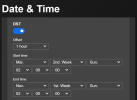
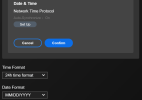
Hmm my Dahua's are set, must of missed the Doorbell, maybe the year before it was in Oct.
Does your camera by chance have internet access? Mine is isolated on my camera network. All other cameras are syncing with my NTP server, but this one. Searching around, it looks like this a fairly common problem with Reolink in general. The settings allow you input custom NTP server, but those settings are ignored.My NTP setting on the Doorbell syncs fine to my NTP local Server on pfSense...as do my other cameras...
Thank you for this post, reminded me to change the DST to 1st Sun. of Nov. this year 2026, it use to be last Sun in Oct.
View attachment 238931
View attachment 238932
Hmm my Dahua's are set, must of missed the Doorbell, maybe the year before it was in Oct.
Hmmm, nope, no Internet access on the Doorbell or any of my Cameras.Does your camera by chance have internet access? Mine is isolated on my camera network. All other cameras are syncing with my NTP server, but this one. Searching around, it looks like this a fairly common problem with Reolink in general. The settings allow you input custom NTP server, but those settings are ignored.
Only thing I can think of is maybe firmware version. I am running the original version...
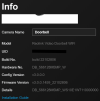
Sorry for the basic question but did you check if your Doorbell has access to your NTP Server, can you ping it? I have actually had this Doorbell access two different NTP Servers. Before pfSense NTP I ran NetTime:
NetTime worked great, when I ran a SOHO store bought Router. I would sync all my switches to it as well as all my PCs/Laptops.
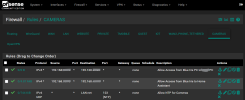
On my Camera VLAN I have a Firewall Rule allowing port 123 access so the cameras can get to the pfSense NTP Server:
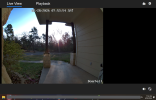
Checking in the ReoLink Client, same time as my PC:
I'm running a dedicated BlueIris machine and all my cameras including the Reolink doorbell are on an isolated network. I'm running the built-in Windows Time Server on that same PC. I can ping the server fine, but for whatever reason that I have not figured out, this one won't sync. I'm running their latest firmware I believe (v3.0.0.3215_2401262241). I was on an older version, but upgraded when I noticed the time was not syncing. Are these things generally good with downgrading firmwares?Hmmm, nope, no Internet access on the Doorbell or any of my Cameras.
Only thing I can think of is maybe firmware version. I am running the original version...
View attachment 238940
Sorry for the basic question but did you check if your Doorbell has access to your NTP Server, can you ping it? I have actually had this Doorbell access two different NTP Servers. Before pfSense NTP I ran NetTime:
NetTime worked great, when I ran a SOHO store bought Router. I would sync all my switches to it as well as all my PCs/Laptops.
On my Camera VLAN I have a Firewall Rule allowing port 123 access so the cameras can get to the pfSense NTP Server:
View attachment 238942
Checking in the ReoLink Client, same time as my PC:
View attachment 238944
Funny, did not know Windows has a NTP Server...never tried it. So, how is the isolated BI PC getting it's time if no Internet?I'm running a dedicated BlueIris machine and all my cameras including the Reolink doorbell are on an isolated network. I'm running the built-in Windows Time Server on that same PC. I can ping the server fine, but for whatever reason that I have not figured out, this one won't sync. I'm running their latest firmware I believe (v3.0.0.3215_2401262241). I was on an older version, but upgraded when I noticed the time was not syncing. Are these things generally good with downgrading firmwares?
My BI PC has Zero Internet access, that is why it gets it's time from my Router.
I do not have experience with downgrading firmware on this Doorbell, on the Hik Doorbell prior to this one it was easy to down/upgrade firmware...I think I read a few post here of people downgrading but don't hold me to it.
I have a few collected Firmwares and will share, which ReoLink Doorbell do you have Wifi or POE, white or black? Oh and do you know if it is version 1 or 2, not sure if this part matters.
This is how I have them separated:
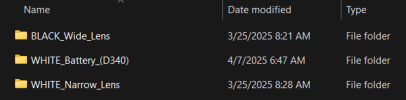
Each one has WiFi or POE:

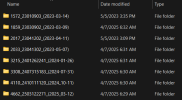
So for instance, here is my Black Wide Lens POE firmware collection:
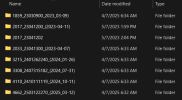
Here is my Black Wide Lens WiFi firmware collection:
Just let me know if you need me to Upload one...
HTH
Thanks for bringing this up, I just check ReoLink, looks like a new firmware version is available...well new for me, my last one was Mar. 2025I'm running a dedicated BlueIris machine and all my cameras including the Reolink doorbell are on an isolated network. I'm running the built-in Windows Time Server on that same PC. I can ping the server fine, but for whatever reason that I have not figured out, this one won't sync. I'm running their latest firmware I believe (v3.0.0.3215_2401262241). I was on an older version, but upgraded when I noticed the time was not syncing. Are these things generally good with downgrading firmwares?
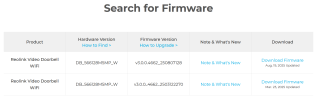

Reolink Firmware | Official Download Center
Access the Reolink Download Center for firmware updates, mobile app and desktop client downloads, user manuals and more. Find all essential software and support files for your Reolink cameras.
 reolink.com
Thinking the fact that they have both versions available to download tells me you may be able to downgrade. You may want to reach out to them...
Yeah I should be clear my Windows machine & Blue Iris have internet access, but the cameras do not as they are isolated and only send the feeds to Blue Iris. You can indeed activate NTP server in Windows. I believe the setup instructions came from this site somewhere.Funny, did not know Windows has a NTP Server...never tried it. So, how is the isolated BI PC getting it's time if no Internet?
My BI PC has Zero Internet access, that is why it gets it's time from my Router.
I do not have experience with downgrading firmware on this Doorbell, on the Hik Doorbell prior to this one it was easy to down/upgrade firmware...I think I read a few post here of people downgrading but don't hold me to it.
I have a few collected Firmwares and will share, which ReoLink Doorbell do you have Wifi or POE, white or black? Oh and do you know if it is version 1 or 2, not sure if this part matters.
This is how I have them separated:
View attachment 238950
Each one has WiFi or POE:
View attachment 238951
So for instance, here is my Black Wide Lens POE firmware collection:
View attachment 238952
Here is my Black Wide Lens WiFi firmware collection:
View attachment 238953
Just let me know if you need me to Upload one...
HTH
I have the black POE version 1.
I installed the August 2025 firmware from their site. I can't recall which version I came from though. It was a couple years old for sure, but also wasn't syncing time.
So my thoughts are kinda weird, that is I try to think of every if not many scenarios on how a hacker could gain access to my stuff. I am sure I am only 70% or so covered but it is like having your front door locked or unlocked, locked keep the honest folks out as they say.Yeah I should be clear my Windows machine & Blue Iris have internet access, but the cameras do not as they are isolated and only send the feeds to Blue Iris. You can indeed activate NTP server in Windows. I believe the setup instructions came from this site somewhere.
I have the black POE version 1.
I installed the August 2025 firmware from their site. I can't recall which version I came from though. It was a couple years old for sure, but also wasn't syncing time.
The reason I keep my BI PC off the Internet is to stop hackers or our government
 , or China, haha, from gaining access to my cameras or network. I don't trust Windows security at all. But what makes this kinda of a pain, well not really, I have to remember every 2-6 months or so to temporarily connect it to the Internet to update Windows or BI. I have two NICs in the machine so all I have to do is physically plug in the second NIC into a switch a few feet away. Which I may do today, thank you again for the reminders, lol
So here is my updated Black POE firmware list:
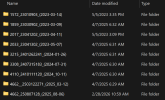
Just let me know if you want to try one...I will Zip it up for you...
I certainly understand your position! We rely on accessing cameras remotely a lot (through VPN of course).So my thoughts are kinda weird, that is I try to think of every if not many scenarios on how a hacker could gain access to my stuff. I am sure I am only 70% or so covered but it is like having your front door locked or unlocked, locked keep the honest folks out as they say.
The reason I keep my BI PC off the Internet is to stop hackers or our government
So here is my updated Black POE firmware list:
View attachment 238963
Just let me know if you want to try one...I will Zip it up for you...
I just moved my doorbell camera to network that has internet access. It found an even more recent firmware update (4662_2508071283) in the Reolink app.