Full ALPR Database System for Blue Iris!

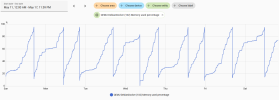
I use Home Assistant to monitor the RAM usage on my Proxmox that host Debian VM that runs Docker and runs both ALRP database and CodeProject.
From Home Assistant, I can either restart the entire Debian VM or restart the container using SSH commands.
Do you have any issues where it stops working or ever locks up?
 
Do you have any issues where it stops working or ever locks up?
Sure do, I have both CodeProject.AI and ALPR database on the same VM. I can see the VM will run out of RAM in time and then the CodeProject.AI will quit running and/or ALRP database will stop.
The only way I come up with is to restart the docker or VM to make it work again.


If it's Codeproject.ai that's causing the issues that may be why I'm not seeing anything as I'm utilizing the built-in AI on v6 now.
I'm having the same issue with the built-in (ONNX) AI, so it's not limited to CPAI.
 
  • Like
Reactions: iwanttosee
@algertc

Circling back to the MQTT requests I've asked for in the past.

I had asked in the past to be able to trigger an MQTT based on a license plate tag in addition to what we already can do with a specific plate.

If that isn't easily implemented, was wondering if there were a way to have Blue Iris send the plate tag and name in the MQTT payload?

What I am using now is this: { "plate_number":"&PLATE", "Image":"&ALERT_JPEG", "camera":"&NAME", "timestamp":"&ALERT_TIME" }

Can we include plate tag and plate name also in that ?
 
@algertc

Circling back to the MQTT requests I've asked for in the past.

I had asked in the past to be able to trigger an MQTT based on a license plate tag in addition to what we already can do with a specific plate.

If that isn't easily implemented, was wondering if there were a way to have Blue Iris send the plate tag and name in the MQTT payload?

What I am using now is this: { "plate_number":"&PLATE", "Image":"&ALERT_JPEG", "camera":"&NAME", "timestamp":"&ALERT_TIME" }

Can we include plate tag and plate name also in that ?
I'm not sure what you are asking... Blue Iris doesn't have direct access to the ALPR database so doesn't know the associated tag or name.

That was the point of it coming from ALPR that it can enrich the output with stuff it knows.
 
I'm not sure what you are asking... Blue Iris doesn't have direct access to the ALPR database so doesn't know the associated tag or name.

That was the point of it coming from ALPR that it can enrich the output with stuff it knows.
Yeah that's what I figured. Need to get Charlie to do the first option then
 
Yeah that's what I figured. Need to get Charlie to do the first option then
I'm not sure what you are asking either. It would help if you described what are you trying to accomplish. You should be able to get a plate number from Blue Iris via an MQTT message and then associate that with a tag and name inside of your automation system.
 
I want to be able to trigger an MQTT from ALPR based on a tag, not just a plate.

Why? Because I have literally several dozens of plates that I have designated as Delivery vehicles in ALPR and I want those to trigger and send MQTT to HomeSeer for announcing. The only way to get that info now is to add each plate as a separate MQTT notification.

I asked this before and Charlie gets it, but he never implemented it.
 
I want to be able to trigger an MQTT from ALPR based on a tag, not just a plate.

Why? Because I have literally several dozens of plates that I have designated as Delivery vehicles in ALPR and I want those to trigger and send MQTT to HomeSeer for announcing. The only way to get that info now is to add each plate as a separate MQTT notification.

I asked this before and Charlie gets it, but he never implemented it.
OK, I guess that makes sense, but where I live I rarely see the same delivery vehicle plate more than a few times a month. I have a camera setup on my front porch that notifies me when a package has been delivered so that's all I need.

I'm not sure how HomeSeer handles notifications, but I would think that you should be able to set these up based on conditions. You could have BI send a single MQTT message based on the "last plate seen" and then have HomeSeer send the notification based on one of several conditions.
 
I want to be able to trigger an MQTT from ALPR based on a tag, not just a plate.

Why? Because I have literally several dozens of plates that I have designated as Delivery vehicles in ALPR and I want those to trigger and send MQTT to HomeSeer for announcing. The only way to get that info now is to add each plate as a separate MQTT notification.

I asked this before and Charlie gets it, but he never implemented it.
I'm still holding out for @algertc implementing the rule engines he previewed several posts back.


I'm not sure what we can do to convince him to spend time getting it over the finish line. I just keep hoping that I open ipcamtalk one day soon and it's @algertc posting about it being ready.
 
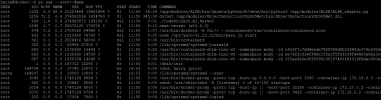
Yup. It's got either a runaway process or a memory leak or both, and the Docker contain will ramp up to 400% CPU and/or many GBs for RAM and bring the machine to its knees.

Bad news and good news on this:
  1. I put Claude on the case this morning, and the problem isn't the application, it's MALWARE!!!!!
    1. I had stupidly opened a port-forward the ALPR container, assuming that my ridiculously long password would protect me.
    2. The app is built with Next.js 15.0.3, which has a known vulnerability (CVE-2025-29927) allowing malformed requests to bypass the login screen entirely and get to the entire app, which included injecting a crypto miner.
    3. The crypto miner was pegging the CPU within 60 seconds of launch, which means it's not even very good malware.
  2. The good news is that,
    1. Claude did a complete audit of my machine and my environment, and the malware was not able to escape the Docker container.
    2. My host machine tested clean, and my network is segmented, so even if the host had been compromised, there is literally no IP route to my main network where important stuff lives.
    3. I've turned off the port-forward, and have vowed to just stop using it for this.
    4. I'll have to figure how to set up easy access to Blue Iris, as many of my users will not find it easy to open a VPN connection beforehand.
  3. So my ALPR is back up, from a fresh install, with several Claude mods to protect things, even though there's no inbound access anyway, since the port-forward is gone:
    1. adding a reverse proxy rule that strips the x-middleware-subrequest header before it reaches the app
    2. Close port 5432 — remove the ports: stanza from the db service or at minimum add firewall rules so it's not internet-reachable
    3. Claude's patch broke access to the database, which it then fixed with one character:
      1. nginx is stripping the port when it sets Host: $host (192.168.50.13), but the browser's Origin still has the port (192.168.50.13:3000). Next.js compares them and aborts the Server Action. The DB data is there — it just can't fetch it.
      2. Fix is one character in nginx.conf: change $host to $http_host, which preserves the original Host header from the browser including the port.
    4. Since BI saved all the alerts even though ALPR was off for a few weeks, I'm having Claude look into populated the db from the saved records.
  4. Even though the malware was the source of my machine getting pegged, in both senses of the word :rofl: , Claude also found that the logging routine was really inefficient, and suggested a fix that it's implemented:
    1. LimitedLineTransport.log() does a full readFileSync → writeFileSync of a file that grows to 1,000 × base64-image entries (~100 MB) on every single console.log/error/warn call in the process. That's a synchronous 100 MB disk read and write on the event loop — not from a tight hot loop, but from all of Next.js's normal background activity: route compilation, cache invalidation, DB query logging, SSE heartbeats. It will block the event loop and climb CPU whenever the log file is at capacity, with zero plate traffic.
    2. The fix: keep __loggerInitialized = true to block the original transport, but add our own console override in preload that does appendFileSync per call (tiny, no read-back) and trims to 1000 lines once per minute via setImmediate. Log viewer works, event loop stays free.
So my ALPR Database is back up and running, with extremely modest resource utilization:
  • Container CPU usage
  • 0.78% / 800% (8 CPUs available)
  • Container memory usage
  • 304.07MB / 15.2GB
Everyone, including me, TURN OFF PORT FORWARDING.

I've been bitten by this before, and I got bit again, so I don't need to be kicked in the nuts a 3rd time.
 
  • Wow
Reactions: prsmith777