Version 6

So after running Version 6 for awhile now with AI enabled on 15 cameras I noticed I am getting a lot of "Clip: Disk can't write fast enough" errors in my BI log file. This is only occurring with my Dahua cameras. I've made several changes to try and rectify this to no avail. I contacted BI support and they told me that my old Western Digital Purple running at 5400 rpm was too slow and and there was too much data being written with 15 cameras using AI.

Before I invest in a new Purple Pro, which would run at 7200 rpm, I wanted to see if there is anyone else having the same issue?

View attachment 235066
I'm not sure if this is beating a dead horse, but
If you dont have more than 7-8 cams 1 drive will work. But as I sit here tinkering,
I'm clicking on and adding " confirm Alerts with AI" on about 5 more cams. I see and hear a load increase on the system. I'm now up at 14% CPU from about 9%.
I'm going to monitor my system with these changes for 8-12 hours.
I mostly feed my Blue Iris machines dual WD purple drives. Compensates for any potential disk bottlenecks.
I have Ai running on a about 8. others are on IVS and some are on the new AI Tab.
I'm dog tired. Not thinking very well. long week.

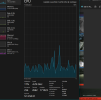
I noticed Playback freezes and glitch issues early on while trudging the Road to happy Surveillance destiny here at Ipcamtalk. This was on Ver 5.0.0.0 with 15 cams ( give or take 1-2)
So I added a drive and split the stream Writes across both at about 60%-40%.
This dramatically improved system responsiveness in all areas.
1766906534430.png
 
Did you have the IP4k-T setup with the Dahua motion detection turned on and used BI AI to confirm wildlife?
I was originally using the built in AI on the 4K T but had that turned off as well as smart motion detection etc. I was using the built in Blue Iris AI exclusively. I confirmed it with the fact it was wildlife that was detected and the little paw print on the recorded clip.
 
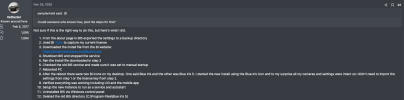
Is this still the best way to upgrade to v6? I'm ready to test v6. Thanks to @Vettester.

View attachment 235511
It doesn’t hurt to do the first two steps. I skipped the last two (11 and 12). I found that you can toggle between versions 5 and 6. Just make sure the services are set for the version you’re working with.
With 6, I have found that there are some video latencies with some cameras (PTZ), cloned channels, and higher CPU usage (I believe this may be due to H.265 processing and or tuning)... still poking at it...
For the most part, it was a simple upgrade...
 
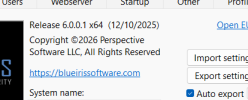
Mine as well, but after editing the registry and a restart it now shows: Probably came about when we were doing those goofy 5.9.9.99 beta updates that were actually 6...I'm guessing


View attachment 235541
I wonder if it will update the number on the next update. Why was it stuck on 5.9.9.99 even though you were installing the updates as they were becoming available?
 
I wonder if it will update the number on the next update. Why was it stuck on 5.9.9.99 even though you were installing the updates as they were becoming available?
It may, I did an un-install of BI6 on my demo and then reinstalled it as I wanted to install in as Blue Iris 6 directory location due to a backup program I used. it all worked perfectly and I lost nothing.
 
  • Like
Reactions: Keizer
I wonder if it will update the number on the next update. Why was it stuck on 5.9.9.99 even though you were installing the updates as they were becoming available?
If you adopted early in the prerelease beta's you were on like 5.9.9.7 or.9 before the official 6.0 came out...dont freak out on the version number. says 5.9.9.9 in Program uninstall. Don't worry .
1767324062330.png
 
  • Like
Reactions: tech101 and Keizer