Version 6.0.1

Ken said the issue with icon being a check mark will be fixed on 6.0.1.4. It only shows up if you were using CPAI on 6.0.1.3 and Not BI's AI. So going to check all my settings now as going from CPAI to BI AI is not just one setting involved. So currently I have 12 cams using AI along with these settings. I did find that 4 of my cams that DO NOT use AI had some boxes checked " Additional Models and Facial recognition" As soon as I unchecked those my memory dropped. So it is very important to go through every cam's AI settings. Now I like it :) For reference here are what all my AI cams are set to:
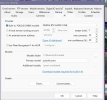
Screenshot 2025-12-20 111508.jpgScreenshot 2025-12-20 111443.jpgScreenshot 2025-12-20 111559.jpgScreenshot 2025-12-20 111348.jpg
 
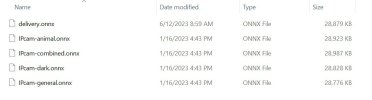
I'm running the latest 6.0.1.3 version and have disabled my CP.AI service in favor of testing the new built-in AI - I'm using the medium model (yolov8m) and so far things seem to be working well and at decent speeds. One thing I don't like is there are no options to fully disable faces, plates etc (models I don't want/use) What I've done is delete all the files from the AI folder and have only left yolov8m.onnx and coco.names - I have also edited coco.names file and have commented out with a - (hyphen) all the objects I don't want to detect (almost all of them).

FYI - deleting the unwanted models makes BI ask if I want to download them again if I go into the AI setting tab (I guess is scans for a list of known files) but other than that everything works as it should.
I tried deleting unwanted objects from Coco.names but triggers still show objects I deleted, like umbrella, motorbike, tennis racket, they are no longer in Coco.names but still show up in the DAT report.
 
I tried deleting unwanted objects from Coco.names but triggers still show objects I deleted, like umbrella, motorbike, tennis racket, they are no longer in Coco.names but still show up in the DAT report.
don't delete them, disable them with a hyphen, like this (do this for all of them you don't want to use, my example below only person and car are enabled.

person
-bicycle
car
-motorbike
-aeroplane
-bus
-train
-truck
 
Ken said the issue with icon being a check mark will be fixed on 6.0.1.4. It only shows up if you were using CPAI on 6.0.1.3 and Not BI's AI. So going to check all my settings now as going from CPAI to BI AI is not just one setting involved. So currently I have 12 cams using AI along with these settings. I did find that 4 of my cams that DO NOT use AI had some boxes checked " Additional Models and Facial recognition" As soon as I unchecked those my memory dropped. So it is very important to go through every cam's AI settings. Now I like it :) For reference here are what all my AI cams are set to:
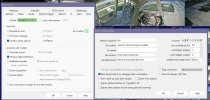
View attachment 234795View attachment 234796View attachment 234797View attachment 234798

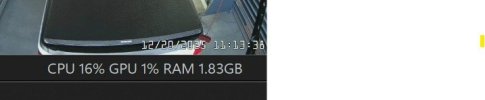
I'm at about 1.6GB of both normal RAM and GPU RAM with the built-in AI on the medium model running 8cams - as I said before I've deleted all the other models so impossible for them to load regardless of BI settings.

1766253195982.png
 
  • Like
Reactions: Tinman
don't delete them, disable them with a hyphen, like this (do this for all of them you don't want to use, my example below only person and car are enabled.

person
-bicycle
car
-motorbike
-aeroplane
-bus
-train
-truck
I presume that this info goes into the "To Confirm" field on the camera AI tab as a coma separated string like this {person,bicycle,car,motorbike,-aeroplane,-bus,-train,truck}
 
So @MikeLud1 Can we just copy these models in the BI model's directory and select them? Or are those just for yolo5?

View attachment 234801
No, v6.0.1.x only supports YOLOv8 & YOLO11. Send Ken an email asking him to add support for custom YOLOv5 models. I have not got around to sending him the email yet, if enough ask for custom YOLOv5 models support hopefully he will add the support.
 
  • Like
Reactions: Tinman and rdxny
No, v6.0.1.x only supports YOLOv8 & YOLO11. Send Ken an email asking him to add support for custom YOLOv5 models. I have not got around to sending him the email yet, if enough ask for custom YOLOv5 models support hopefully he will add the support.
Weren't you also working on retraining/reworking your YOLO5 models into YOLO11.NET format? Or has that been shelved?
 
I presume that this info goes into the "To Confirm" field on the camera AI tab as a coma separated string like this {person,bicycle,car,motorbike,-aeroplane,-bus,-train,truck}
I would think you do it within the coco.names file.


6.0.1.2] – 2025-12-18 Changed • Optional built-in AI processing using YOLOv8 ONNX models. Optional face recognition when humans are detected and license plate OCR when vehicles are detected. • Registry location for all AI settings moved from Options\AI to AI • The default faces and plates folders are now C:\Blue Iris\AI\faces and \plates • Edit the coco.names files in C:\BlueIris\AI\models to localize object names. A hyphen is used before the name to ignore specific objects completely to prevent useless clutter. • An option on the clips view right-click Move menu to move to Known Faces. This is a convenient way to use a camera to take portraits of family members or automatically saved unknown faces and move them into the Known Faces folder. Visit Settings/AI/Faces in order to sync the face database and OK to restart the AI. • DB repair will tolerate manual movement of files between recording folders without losing DB metadata
 
I would think you do it within the coco.names file.


6.0.1.2] – 2025-12-18 Changed • Optional built-in AI processing using YOLOv8 ONNX models. Optional face recognition when humans are detected and license plate OCR when vehicles are detected. • Registry location for all AI settings moved from Options\AI to AI • The default faces and plates folders are now C:\Blue Iris\AI\faces and \plates • Edit the coco.names files in C:\BlueIris\AI\models to localize object names. A hyphen is used before the name to ignore specific objects completely to prevent useless clutter. • An option on the clips view right-click Move menu to move to Known Faces. This is a convenient way to use a camera to take portraits of family members or automatically saved unknown faces and move them into the Known Faces folder. Visit Settings/AI/Faces in order to sync the face database and OK to restart the AI. • DB repair will tolerate manual movement of files between recording folders without losing DB metadata
Thanks, that got working for me, disabled most of the items for my usage!
 
  • Like
Reactions: Tinman
I've left mine in the "to confirm' field and it seems to be working well.
I tried with the "to confirm" field, but there where still so many objects being detected, that I would have run out of room, editing the coco.names file got rid of all the extraneous stuff that I did not care about, and there was a lot of them!
 
I tried with the "to confirm" field, but there where still so many objects being detected, that I would have run out of room, editing the coco.names file got rid of all the extraneous stuff that I did not care about, and there was a lot of them!
According to the help file the use of labels is still valid.
 
According to the help file the use of labels is still valid.
I did not say that it would not work in the "to confirm" field! My point was that if you wanted to disable the majority of object you would have to put in the following string for each camera

person,bicycle,car,motorbike,-aeroplane,bus,-train,truck,-boat,-traffic light,-fire hydrant,-stop sign,-parking meter,-bench,-bird,cat,dog,-horse,-sheep,-cow,-elephant,-bear,-zebra,-giraffe,-backpack,-umbrella,-handbag,-tie,-suitcase,-frisbee,-skis,-snowboard,-sports ball,-kite,-baseball bat,-baseball glove,-skateboard,-surfboard,-tennis racket,-bottle,-wine glass,-cup,-fork,-knife,-spoon,-bowl,-banana,-apple,-sandwich,-orange,-broccoli,-carrot,-hot dog,-pizza,-donut,-cake,-chair,-sofa,-pottedplant,-bed,-diningtable,-toilet,-tvmonitor,-laptop,-mouse,-remote,-keyboard,-cell phone,-microwave,-oven,-toaster,-sink,-refrigerator,-book,-clock,-vase,-scissors,-teddy bear,-hair drier,-toothbrush

Much easier to do in the coco.names file and it applies globally for all my cameras, which works for me!
 
I did not say that it would not work in the "to confirm" field! My point was that if you wanted to disable the majority of object you would have to put in the following string for each camera

person,bicycle,car,motorbike,-aeroplane,bus,-train,truck,-boat,-traffic light,-fire hydrant,-stop sign,-parking meter,-bench,-bird,cat,dog,-horse,-sheep,-cow,-elephant,-bear,-zebra,-giraffe,-backpack,-umbrella,-handbag,-tie,-suitcase,-frisbee,-skis,-snowboard,-sports ball,-kite,-baseball bat,-baseball glove,-skateboard,-surfboard,-tennis racket,-bottle,-wine glass,-cup,-fork,-knife,-spoon,-bowl,-banana,-apple,-sandwich,-orange,-broccoli,-carrot,-hot dog,-pizza,-donut,-cake,-chair,-sofa,-pottedplant,-bed,-diningtable,-toilet,-tvmonitor,-laptop,-mouse,-remote,-keyboard,-cell phone,-microwave,-oven,-toaster,-sink,-refrigerator,-book,-clock,-vase,-scissors,-teddy bear,-hair drier,-toothbrush

Much easier to do in the coco.names file and it applies globally for all my cameras, which works for me!
My point is you don’t need to disable anything, just include the labels what you want detect.