Version 6.0.1

Yep definitely holding off until things settle out
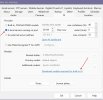
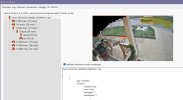
It does allow you to keep using your existing CPAI running (see arrow) BUT the link does not work for me, tried it on 3 other computers and no luck.


Screenshot 2025-12-17 071118.jpg
I dropped this on to a shared drive if you want to download it. Let me know when you get it so I can stop sharing.


Awesome...got it, Thanks !
 
  • Like
Reactions: wooties
FYI, with an unrelated issue, I found that Comcast DNS servers do not have DNS entries for some domains and servers.
I was able to resolve my issue by changing the default DNS settings on my router to Cloudflare.
YMMV
That was exactly what my issue was, my Mediacom DNS server could not find it yet. Popped in 1.1.1.1 and away it went. Thanks for the tip! Now as far as the new AI, it brought my 12th gen to its knees on my demo machine first time around....still playing with it.
 
Hello, I tried to put yolo11x.onnx model in the folder and choose it in AI interface. It seems to work perfectly, and fast with a RTX3060 12Gb
Same for me, YOLO11 is working on BI. What is your consumption of graphic ram ? I'm at 6,8/8Go with L model. Not sure X will pass on my card.
 
How many possibilities we have to fine tune ALPR ? With the CPAI module you could set the size of plate, size of chars etc. to get the italian plates to be correctly recognised I had to change the default settings a but (ie 3.4:1 ratio)
Thanks