


Full ALPR Database System for Blue Iris!
- Thread starter algertc
- Start date
You are using an out of date browser. It may not display this or other websites correctly.
You should upgrade or use an alternative browser.
You should upgrade or use an alternative browser.

Yep. And I've now updated to 4.63.0.

adventuredphoto
Young grasshopper
Awesome work! You’re killing it.Making good progress so far. Lot of stuff hardened, completely fresh new DB with query builder, new auth with multiple users and roles, tons of data fetching stuff fixed, and many other improvements.
Agents requiring more supervision than I initially expected and I have a bunch of other tasks I need to get done before tmr, so won’t be done today.
I also found two different libraries that might be able to solve the hard part of the automation rule builder @VideoDad brought up.
Going to redo a bunch of UI too. Might use this:
Overkill for this but really cool.
Any eta on a beta or need help testing anything?

TheWaterbug
Known around here
And it just locked up again. Here's the Container dashboard while it was unresponsive:I was running Docker Desktop << 4.62.0, but I just updated to 4.62.0, which is what prompted the restart of the container.
and then after a Stop/Start:
Memory leak?

Memory leak?
I'm not having this issue. In comparing your dashboard to mine I would suspect high CPU usage is the issue.
TheWaterbug
Known around here
Docker-philes, is there a way to interrogate my container when it's in this stuck state? I can open a Terminal, but I'm unfamiliar with what I can or can't do, there. I did try "top" but it didn't do anything while it was stuck, whereas right now, functioning properly, "top" does report process usage.
PeteJ
Pulling my weight
Docker-philes, is there a way to interrogate my container when it's in this stuck state? I can open a Terminal, but I'm unfamiliar with what I can or can't do, there. I did try "top" but it didn't do anything while it was stuck, whereas right now, functioning properly, "top" does report process usage.
From your screenshots, looks like whatever is chewing up all of the cpu cycles is the alprdashboard and not the database. Have you looked at the logs on the dashboard to see what it's doing? Not sure about Windows, under Linux, the dashboard is pretty idle (but maybe you live on a busy street and getting 10k reads a day).
You can try using process explorer (Process Explorer - Sysinternals) and see if that will show what is using the cpu cycles.
adventuredphoto
Young grasshopper
@TheWaterbug Had the SAME exact issue as you, not sure why. I backed up all my docker VHDX (Under AppData/Local). Completely uninstalled and deleted folders. Backed up my ALPR folder. Updated windows, restarted, reinstalled both fresh and restored all my data. Everything works now.. but i feel your pain. Went through the same thing, my CPU usage was identical, would lock up and force a task manager kill before restarting
TheWaterbug
Known around here
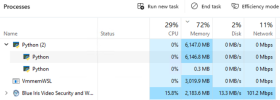
It happened again this morning. This time I looked at the host PCs Task Manager:And it just locked up again. Here's the Container dashboard while it was unresponsive:
and Python is eating tons of RAM. Apparently this is my CPAI server running amok somehow. Restarting the CodeProject.AI Server brought Python RAM usage down to reasonable levels:
Attachments
PeteJ
Pulling my weight
maybe try limiting the cpu and mem on your docker compose and see what happens when it hits those limits.
TheWaterbug
Known around here
I think that's when the Database dies!maybe try limiting the cpu and mem on your docker compose and see what happens when it hits those limits.
This morning it was extremely sluggish, and barely functional. I have plenty of RAM on the host machine, so it was fine, but the container was up against its limits and really struggling.
PeteJ
Pulling my weight
The app is 2 parts, the database and the dashboard. From a previous screenshot, it was showing that the dashboard was chewing up all of the CPU while the database was basically idle. Have you checked the logs on the dashboard to see what it's actually doing?
If things are normal, you should see something similar to this:

If things are normal, you should see something similar to this:
TheWaterbug
Known around here
I'll have to check next time it goes sluggish, but before it dies, because once it dies I can't get to the logs. Unless they're stored somewhere that I can read them from outside the container or web interface.The app is 2 parts, the database and the dashboard. From a previous screenshot, it was showing that the dashboard was chewing up all of the CPU while the database was basically idle. Have you checked the logs on the dashboard to see what it's actually doing?
If things are normal, you should see something similar to this:
View attachment 239363
Also wondering the same thing. I now remember what it's like being a kid waiting for Christmas morning...Awesome work! You’re killing it.
Any eta on a beta or need help testing anything?

Didn’t work on it this past weekend. Can be finished with one more solid focused day.

TheWaterbug
Known around here
So I just clicked the one radio button to switch from the "local service" (e.g. CPAI) to the Built-In AI:LOL! I just noticed that you're using the built-in YOLOv8, whereas I'm using CPAI and its YOLOv5. I copied the rest of your settings, and it's working, so maybe it's as simple as that one radio button for AI engine.
I'll wait until I collect a Monday's run of plates, and then switch and see if it still works.
then turned off the Object Detection and LPR in the CPAI dashboard:
and I'm still getting plates, so I guess it really is that simple! After a few days I will uninstall CPAI completely.
Is the built-in service any more efficient re: CPU and RAM than using CPAI?
wpiman
Getting comfortable
I was just looking at my and realized the database hasn't update in a month. I'll take a look at it... I think the format from Blue Iris might have changed? There messages are still going in but it is complaining about the key I think
I wouldn't say its more efficient, but it works well and it is nice not to have to manage a separate application.Is the built-in service any more efficient re: CPU and RAM than using CPAI?
There were a couple of early versions of BI6 where Ken changed the JSON format, but he has changed it back so if you are up to date it should be working.I think the format from Blue Iris might have changed?