Dahua WizColor 5x59-PRO and SmartLight 5x59-IL new series

it's first -IL reported on forum, where you bought it?

please put video footage with people/car movement at night...
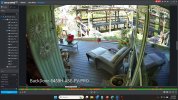
Andy got the -IL for me, and it's a slow process. I'll post some images but this is an animal cam. No vehicles and very little people movement in the FOV, unless I catch some burglars.
 
Anyone else have their IVS just totally wig out and start tripping a rule for over 2 hours straight on a patch of screen that has no IVS rule, no SMD, ???

54PRO AS phantom triggers

View attachment 235751
Had this on my 4MT when I had an IVS rule for stay detection. It was going off constantly when bright sunlight caused, tree/bush shadows. Turned the stay detection off, to resolve.
 
Weird.
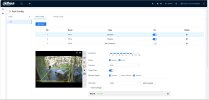
Stay detection was there but disabled. I rebooted it and it stopped.

StayDetection-workingwhendisabled.jpg

Then i went back in to delete the Stay Detection rule and found Large Scale Models enabled, which i'm SURE i had off becasue it... produces false alerts.

Anyway, both off, for now and all quiet
 
I have 5 T54PRO's ... all 5 have been running with self adaptive selected ...

Yes, I've read everything here and understand all the comments, but for my use case I was fine with that ... :)

This week I upgraded all 5 cameras to the 11/27/25 firmware on Andy's site, once I saw the firmware was public.

At the time, I noticed that one of the cameras came up different than the other 4, though all 5 have been configured exactly the same previously.

For one of the cameras, the AI-ISP option was OFF, AI-SSA was ON ... all of the other 4 had both the AI-ISP and AI-SSA options ON.

Whenever I tried to turn AI-ISP ON to match the other cameras I'd get "AI-ISP and Video Metadata have a conflict. Please disable one"

This was weird since all 5 have always been the same, but I ignored it and left as is, knowing it was different than the other 4 cameras.

Well today, I noticed that camera has a purple tint to the video all day long.

The only fix was to turn AI-SSA also OFF, and then the video went back to normal.

Weird ... hmmm ... thoughts anyone?

So really weird ... out of the clear blue ... a second camera turned off AI SSA today and had the same purple affect ... I just turned off all AI on all 5 cameras until the next firmware ...
 
AI-SSA attempts to decide the best settings for any scene and light condition.

Clouds, rain, bright sunshine etc all effect it.

I haven’t found it to be useful, and in the few cases I tested it, downright bad. It does indeed turn itself off when it determines the scene doesn’t require it.

It seems to be targeted to an “Auto” set and forget experience.
 
Best practice is to factory reset a device before a firmware update and factory reset after the update.

And folks that get under the hood have seen a firmware update not completely take until a couple of factory resets.

So many of us adopted 3 factory resets before and after the firmware update.
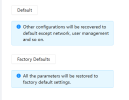
When doing the update factory reset, is Default ok or does it need to be Factory Defaults ?
1767887379454.png
 
Most here will do the factory default.
Yeah, I decided not to do that for now.

With 5 cameras, would have have to start again and setup IVS, IP addresses, NTP settings, streaming quality, camera settings, user & ONVIF accounts/passwords, weekly restart settings, overlay names ...

I was just about to do it and then was like OMG there's a lot that I setup/changed for each camera ... so I left as is for now thinking maybe the next firmware might solve this, I had no issue like this before 11/27 ...
 
When will the new firmware be released?

Just out of curiosity I checked Andy's firmware download section. It has 2 folders for these camera's, one called "2025.11.27" and one "25.12.17".
The first one dates to 22 December 2025, the latter to 2 January 2026.

I'm still running 3.146.0000000.4.R / Build Date: 2025-11-11 and thinking about updating.

Also have to check my IVS settings. It still sucks compared to my S3 right next to it. Some nights it triggers constantly, other nights (when the cars etc. are exactly the same) just when it should. Just weird...

EDIT: another thing; the improvements on Andy's website just directs you back to the firmware page.
 
When doing the update factory reset, is Default ok or does it need to be Factory Defaults ?
View attachment 235969


I just do the standard Default, usually 2X

The Factory simply adds network and login permission and initialization to the mix, none of which in theory mess with the image/detection functionality
 
  • Like
Reactions: Chokolinho
The 12/17 FW is the one th,at has the ability to turn off AI-ISP

ON IVS, turn OFF Large Scale Models on the Global tab

So better to use the older firmware instead of the new January one?

Just checked the differences between the two.
I'm a bit out the loop about the current firmware preferences.

And yes, on previous recommendations I've turned of Large Scale Models since around early December.