Dahua WizColor 5x59-PRO and SmartLight 5x59-IL new series

For those interested, here's the "version numbers" that change when you push to the latest firmware from @EMPIRETECANDY - changes in BOLD.

I applied the (smaller - 123MByte) "IPC" file first and then the (746MByte) firmware.bin second. The camera rebooted each time. After that (per comment from Andy) I did a Maintenance Center->Maintenance->Default->Default (NOT Factory Default) which resets most everything except "network, user management, and so on" ... and then reconfigured the camera. LOL a "good test" of your setup procedure! ;-)

As others have mentioned, there is a new option under Camera->Exposure->AI-ISP which you can toggle on/off ... which I think is the "magic" button to disable some of the "wizardy"

I haven't looked "enough" to say if it's better/worse ... just letting folks know the upgrade was easy to apply and appears to be working fine.

BTW, kinda interesting that the "System Version" for Andy's firmware is ".5.T" dated 2025-11-27 ... whereas the Dahua firmware (which I have NOT tested) is "4.R" dated 2025-11-11.

2025_10_28 Firmware
ONVIF Version: 25.06(V3.1.0.2298085)
System Version: V3.146.0000000.0.R, Build Date: 2025-10-28
Web Version: V5.01.0.2340775
Algorithm Version: V5.10.20.1
Security Baseline Version: V2.4
H5Player Version: V3.01.1
Cloud Service Version: 2327855

Face Detection: R1482440.0_V3.005.0000000.0.R
People Counting: R1486745.0_V3.006.0000036.0.R
Video Metadata: R1489959.0_V2.010.0000000.7.R
Heat Map: R1486745.0_V3.006.0000036.0.R
IVS: R1515312.0_V2.010.0000000.0.R
AcuPick (Motor Vehicle): 1007001000004
AcuPick (Human Body): 1005001001004


2025_11_27 Firmware
ONVIF Version: 25.06(V3.1.0.2298085)
System Version: V3.146.0000000.5.T, Build Date: 2025-11-27
Web Version: V5.0001.0.251126.2360417.2361663
Algorithm Version: V5.11.10.0

Security Baseline Version: V2.4
H5Player Version: V3.01.1
Cloud Service Version: 2348018

Face Detection: R1482440.0_V3.005.0000000.0.R
People Counting: R1486745.0_V3.006.0000036.0.R
Video Metadata: R1519389.0_V2.010.0000000.12.R
Heat Map: R1486745.0_V3.006.0000036.0.R
IVS: R1515312.0_V2.010.0000000.0.R
Smart Object Detection: R1515332.0_V1.005.0000000.0.R [NEW]
AcuPick (Motor Vehicle): 1007001000004
AcuPick (Human Body): 1005001001004
 
I am so glad to see positive things here about Andy's current test firmware. Thanks as always, to members for taking the time to evaluate and post their findings, especially bigredfish. I especially appreciate his consistent approach of sharing the video and still imagery of scenarios and settings (love those) along with his explanations. This helps me to both understand and learn (My being a dense, bone-head, thick-skull, chuckle-head, ignoramus of a newbie).

And of course, thanks to Emperor Andy, for pushing for these improvements and for making these services and products available to us.

I would wait before jumping to any conclusions just yet, it is my opinon that significant firmware revisions or more likely hardware upgrades (54Pro V2 or similar) will be required before these cameras are performing where they should, particularly at night. Just my opinion of course, I have been testing the new firmware for over 24 hours now.

If you live in an area with good ambient lighting, street or otherwise, then these could work out OK for you. If you have little to no ambient light, or depend on floodlights activated by motion, go straight for the S3 or possibly 4K series, this is assuming the target range is more than 8-10 feet. For close up work as has been noted previously, porches, entrance doors and so on, the 54Pro will work pretty well.
 
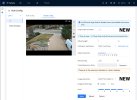
Just noticed this minor change/update - under AI->IVS->Global Config, there are some new options at the bottom of the page to set the image resolutions/control type/level

Perhaps waayyy more interesting is that there is an option at the top to enable "Large-Scale AI models"

2025_11_30_New_AI_Options.jpg
 
  • Like
Reactions: JDreaming
Just noticed this minor change/update - under AI->IVS->Global Config, there are some new options at the bottom of the page to set the image resolutions/control type/level

Perhaps waayyy more interesting is that there is an option at the top to enable "Large-Scale AI models"

View attachment 233518


Noted a few pages back on P_ost #1377

Large scale models has been available since at least the 10/28 FW
 
  • Like
Reactions: JDreaming
Thanks for clarifying @bigredfish ... as I just double-checked the T540PRO-ZE ... and the System Info page is IDENTICAL (i.e. "V3.146.0000000.0.R, Build Date: 2025-10-28" and everything else) to what you posted, except, of course, the "Device Model" is a T54PRO-ZE ... but under AI->IVS->Global Config, it does NOT have that option at the top to enable "Large-Scale AI models"

So either the code development process is fragmented ... or (hopefully) stuff like this is in the common code base ... but for some reason, they IFDEF'ed it in for the AS models, but not the ZE models in the 1028 firmware ... but now the ZE gets it in in the 1127 firmware.
 
I am not a conclusion jumper, by any means. I was simply posting an acknowledgement of the efforts that have been made to evaluate and correct the situation. I understand that we are not at the end of the road. :)

Well both myself and others appreciate the acknowledgement, no doubt between us there have been a few hundred hours logged on these 54Pro's, pretty sure I must have 10-12 hours at least, most likely more. I suspect we just about turned onto the road, possibly into second gear.

I guess ultimately I didn't want you rushing out to grab one just yet, so more a case of trying to be helpful in that respect. :idk:
 
Interesting. Looks like I may have been correct. I haven't read through this but Dahua have a page up about AI-SSA and it looks as if AI-SSA is simply using AI to adjust the picture parameters eg Brightness, Contrast etc looking at their sample images:


Yes AI-SSA has been around for a while. It acts very much like dynamic WDR

AI-ISP is the new magic juju on these 5449 cameras that isn't ready for primetime.
 
Sorry if I missed seeing somebody saying this ... but did the "Gain Scale" get "reset" moving from the 1028 to 1127 firmware?

The reason I asked is on 1028, if you went above 65, the noise rapidly became OMG bad.
However, with 1127, I'm not seeing it near as bad ... even when set to 100 (assuming some decent NR applied) ... and yea, AI-SSA is "off"

But similar to some changes from earlier firmware (hard to keep track of all this stuff!), I'm wondering if it's just a "reset" of the "Gain Scale" ... kinda like having an amplifier that goes to 11 ... ;-)

Assuming true, those of you that went from 1028->1127 firmware might try bumping the gain as part of the exposure triangle and assess how that impacts your image/video quality.


BTW, if you think that setting the the "3D & 2D NR Levels" to ZERO means no NR, that is still NOT the case ... as even when they are both 0, toggling the "3DNR" button does a fair amount in a low light scene when you are "pushing" the camera.
 
  • Like
Reactions: bigredfish
Sorry if I missed seeing somebody saying this ... but did the "Gain Scale" get "reset" moving from the 1028 to 1127 firmware?

The reason I asked is on 1028, if you went above 65, the noise rapidly became OMG bad.
However, with 1127, I'm not seeing it near as bad ... even when set to 100 (assuming some decent NR applied) ... and yea, AI-SSA is "off"

But similar to some changes from earlier firmware (hard to keep track of all this stuff!), I'm wondering if it's just a "reset" of the "Gain Scale" ... kinda like having an amplifier that goes to 11 ... ;-)

Assuming true, those of you that went from 1028->1127 firmware might try bumping the gain as part of the exposure triangle and assess how that impacts your image/video quality.


BTW, if you think that setting the the "3D & 2D NR Levels" to ZERO means no NR, that is still NOT the case ... as even when they are both 0, toggling the "3DNR" button does a fair amount in a low light scene when you are "pushing" the camera.

I will experiment with this for you later, also echo the NR to zero comments. Once I've pushed the gain and NR, shall see how things work out. Previously I have kept gain below 60 at night and NR below 20, daytime I have NR 'off' :)
 
Thanks BigRed.

I found the blurb on Dahua's website although the larger pixel sensor seems to refer to Wizcolour PTZ's so I don't know if it is also used in the other Wizcolour cameras. or PTZ Unique.
"On the hardware side, it meets the three key elements for building highly efficient AI: Powerful computing power of up to 2.4T, highly efficient algorithms and massive training media.

It also adopts an advanced 12nm process aligned with the current mobile phone industry, reducing power consumption by 30% compared to conventional cameras.

On the software side, there is an update to the advanced 3DNR technology, which reduces image noise while maximising the preservation of scene details.

Also, improvements in 2D noise reduction technology enable the WizColor camera to meet the noise reduction needs of different scenes.

What’s more, with the help of deep learning semantic segmentation, AI-ISP can accurately separate moving targets from the background, greatly assisting in eliminating motion blur."


My interpretation of this is it sounds like, hardware improvement aside (there is mention also elsewhere of larger pixels on the PTZ Wizcolour cameras sensor), it may be using increased levels of gain beyond what most people would contemplate using manually, then using AI Noise processing to reduce any resulting issues of Grain / Artefacts / Motion Ghosting etc.. I'm guessing therefore CCTV AI is not at the stage where it can interpolate pixels as per what we're seeing with the current video graphics cards, albeit they have huge size, heat, power requirements & processing power.

Personally I'm a bit mixed about AI. I'd love to see it CSI style where you could clean up an image or zoom into a picture way beyond the point at where it pixellated. However, that looks a long way off and I was wrong earlier when I thought some interpollation might be happening. I'm guessing we're just not there yet. I am still a great believer in simply capturing the image in the 1st place in great quality and then it being tweaked better rather than getting a poorer image and trying to improve it. I can't help but feel it's probably like the quality chain theory you see with HiFi systems. Ulimately the quality of what you get out of the processor is dependent on the quality of what you put in. I guess we'll see.
 
Last edited:
  • Like
Reactions: bigredfish