B54PRO-Z4E first impression

Nice lights!

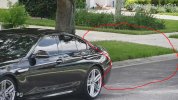
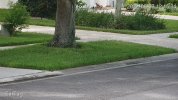
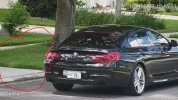
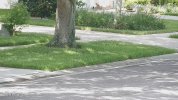
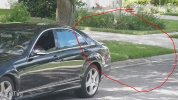
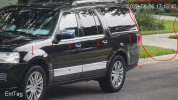
Would you agree that with 1/166s shutter speed, the "Pig-Pen Dust Cloud" persists longer than that?
Just pointing out it "exists" with the Color4K ... but I'm guessing that if you put a 54PRO with similar settings, the "Pig-Pen Dust Cloud" would be "bigger" and "longer lasting" ... which I think is the area that Dahua needs to focus their efforts on.

BTW, for those that don't know the reference, just Google it - example image below.

View attachment 234035

Not a new phenomena or isolated to the new 54PRO series.

We've seen trailing artifacts on various Dahua cameras for years going back to the 5231 series,and its not limited to Dahua.

I'm not nerd enough to fully understand the details at pixel level and there can be more than one reason for it.
  • Anti aliasing
  • DNR,
  • codec/compression
  • bitrate

I noticed it on zoomed in scenes such as LPR on 5231 and 5241 Z12's especially; I dont believe its unique to the Z12, just that its more obvious on higher zoomed in images

This camera is running 1/1000 and sometimes 1/2000 exposure


Examples
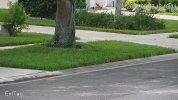
HOA Entr_EntTag_main_20220807131011_@3.jpg HOA Entr_EntTag_main_20220807131007_@3.jpg

HOA Entr_EntTag_main_20220807121534_@3.jpg HOA Entr_EntTag_main_20220807121531_@3.jpg


HOA Entr_EntTag_main_20220807115434_@3.jpg HOA Entr_EntTag_main_20220807115430_@3.jpg


HOA Entr_EntTag_main_20220806171337_@3.jpg HOA Entr_EntTag_main_20220806171340_@3.jpg


Very obvious behind this mail truck

View attachment HOA Entr_ch3_20220807143207_20220807143221.mp4


Notice also that the camera (as do many of my newer ones) automatically adjust exposure when the brighter white vehicles pass. Less so on darker objects
This may be due to setting a range on exposure vs a fixed value along with possible overexposure settings.

View attachment HOA Entr_ch3_20220807121523_20220807121537.mp4
 
  • Like
Reactions: JDreaming and alekk
Not a new phenomena or isolated to the new 54PRO series.

We've seen trailing artifacts on various Dahua cameras for years going back to the 5231 series,and its not limited to Dahua.

I'm not nerd enough to fully understand the details at pixel level and there can be more than one reason for it.
  • Anti aliasing
  • DNR,
  • codec/compression
  • bitrate

Yes ... and great examples - I like how you did an excellent job showing it. I was just pointing out that it appears on the 4K ... and seems like a similar phenomena on the 54PRO, but much more pronounced.

I would think(?) that the final codec/compression is similar (between the 5442-S3 and 54PRO), so it seems like what it is being "fed" already has the artifacts in it from something further upstream in the image processing pipeline ... and I'm making a WAG that it has something to do with the inter-frame 3DNR.
 
Yes ... and great examples - I like how you did an excellent job showing it. I was just pointing out that it appears on the 4K ... and seems like a similar phenomena on the 54PRO, but much more pronounced.

I would think(?) that the final codec/compression is similar (between the 5442-S3 and 54PRO), so it seems like what it is being "fed" already has the artifacts in it from something further upstream in the image processing pipeline ... and I'm making a WAG that it has something to do with the inter-frame 3DNR.

Mebbe.
Its existed across series/models for at least 5 years when I first started to try and diagnose it
 
  • Like
Reactions: JDreaming
I was just pointing out that it appears on the 4K ... and seems like a similar phenomena on the 54PRO, but much more pronounced.

I would think(?) that the final codec/compression is similar (between the 5442-S3 and 54PRO), so it seems like what it is being "fed" already has the artifacts in it from something further upstream in the image processing pipeline ... and I'm making a WAG that it has something to do with the inter-frame 3DNR.

This ^^^^^ the 54Pro has very pronounced issue in this regard, also 'ghosting' at night and low light is worse than any other Dahua camera I have seen.
 
Clearly worse ghosting and noise.
I hadn’t been focused on the trailing pixel cloud on it though.
 
  • Like
Reactions: JDreaming
The 54PRO seems (generally) "better" than the 5442-S3 for STATIC content ... with it having issues on DYNAMIC content ... so my "Pig-Pen Dust Cloud" is a catch-all expression that would encompass noise/ghosting.
 
The 54PRO seems (generally) "better" than the 5442-S3 for STATIC content ... with it having issues on DYNAMIC content ... so my "Pig-Pen Dust Cloud" is a catch-all expression that would encompass noise/ghosting.

This could be the tag line on Dahua's sales blurb...."The new Dahua 54Pro, better than the 5442-S3 for static content!"

Joking aside, understood re the pig pen dust cloud :thumb: - it is a major stumbling block with the 54Pro in current form (firmware), particularly in low light. During the day I am still seeing variation in frame to frame quality, some sharp (almost over sharpened) then mostly the others varying between good to mediocre quality. I can only speculate this is either a bottleneck in the data stream or the potential Ai type processing.
 
Last night I decided to test some compression, bit rate, and codec settings on one of the Color4K-X cameras. (the 6mm pointed at the driveway) I had always thought that H.264.H produced the best results from the 4K-X. Now my thoughts have changed. See what you think. I am planning additional testing tonight using the B54PRO-Z4E.

The settings for the clips are as follows:
1. H.264.H 12,228 bitrate general codec
2. H.265 8,192 bitrate AI codec
3. H.265 12,228 bitrate AI codec
4. H.265 14,336 bitrate AI codec
5. H.265 14,336 bitrate general codec


Last edited:
  • Like
Reactions: alekk
Last night I decided to test some compression, bit rate, and codec settings on one of the Color4K-X cameras. (the 6mm pointed at the driveway) I had always thought that H.264.H produced the best results from the 4K-X. Now my thoughts have changed. See what you think. I am planning additional testing tonight using the B54PRO-Z4E.

The settings for the clips are as follows:
1. H.264.H 12,228 bitrate general codec
2. H.265 8,192 bitrate AI codec
3. H.265 12,228 bitrate AI codec
4. H.265 14,336 bitrate AI codec
5. H.265 14,336 bitrate general codec


Is it the video or is the H264H (static) footage not sharp at all, the others look fine? I am seeing shutter speed too slow, hence the static objects including training shoes when on the ground are sharp. Is the codec set to VBR or CBR out of interest? almost look like VBR triggering to high quality in the 2nd clip. If the shutter speed gets increased it will of course darken the image

What I should have added but have become accustomed to with the 4K series already, these images are taken at night...just look at them, incredible, that is some sensor :clap: Been very pleased with my T variants (will get some X's soon) and even with onboard light only, at 20-25 feet I can ID vehicle model and colour when it passes at 30-35mph.
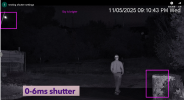
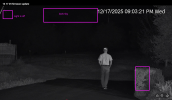
I will be very interested to see the 54Pro footage, maybe with and without additonal lighting, proper challenging night footage I feel has been lacking on here so far. I know the outcome from my own testing but it would be good to see some footage from your camera setup, this is a good test scene in my opinion. Plenty of black/dark driveway which absorbs the light, hence testing the cameras more.
 
Last edited:
  • Like
Reactions: bigredfish