I just purchased my 3rd Dahua NVR from Empire Tech on Amazon for use at work.
Model
NVR16CH-AI-S2,
hardware vers V1.0.
system vers V5.000.0000000.1.R
Manufacture date 06/24/2025
I have 2 others, 16 channel, that're a couple of years old running on the same network. They both work great on P2P while on the same LAN, a Verizon cell, and Smart PSS Lite from local and remote locations.
This new NVR only works while my cell is connected to the same LAN. The P2P in web setup on the NVR shows online.
I've turned on/off P2P a few times, Tried DHCP and gave it a static address with the DNS of 8.8.8.8 / 8.8.4.4. Still only works with my cell on the LAN.
I did notice one thing though, on the DMSS app while on the LAN the cameras work live but the "get info" shows "failed to get". The other 2 show "On Line". The Smart PSS desktop app does not see the NVR at home or at work.
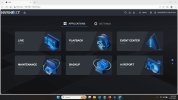
The new on has a menu that looks like Amcrest. I did not sign up for the Dahua account on this or the other 2 that are working fine.
I brought it home and tried on my LAN with spectrum and a ASUS / Tomato router and i get the same issue.
Has anyone dealt with this issue?
Model
NVR16CH-AI-S2,
hardware vers V1.0.
system vers V5.000.0000000.1.R
Manufacture date 06/24/2025
I have 2 others, 16 channel, that're a couple of years old running on the same network. They both work great on P2P while on the same LAN, a Verizon cell, and Smart PSS Lite from local and remote locations.
This new NVR only works while my cell is connected to the same LAN. The P2P in web setup on the NVR shows online.
I've turned on/off P2P a few times, Tried DHCP and gave it a static address with the DNS of 8.8.8.8 / 8.8.4.4. Still only works with my cell on the LAN.
I did notice one thing though, on the DMSS app while on the LAN the cameras work live but the "get info" shows "failed to get". The other 2 show "On Line". The Smart PSS desktop app does not see the NVR at home or at work.
The new on has a menu that looks like Amcrest. I did not sign up for the Dahua account on this or the other 2 that are working fine.
I brought it home and tried on my LAN with spectrum and a ASUS / Tomato router and i get the same issue.
Has anyone dealt with this issue?