Off topic, but did you know that you can significantly reduce your RAM usage by decreasing the "max connects" setting?Can you post your settings of the camera and the BI/settings/AI?
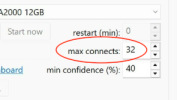
Off topic, but did you know that you can significantly reduce your RAM usage by decreasing the "max connects" setting?Can you post your settings of the camera and the BI/settings/AI?
Wow, no I did not. I went to 20 and it saved 1GB mem!Off topic, but did you know that you can significantly reduce your RAM usage by decreasing the "max connects" setting?
View attachment 235427
Try 10Wow, no I did not. I went to 20 and it saved 1GB mem!
Can you post your settings of the camera and the BI/settings/AI?
View attachment 235424 View attachment 235425
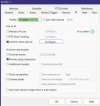
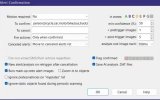
From your example I noticed extremely high analysis times (over 1 1/2 minutes) which is extremely slow. Are these wifi cameras?I see the following when I analyze:

is there any way to tell how many "max connects" a system needs? i.e 1 per camera or maybe x2 per camera? I have 8 cameras, so would 8 "max connects" be enough?Off topic, but did you know that you can significantly reduce your RAM usage by decreasing the "max connects" setting?
View attachment 235427

As this is a setting for the BI web server, I would suspect that it refers to the max web server connections, presumably from UI3 clients, I have no idea how the BI Android/Apple apps connect, this is just a guess on my part!is there any way to tell how many "max connects" a system needs? i.e 1 per camera or maybe x2 per camera? I have 8 cameras, so would 8 "max connects" be enough?

This setting is for AI I believe.As this is a setting for the BI web server, I would suspect that it refers to the max web server connections, presumably from UI3 clients, I have no idea how the BI Android/Apple apps connect, this is just a guess on my part!
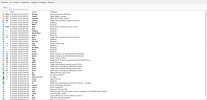
For your system to be up for about the 4hrs. shown in your log, you have WAY too many errors going on that need to be addressed. Is it affecting your AI, maybe, but I would still like to see your main BI/settings/AI screen.View attachment 235445View attachment 235446
And the logs show that the alert trigger is happening, but nothing is found:
View attachment 235447
For some reason it won't let me add my BI AI screen, but I have Built-In selected as "provider", and yolov8m.onnx selected as my primary model. Nothing else is checked.
This is an AI setting and it controls the maximum number of concurrent requests (or simultaneous connections) that BI sends to an AI processing server. It was created for integrated AI servers like DeepStack and CPAI. It helps manage system resources, preventing memory spikes, backlogs, or overload on slower hardware when processing images for AI.is there any way to tell how many "max connects" a system needs? i.e 1 per camera or maybe x2 per camera? I have 8 cameras, so would 8 "max connects" be enough?
The help files refers to this box as follows, perhaps it is out of date?This setting is for AI I believe.
From your example I noticed extremely high analysis times (over 1 1/2 minutes) which is extremely slow. Are these wifi cameras?
For your system to be up for about the 4hrs. shown in your log, you have WAY too many errors going on that need to be addressed. Is it affecting your AI, maybe, but I would still like to see your main BI/settings/AI screen.
You’ve got some network issues somewhere. If you ping one of your cameras from a command prompt what kind of response times are you seeing?Nope. Dahua 5442s, mostly.
You’ve got some network issues somewhere. If you ping one of your cameras from a command prompt what kind of response times are you seeing?
I had it set to 32 sessions and had some issues with AI overwhelming my system. Ken asked me to set it to 8 (default for built-in AI). It's been running much better since....This is an AI setting and it controls the maximum number of concurrent requests (or simultaneous connections) that BI sends to an AI processing server. It was created for integrated AI servers like DeepStack and CPAI. It helps manage system resources, preventing memory spikes, backlogs, or overload on slower hardware when processing images for AI.
I've been playing around with this setting for a few days now and it doesn't seem to be needed if you're using the AI built into BI6. I currently have mine set to 1 and haven't seen any issues. I haven't verified this with Ken yet so if you change this setting your results may vary.
I have 15 cameras all using the built-in AI and have been running mine at 1 for a few days now and it has been working better than ever.I had it set to 32 sessions and had some issues with AI overwhelming my system. Ken asked me to set it to 8 (default for built-in AI). It's been running much better since....
I had it set to 32 sessions and had some issues with AI overwhelming my system. Ken asked me to set it to 8 (default for built-in AI). It's been running much better since....
2 04.01.2026 10:31:28.427 AI Initialization failed: ONNX Runtime error: Exception during initialization: E:\_work\1\s\onnxruntime\core\providers\dml\DmlExec
9 04.01.2026 10:31:28.595 left AI: [Objects] person:88% 167ms
9 04.01.2026 10:31:28.596 left Trigger: Alert confirmed [person:88%]
2 04.01.2026 10:31:30.132 AI Analysis failed: Detection error: E:\_work\1\s\onnxruntime\core\providers\dml\DmlExecutionProvider\src\DmlCommandRecorder.cpp(3
2 04.01.2026 10:31:30.505 AI Analysis failed: Detection error: E:\_work\1\s\onnxruntime\core\providers\dml\DmlExecutionProvider\src\DmlCommandRecorder.cpp(3
2 04.01.2026 10:31:30.816 AI Analysis failed: Detection error: E:\_work\1\s\onnxruntime\core\providers\dml\DmlExecutionProvider\src\DmlCommandRecorder.cpp(3
3 04.01.2026 10:31:31.051 asecam Trigger: Motion_A
2 04.01.2026 10:31:31.078 AI Analysis failed: Detection error: E:\_work\1\s\onnxruntime\core\providers\dml\DmlExecutionProvider\src\DmlCommandRecorder.cpp(3
2 04.01.2026 10:31:31.523 AI Analysis failed: Detection error: E:\_work\1\s\onnxruntime\core\providers\dml\DmlExecutionProvider\src\DmlCommandRecorder.cpp(3
2 04.01.2026 10:31:31.814 AI Analysis failed: Detection error: E:\_work\1\s\onnxruntime\core\providers\dml\DmlExecutionProvider\src\DmlCommandRecorder.cpp(3
2 04.01.2026 10:31:32.113 AI Analysis failed: Detection error: E:\_work\1\s\onnxruntime\core\providers\dml\DmlExecutionProvider\src\DmlCommandRecorder.cpp(3
2 04.01.2026 10:31:32.230 AI Analysis failed: Detection error: E:\_work\1\s\onnxruntime\core\providers\dml\DmlExecutionProvider\src\DmlCommandRecorder.cpp(3
2 04.01.2026 10:31:32.250 AI Analysis failed: Detection error: E:\_work\1\s\onnxruntime\core\providers\dml\DmlExecutionProvider\src\DmlCommandRecorder.cpp(3
2 04.01.2026 10:31:32.275 AI Analysis failed: Detection error: E:\_work\1\s\onnxruntime\core\providers\dml\DmlExecutionProvider\src\DmlCommandRecorder.cpp(3
2 04.01.2026 10:31:32.510 AI Analysis failed: Detection error: E:\_work\1\s\onnxruntime\core\providers\dml\DmlExecutionProvider\src\DmlCommandRecorder.cpp(3
2 04.01.2026 10:31:45.666 App Restarted after unexpected shutdown (6.0.1.9/1500/240)
0 04.01.2026 10:31:45.678 App Nvidia video hardware detected