Wrong scaling in Blue Iris 6 UI (Windows Server 2022)

vcs

n3wb
Oct 24, 2020
4
0
Ireland
Hi all,

I have Blue Iris release 5.9.4.5 release from 2024.
I am out of 1-year period of free upgrades, but everything works fine on that version, so I did not bother.

However having learned that a new release 6 is available, I decided it is time to pay for the new version.
Before purchasing 6 I downloaded the evaluation.
However the interface looks like there are issues with scaling.

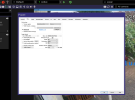
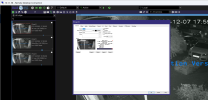
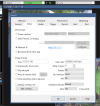
See example screenshots:
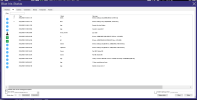
1 - from BI 5.9.4.5 (normal)
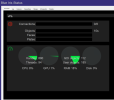
2 - BI 6 (issues with scaling of UI)

I suspect this is related to the fact it is a VM, with no physical graphics card (WIndows Server 2022 as Proxmox VM).
Googling did not help much, looks not many had this issue.
But the old version works perfectly in exactly the same setup.

5.9.4.5:
1765121115306.png


6:
1765121278711.png
 
Very strange. It looks like the font is different too. That would not affect the scaling like this, but it could be another symptom of whatever is causing the issue.

I'd try right clicking BlueIris.exe and go to properties, compatibility, and see if anything in there can make it behave more properly.
 
Very strange. It looks like the font is different too. That would not affect the scaling like this, but it could be another symptom of whatever is causing the issue.

I'd try right clicking BlueIris.exe and go to properties, compatibility, and see if anything in there can make it behave more properly.
Thanks for the hint. I tried different compatibility options, however nothing helps.
Very strange indeed.

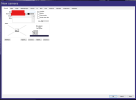
Notice how the main window and its elements are normal size.
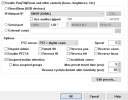
Then, the size of "Front1" popup window is normal size. But everything inside it looks like 50% of intended size - and not only the fonts, but other elements as well (notice that the preview video is also very small).
1765130415447.png
 
I updated a win10 vm running under unraid to BI 6.0.0.0 today and had no scaling issues. It is the same qemu/kvm virtualization as proxmox I am pretty sure.
 
I wonder if this only happens on systems with DPI scaling set above 100%. None of mine are, and I have not seen the issue yet.
 
  • Like
Reactions: Flintstone61
I wonder if this only happens on systems with DPI scaling set above 100%. None of mine are, and I have not seen the issue yet.
I think you are onto something!
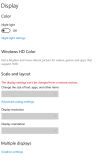
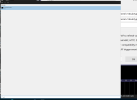
The issue only apprear over Remote Desktop connection to the VM. And over Remote Desktop it is not possible to change the Font scaling in Display Settings.
1765397644775.png
Now I have connected to the same Windows VM using local Proxmox console (I usually don't use Proxmox console, it is not convenient) - there is no issue.
UPDATE: The issue is back even with local console. Appeared correctly once, then after disconnect/reconnect the scaling is wrong again. Not consistent.==

This is still is a Blue Iris bug, though.
I've never seen any other Windows software misbehaving like this, even over Remote Desktop.
 
I would think that if this is a display bug in BI6 others would be having issues also, I have three BI6 systems (all win 11) that I manage, they are all accessed using RDP and I don't see any scaling issues on any of them.
 
Remote Desktop tries to have the remote machine use the DPI scale of the local machine that is running the Remote Desktop client. The DPI setting can get "stuck" on the remote machine particularly I think if you just close the connection without logging out.

I don't use Remote Desktop to connect to any of my BI machines which might be why I haven't seen the issue yet.
 
I narrowed the issue down a little bit.
My laptop is a 4k display. So, when connecting using Remote Desktop, by default remote desktop uses the same resolution as the host display (I can see "Show options" -> "Display" is set to 3840x2160). I guess in such case the Windows VM uses some pre-configured Font scaling for high resolutions - usually the higher the resolution, the larger the scaling.
If, before opening the remote desktop connection, I change the display resolution "Show options" -> "Display" to 1920x1080, then the scaling is normal.

It is probably quite a niche scenario, that's why there are not many reports. But even in this thread already at least 2 other members confirmed they have the same issue.