Version 6

Couple fo questions:

1. Now BI 6 is in the update screen in version 5, do you still need to uninstall version 5 or can you install version 6 from the update screen in version 5?

2. If you update to version 6 (either way) do you lose all your settings becasue BI is a pain to go through and re-configure with so many options / screens etc
I emailed BI Support this question a week ago Friday, they answered the next day. This was from Jennifer, not Ken.

You can really do either; install the full software from the Download page of the website, then uninstall the previous version, or you can uninstall first then reinstall the full software.
Your settings should also remain in place without exporting, but it's always safe to export them beforehand just in case.
 
I believe this has been answered before. I'm running Version 5.9.917 and my support expired about 30 days ago. Can I renew maintenance from this version.

Thanks
 
I belive this has been answered before. I'm running Version 5.9.917 and my support expired about 30 days ago. Can I renew maintenance from this version.

Thanks

Yes, you can renew from whatever version you are currently on. Just don't upgrade to any version until you have a valid maintenance support.
 
  • Like
Reactions: mvoss
Not sure if this is the right way to do this, but here's what I did.
  1. From the about page in BI5 exported the settings to a backup directory
  2. Used BI Tools to capture my current license
  3. Downloaded the install file from the BI website:
  4. Shutdown BI5 and stopped the service
  5. Ran the install file downloaded in step 3
  6. Checked the old BI5 service and made sure it was set to manual startup
  7. Rebooted PC
  8. After the reboot there were two BI icons on my desktop. One said Blue Iris and the other was Blue Iris 5. I started the new install using the Blue Iris icon and to my surprise all my cameras and settings were intact so I didn't need to import the settings from step 1 or the license key from step 2.
  9. Verified everything was working including UI3 and the mobile app
  10. Setup the new instance to run as a service and autostart
  11. Uninstalled BI5 via Windows control panel
  12. Deleted the old BI5 directory (C:\Program Files\Blue Iris 5)
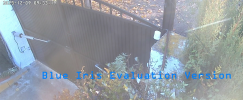
'm having trouble. I followed the steps the other user described, updating to version 6.0 from V5.9, but it still says it's an evaluation version. I've uninstalled and reinstalled, but nothing works. I even reinstalled V5.9 and everything seems to be working perfectly.

Any suggestions on how to update?
 
I haven't done it yet, but from the answer to my question above given above (thanks guys), do it from version 5 in the upgrade page. It should offer you version 6 in there. That then removes the need to follow most of those steps as the software will handle most it and should instruct you if interaction or any manual steps are needed, which should in itself be minimal.
 
I installed v6 via the full new download, and it runs successfully and has my cameras and license, but when I uninstalled v5, it loses everything and the license. I imported the reg settings and the cameras come back, but no license. I had to do a Windows system restore to get v5 back. I installed v6 again, and all is working, but I'm afraid to uninstall v5 again. Thoughts?
 
I installed v6 via the full new download, and it runs successfully and has my cameras and license, but when I uninstalled v5, it loses everything and the license. I imported the reg settings and the cameras come back, but no license. I had to do a Windows system restore to get v5 back. I installed v6 again, and all is working, but I'm afraid to uninstall v5 again. Thoughts?
Install bi tools to back up our key so you can see the whole thing, then uninstall v5 and install v6.
 
  • Like
Reactions: Walrus
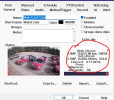
Hi, I've tried Vettester's suggestion again. When I run version 6, I get an evaluation message. I've attached a screenshot for more details.
Captura.PNG
 
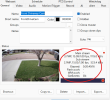
I installed the BI 6 on 2 different servers now. One is fine, the other has and issue with camera settings and font. I don't know what happened and have never had an issue like this. I'll attach a screen shot so you can see what I"m talking about. The font is way to big and is totally different. What did I do wrong on this install????? Thanks.
 

Attachments

  • Screenshot 2025-12-09 121304.png
    Screenshot 2025-12-09 121304.png
    129 KB · Views: 19
  • good shot.png
    good shot.png
    241.9 KB · Views: 19
I installed the BI 6 on 2 different servers now. One is fine, the other has and issue with camera settings and font. I don't know what happened and have never had an issue like this. I'll attach a screen shot so you can see what I"m talking about. The font is way to big and is totally different. What did I do wrong on this install????? Thanks.
What server OS are you talking about, are these running in VM's or an actual MS Windows server OS?
 
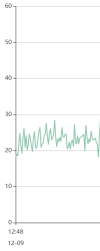
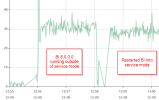
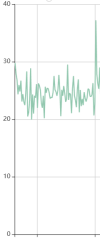
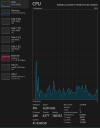
I just upgraded a test system I have to v6 and have noticed that cpu usage increased from between 20-25% to around 45%

Anybody else see or notice anything similar?
 
I just upgraded a test system I have to v6 and have noticed that cpu usage increased from between 20-25% to around 45%

Anybody else see or notice anything similar?
I am not seeing this on the system that I upgraded to V6, CPU usage is 5% - 10% but it does not see a lot of motion on the 18 cameras
 
I just upgraded a test system I have to v6 and have noticed that cpu usage increased from between 20-25% to around 45%

Anybody else see or notice anything similar?
I didn't upgrade, but I read that some people said their frame rates didn't come over and they had to redo them.... Once they did this, the usage went back.

I have no idea what they mean exactly but look into it.
 
I just upgraded a test system I have to v6 and have noticed that cpu usage increased from between 20-25% to around 45%

Anybody else see or notice anything similar?

Many have seen that and when they added the new BI folder to the antivirus exclusion list, it dropped.