UI3 doesn't switch to main stream when viewing single camera (Live View and Timeline)

Dec 28, 2018
5
3
United States
Hello, apologies if this has been asked and addressed; if it has, I'd appreciate a link to the thread.

Here's my setup:
Cameras: 12 x Dahua IPC-T5442TM-AS and 1 x IPC-HFW5241E-Z12E
Server:
Hardware: Intel i7-12700, 32GB DDR5 on B760M board.
OS: Windows Server 2025
Blue Iris: v6.0.5.6 and UI3 v323

I have had this setup (with an older computer) for about 4 years and everything worked as expected. Had to rebuild the server last year due to hardware issues. I have continuous + alerts recording on all 13 cameras with main and sub streams configured.

Not sure when exactly this issue started, but, I noticed it this morning - clicking on a camera in UI3 grid view opens the camera but the image quality is blurry. In looking at the properties in UI3, it looks like it's the substream being rendered and not the mainstream. This happens with both live view and timeline view.

Within the BlueIris console, single camera view renders a sharp image and is the main stream (as expected). And so does viewing any recorded clip.

Are there any settings that can be preventing single camera view from switching to main stream via UI3?

Other data points that may be relevant:
  • Testing with a Win 11 device on the same LAN - 1GB3 wired LAN, Chrome and Edge browsers
  • Tried enabling DIrect to wire and with it disabled
  • UI3 profile in the browser is set to inherit all settings.
  • Cameras are set to send H265 streams for both main and substreams to Blue Iris.
  • About this UI in UI3 shows support for H264 and H265
  • With Direct to wire enabled, H265 streams play fine in the browser. With it disabled, the stream defaults to H264.
  • I've tried changing other settings in the BI -> settings -> WebServer -> "Streaming 0" - encoder page to see if it makes a difference.
I read somewhere that this inability to auto switch to main stream was a bug introduced in BI 5.9.9.x. But, not sure if this is accurate. I'd appreciate any and all suggestions and troubleshooting ideas to get this resolved. Thanks!
 
Even though it says H265 is supported, many have seen issues with it.

Try a camera at H264 and see if it goes away with that camera. If so, you know the reason.

There is a thread about it somewhere that I think @bp2008 posted about this issue.
 
I am unaware of any recent bugs that would cause this. The only way I know of to have UI3 get "stuck" with a substream is to restart the camera while UI3 is actively streaming it. At least in the past, Blue Iris would fail to switch to sending the main stream if UI3 requested the video feed too quickly after the camera instance started up.

Other than that, the only reason you should be getting stuck with a sub stream is if UI3 is actually requesting a resolution equal to or smaller than the sub stream resolution. I trust that you don't just have a low resolution streaming profile selected :)

This issue is most likely caused by something in your Blue Iris configuration.

Make sure the recording format is BVR, which is in Blue Iris camera properties > Record tab > File format and compression. Direct-to-disk needs to be enabled also.

Please share some screenshots, including:
  • Stats for nerds panel in UI3 while you're getting the unwanted substream.
  • Camera properties panel in UI3 for an affected camera -- just the top of it, most importantly the "Video", "Main stream", and
    "Sub stream" lines.
  • Blue Iris Status window > Cameras tab (you can shrink the "IP" column so IP addresses are not readable if you want).
 
Try a camera at H264 and see if it goes away with that camera. If so, you know the reason.
Tried this too - and it's still the substream that gets rendered.

I trust that you don't just have a low resolution streaming profile selected
Shouldn't be. I've been testing with the 2160 VBR and 2160 profiles in UI3.

Make sure the recording format is BVR, which is in Blue Iris camera properties > Record tab > File format and compression. Direct-to-disk needs to be enabled also.
Yes, both of these are set correctly. And this issue happens with all 13 cameras.

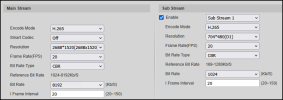
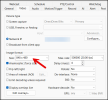
Camera stream resolution settings
1778529956065.png

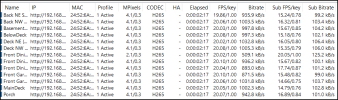
BI -> Status -> Cameras
1778530450822.png

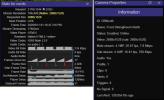
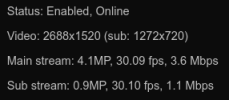
Camera Properties and Stats for Nerds
1778530895309.png
 
Ok there is something strange going on.

The camera config looks fine, and the BI Status > Cameras looks fine (except that sub stream frame rates are mostly lower than the main stream, but I doubt that is related to this resolution issue).

One problem is, it appears Blue Iris is reporting that the sub stream resolution is the same as the main stream resolution (revealed via Camera Properties window in UI3). But for some reason it has the correct sub stream frame rate and bit rate. So Blue Iris is reporting metadata wrong in a way I do not recall ever seeing before. But that isn't the only problem because Blue Iris is also sending you the sub stream via direct to wire when it should have sent the main stream via direct to wire. BI should have only sent the sub stream if UI3 had requested a very low resolution, but UI3 actually asked for a resolution exactly matching the main stream's resolution so it definitely should have been sent the main stream.

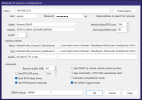
Can you do a screenshot of the BI camera IP settings where the video stream paths are entered? (BI camera settings > Video > Network IP > Configure)

Also figure out which user you are using to log in with UI3, and look at that user configuration in Blue Iris Settings > Users. Is the "Bandwidth limit" box checked? That can apply unexpected changes to your streaming.

But I am getting the feeling you might have to contact BI support about this issue.
 
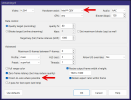
Here's the Streaming 0 profile settings. Only changes from Default are marked by arrows. I've tried multiple combinations here - specifying a "bitrate target", disabling "direct-to-wire", disabling "hardware assist", disabling "resize output frame", etc. None of them seem to make a difference. I even restarted the BI service after saving each change.
1778533944985.png
 
  • Like
Reactions: bp2008