TP-Link TAPO Doorbell Camera D225 / Blue Iris

eyeball

Getting comfortable
Jun 30, 2014
247
571
Greetings. Posting this as information/FYI.

BI Version: 5.9.9.65

I just managed to get the Tapo D225 (Firmware 1.1.19) working with BI.

The standard settings for "Tapo" (From BI "Make" Dropdown) don't work for the D225 and cause BI to crash. Restarting BI would immediately crash again. The only thing that would allow me to restart BI is to delete the newly added doorbell camera from the registry.

The generic RTSP doesn't work either and supplying "/stream1" in Main causes BI to crash also.

What ended up working is supplying "/stream2" in Main designation along with "Generic/ONVIF" and Model: *RTSP H.264/H.265/MJPG/MPEG4".
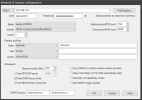
BI_Tapo_Doorbell_D225.png


I didn't try increasing the receive buffer for /stream1 - that may have made a difference, not sure, or it could be that there's some kind of H.265 incompatibility with BI and Tapo D225's H.265 decoding...but I'm only guessing.

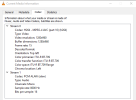
I did try /stream1 outside of BI and the Tapo app in the VLC media player, and it worked fine...here's the /stream1 Codec info from VLC:
D225_Codec.png

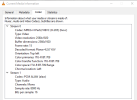
Here's the /stream2 Codec:

D225_Stream2_Codec.png


H265 (/stream1) vs H264 (stream2) ... /stream2 is of course lower resolution, but I'm glad to get it working in any resolution. Out of curiosity, does anyone know where the problem is with /stream1? Maybe it has to do with video hardware acceleration (mine is set to "Intel" in general BI settings->Cameras tab)...?

As an aside, I do have a few Tapo bullet cameras, model C320WS, and they all work fine with "Tapo" selected from the "Make" dropdown and /stream1 specified. Both the D225 and the C320WS have 2k resolution configured in the Tapo app.

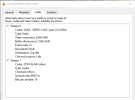
Using the VLC player, the code for the C320WS "/stream1" shows this:
C320WS_Stream1_Codec.png


Since the D225 Doorbell camera uses H265 for /stream1 while the older (?) C320WS uses H264 for /stream1, perhaps the issues lies with how BI handles H265? Or maybe there are settings in BI for H265 that I didn't set properly?

Anyone have any insight on this - it's not that big of a deal, just a curiosity, and I'm glad to have it working in BI even on the lower resolution.

Cheers!
 
@eyeball Did you ever find a solution for this? I just replaced my Amcrest AD410 with the D225 and have been very impressed with the wider FOV and image quality. However I'm struggling to keep BlueIris connected to the camera. It keep dropping connection randomly. Hoping to find a solution so I don't have to return it.
 
  • Like
Reactions: eyeball
@eyeball Did you ever find a solution for this? I just replaced my Amcrest AD410 with the D225 and have been very impressed with the wider FOV and image quality. However I'm struggling to keep BlueIris connected to the camera. It keep dropping connection randomly. Hoping to find a solution so I don't have to return it.
Could you let us know what version of BI you are using?
 
  • Like
Reactions: eyeball
Hey @Vansmak - unfortunately I don't have an answer.

I started using several of the Tapo C460 battery cameras in remote places around my property. Since those will not work with BI, I started using the Tapo app, and just moved the doorbell cameras (D225) over to the Tapo app too.

The Tapo app isn't as convenient as BI (which I still use for all of my other cameras), but it does provide some handy utilities such as being able to answer the door via the phone (the "doorbell" rings on the phone). There's also Amazon echo integration that (if you use Amazon Fire Stick for your TV) will display the doorbell cameras on the TV when someone rings the doorbell, kind of handy.

I'd rather have everything on BI, but having a separate, independent camera system alongside BI is useful too (redundancy).

You might reach out to BI support & see if you can get some help there.

Good luck - be sure to post any updates here or in another thread - those Tapo D225 doorbell cameras are nice; worth getting it to work with BI smoothly.
 
  • Like
Reactions: Vansmak
@eyeball Did you ever find a solution for this? I just replaced my Amcrest AD410 with the D225 and have been very impressed with the wider FOV and image quality. However I'm struggling to keep BlueIris connected to the camera. It keep dropping connection randomly. Hoping to find a solution so I don't have to return it.
Just joined because I have been trying to resolve what appears to be the same problem and I thought I would share some insight. I am not using BI, however I am using Frigate. I believe the problem is actually with the D225 and not with BI or Frigate at all. I seem to lose connectivity to my D225 and only my D225, out of several other Tapo cameras at random (but typically once per hour.) What I have found is that it appears the D225 is actually restarting. You can grab the logs from the D225 by inserting an SD card and turning on diagnostics and then comb through them after you capture them for a while. What you will see is that the device appears to go into a reboot cycle, and as part of that, disconnecting from the network.

I have currently done the following:
  • Worked with Tapo support to replace the Doorbell with a new one - no fix
  • moved the D225 to an isolated AP with a signal strength of -41db (excellent) and no other traffic
  • changed out the doorbell transformer with a brand new one (16V - 30VA). I hope it doesn't need a 24V - 30VA unit and there is nothing in any Tapo information that says it does.
  • removed the old chime completely from the low voltage line (not even using the jumper any more.)
  • setup firewall rules to prevent the D225 from connecting to the internet, except for NTP (this is where it gets interesting and helps validate my theory.)

I have setup monitoring in Home Assistant (which is use to automate many other things related to cameras) to alert me any time the device goes offline (which is somewhere around 1 time per hour or more.) When I blocked the D225 from accessing the internet and only allowing the stream to go to my Frigate box, at the time the disconnect/reboot happens, when the device comes back online, the date and time are always off. I use the Tapo integration to then sync the time if need be. When I allow access to the internet, it syncs almost immediately (as can be seen in the logs as well.) You don't see any of this in the Tapo app itself, but it is visible when streaming 24/7. BTW I do have both Stream 1 and Stream 2 working. I use Stream 1 for the live stream and recording and Stream 2 for detections (Frigate Terms). I have tried just using a single stream and no difference at all.

I am currently working with Tapo, but suggest you do the same and open a support case. This could be a firmware related issue or some other problem, but the more people that report it, the greater the chance of getting is resolved. If I find any resolution I will post it here.
 
  • Like
Reactions: Vansmak
Update:

Well as luck would have it the camera once again started dropping wifi connection each weekday morning around 9am until about 11am which is the exact time the sun was rising and shining directly on the unit. Looking closer at the logs and running them through ChatGPT, it appears I have a heat issue:

Yes—the log provides strong evidence that overheating is causing the disconnects.
Key findings:
  • At 9:13 a.m., reported battery temperature: 71°C / 160°F
  • At 9:34 a.m.: 64°C / 147°F
  • At 9:56 a.m.: 66°C / 151°F
  • At 10:06 a.m.: 72°C / 162°F
  • Additional temperatures between 64–71°C continued through 11:03 a.m.
  • In the evening, the temperature was only 36°C / 97°F, and the camera had remained running normally.
The log also shows repeated abrupt restarts around:
  • 9:14
  • 9:34
  • 9:56
  • 10:06
  • 10:30
  • 10:49
  • 11:03

Tapo rates the D225 for operation only up to 113°F / 45°C. Your reported internal battery temperatures are far above that.

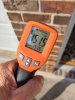
1788404122663.png

Apparently these camera's are no match for South Carolina heat. :(
 
I'm glad the heat isn't the main issue here. While it is currently toasty in the Midwest, I'm still seeing drops/reboots on mine. It continues to be escalated. I've attached more logs and videos of what is going on. I also added yet another, different brand, AP to the environment and added just that d225 to it. Got the RSSI to -31 and still the problem persists.

I'm sure I could prevent the logs from displaying anything by bumping up the timeout values, but it is one of 7 cameras that is having an issue.

Waiting on response now from engineering. I'm about to put a meter on the leads and record the min/max to show there is no drop in voltage or VA as well.

Going to give them a couple days then reach back out or get them to refund and go a different route.
 
I'm glad the heat isn't the main issue here. While it is currently toasty in the Midwest, I'm still seeing drops/reboots on mine. It continues to be escalated. I've attached more logs and videos of what is going on. I also added yet another, different brand, AP to the environment and added just that d225 to it. Got the RSSI to -31 and still the problem persists.

I'm sure I could prevent the logs from displaying anything by bumping up the timeout values, but it is one of 7 cameras that is having an issue.

Waiting on response now from engineering. I'm about to put a meter on the leads and record the min/max to show there is no drop in voltage or VA as well.

Going to give them a couple days then reach back out or get them to refund and go a different route.
Sorry to hear that....I like the image quality of this camera a lot but I miss the reliability of my Amcrest AD410. I just returned a ReoLink Gen 1 Doorbell Camera, the RTSP feed was super laggy and the WDR was awful. I was thinking about picking up the Aqara G400 and testing it out but I'm still not sold of the 3:4 image format for my needs. Still hoping Amcrest replaces the AD410 with a updated model soon. Let me know what happens with your situation!
 
FWIW, one of my two Reolink video doorbells has been facing west for 3 years now, has hit 151°F on its face and not a hiccup. Also, there's no overhang so it gets rained on as well....

 
  • Like
Reactions: looney2ns
FWIW, one of my two Reolink video doorbells has been facing west for 3 years now, has hit 151°F on its face and not a hiccup. Also, there's no overhang so it gets rained on as well....

I really wanted to like the ReoLink but the software driven WDR is awful. It makes sense that it has a higher tolerance to heat since it doesn't also have the ability to run off batteries. I'm sure TPLink/Tapo had to take the lipo batteries into consideration when they decided on the heat cut-off temps. Unfortunately they do not make a hardwired only camera option at this point. It's too bad because the camera image quality is fantastic and it's RTSP stream has been rock solid (when it's not overheating) for me. In a couple more weeks the sun will shift and then it won't be an issue for another year. Hopefully something else comes out by then!
 
Unfortunately they do not make a hardwired only camera option at this point. It's too bad because the camera image quality is fantastic and it's RTSP stream has been rock solid (when it's not overheating) for me.
By "hardwired only" do you mean POE?
And on your D225 drop-outs with BI at "Camera Settings" => "Video" => "Configure" have you tried UNchecking the box "Send RTSP keep-alives" ?
 
By "hardwired only" do you mean POE?
And on your D225 drop-outs with BI at "Camera Settings" => "Video" => "Configure" have you tried UNchecking the box "Send RTSP keep-alives" ?
Sorry....bad choice of words. POE isn't an option. I meant hard-power to the doorbell transformer. Yes RTSP keep-alive was unchecked. The ReoLink was just very laggy for me and I wasn't impressed with the picture quality or WDR/HDR functionality.
 
Sorry....bad choice of words. POE isn't an option. I meant hard-power to the doorbell transformer. Yes RTSP keep-alive was unchecked. The ReoLink was just very laggy for me and I wasn't impressed with the picture quality or WDR/HDR functionality.
Understood.
I would like to have POE to both my Wi-Fi (version1) Reolink doorbells but running CAT-5e to both was not impossible but it would have been like pulling teeth hiring someone around here to do it for me, as I can no longer go in the attic, climb ladders, etc.

So I went with two dedicated 5GHz AP's about 10 feet away from each one which makes it through the brick very well with results being, although not perfect, next to zero lag and few dropouts. I seldom can achieve much better than that even with POE. :cool: