- Jun 30, 2014
- 247
- 571
Greetings. Posting this as information/FYI.
BI Version: 5.9.9.65
I just managed to get the Tapo D225 (Firmware 1.1.19) working with BI.
The standard settings for "Tapo" (From BI "Make" Dropdown) don't work for the D225 and cause BI to crash. Restarting BI would immediately crash again. The only thing that would allow me to restart BI is to delete the newly added doorbell camera from the registry.
The generic RTSP doesn't work either and supplying "/stream1" in Main causes BI to crash also.
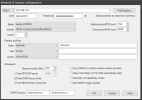
What ended up working is supplying "/stream2" in Main designation along with "Generic/ONVIF" and Model: *RTSP H.264/H.265/MJPG/MPEG4".
I didn't try increasing the receive buffer for /stream1 - that may have made a difference, not sure, or it could be that there's some kind of H.265 incompatibility with BI and Tapo D225's H.265 decoding...but I'm only guessing.
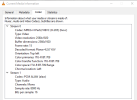
I did try /stream1 outside of BI and the Tapo app in the VLC media player, and it worked fine...here's the /stream1 Codec info from VLC:
Here's the /stream2 Codec:
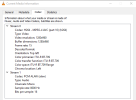
H265 (/stream1) vs H264 (stream2) ... /stream2 is of course lower resolution, but I'm glad to get it working in any resolution. Out of curiosity, does anyone know where the problem is with /stream1? Maybe it has to do with video hardware acceleration (mine is set to "Intel" in general BI settings->Cameras tab)...?
As an aside, I do have a few Tapo bullet cameras, model C320WS, and they all work fine with "Tapo" selected from the "Make" dropdown and /stream1 specified. Both the D225 and the C320WS have 2k resolution configured in the Tapo app.
Using the VLC player, the code for the C320WS "/stream1" shows this:
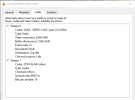
Since the D225 Doorbell camera uses H265 for /stream1 while the older (?) C320WS uses H264 for /stream1, perhaps the issues lies with how BI handles H265? Or maybe there are settings in BI for H265 that I didn't set properly?
Anyone have any insight on this - it's not that big of a deal, just a curiosity, and I'm glad to have it working in BI even on the lower resolution.
Cheers!
BI Version: 5.9.9.65
I just managed to get the Tapo D225 (Firmware 1.1.19) working with BI.
The standard settings for "Tapo" (From BI "Make" Dropdown) don't work for the D225 and cause BI to crash. Restarting BI would immediately crash again. The only thing that would allow me to restart BI is to delete the newly added doorbell camera from the registry.
The generic RTSP doesn't work either and supplying "/stream1" in Main causes BI to crash also.
What ended up working is supplying "/stream2" in Main designation along with "Generic/ONVIF" and Model: *RTSP H.264/H.265/MJPG/MPEG4".
I didn't try increasing the receive buffer for /stream1 - that may have made a difference, not sure, or it could be that there's some kind of H.265 incompatibility with BI and Tapo D225's H.265 decoding...but I'm only guessing.
I did try /stream1 outside of BI and the Tapo app in the VLC media player, and it worked fine...here's the /stream1 Codec info from VLC:
Here's the /stream2 Codec:
H265 (/stream1) vs H264 (stream2) ... /stream2 is of course lower resolution, but I'm glad to get it working in any resolution. Out of curiosity, does anyone know where the problem is with /stream1? Maybe it has to do with video hardware acceleration (mine is set to "Intel" in general BI settings->Cameras tab)...?
As an aside, I do have a few Tapo bullet cameras, model C320WS, and they all work fine with "Tapo" selected from the "Make" dropdown and /stream1 specified. Both the D225 and the C320WS have 2k resolution configured in the Tapo app.
Using the VLC player, the code for the C320WS "/stream1" shows this:
Since the D225 Doorbell camera uses H265 for /stream1 while the older (?) C320WS uses H264 for /stream1, perhaps the issues lies with how BI handles H265? Or maybe there are settings in BI for H265 that I didn't set properly?
Anyone have any insight on this - it's not that big of a deal, just a curiosity, and I'm glad to have it working in BI even on the lower resolution.
Cheers!