My first thoughts on version 6

heyho

n3wb
Jun 10, 2024
25
7
England
I have been running version 5.9.9.9 for a few weeks now along with Codeproject Yolov5 6.2 and all has been well. When I saw that Yolo V8 is now integrated into BI I though lets give it a go.

I uninstalled BI and CPAI through windows and deleted all residual folders (including those on my CCTV drive. Then I went about installing BI6 plus the integrated AI. interesting all my cameras and setting reappears which I wasnt expecting. And for some reason Ai would not detect anything. So I used BCUninstaller which deep cleans an unistall. The subsequent reinstall in BI6 required reentry of my licence details plus setting up of my cameras again (plus other little tweaks). But it also meant that AI started working.

There's not a great deal of diffrence, if any, to the user interface for me as i was on 5.9.9.9 but having AI integrated is nice. Reinstall went smoothly except for the webserver which needed tweaking a little (I use port 8082 which it seemed to have difficulties with at first).

My biggest concern is CPU itilisation though. When I had BI 5.9.9.9 plus Codeproject Yolov5 6.2 my CPU was running at around 6-8% (NVIDIA GeForce GTX 970 GPU plus AMD Ryzen 5 3600 plus16Gb RAM. I also had continues video recording enabled. With the new BI6 / AI it was getting hammered at 45% lowering to around 30%. So much so I have taken continuous recording off and gone back to trigger. Even now I am around 18% when idel and 30% when triggered. Will keep an eye out on this forum to see if this is common.

Early indications are that the alert triggering is pretty accurate.

Oh i also tried yolov8m and yolov8n ( I am using yolov8s) to see if that help cpu urilisation. It didnt.

Other than that the AI integration is to be applauded.
 
  • Like
Reactions: cscoppa
After 24 hours the CPU usage has settled down to around 7-9% so I'm pleased with that.

Have noticed a lot more false positives though compared to Yolov5 6.2. Always had them with one camera as it is located near a central heating vent so impacted by vapour but now two more cameras are produing a lot of false positives with respect to parked cars. I did use to have the sensitivity setting very high so I have put these cameras back to default and that might sort it.
 
Thanks for the posts! I hope others will share their v6 experiences because I suspect there is a large group of people waiting to see how it all works out before making the switch.

I plan on replacing my current dedicated BI machine with a VM running on a new Proxmox machine. Once everything is setup, tested, and working correctly, I'll switch over to the new machine. My plan has been to install V6 on the new machine and I'm definitively looking forward to using AI. Up to this point, I've just relied on the built in AI in my Dahua cameras which leaves a lot to be desired.....
 
  • Like
Reactions: lehollaender
ASRock X600 ITX, AMD Socket 5 Ryzen 7 8700G, Radeon™ with internal 780M Graphics GPU, Windows 11 Pro, 64GB DDR 5 RAM, 10TB WD Purple, 2TB WD Black NVMe

Edit - 6 cameras CPU 3% GPU 4% RAM 3.28GB
 
Last edited:
  • Like
Reactions: Arjun
  • Like
Reactions: Arjun
If you are posting CPU % and mem usage, then number of cams and throughput (kB/s and MP/s) are important to list also.
 
  • Like
  • Love
Reactions: Arjun and sdkid
Thirteen cameras total. Five 8MP and the rest 4MP. I am using BI 6.0.1.6. My five 4K cams are using the built in AI. CPU usage is hovering between 5% and 8%. RAM usage is at 10.7%.

PC Specs: i5 14600K. 32G DDR5 RAM. Using onboard graphics on my CPU.
 
Thirteen cameras total. Five 8MP and the rest 4MP. I am using BI 6.0.1.6. My five 4K cams are using the built in AI. CPU usage is hovering between 5% and 8%. RAM usage is at 10.7%.

PC Specs: i5 14600K. 32G DDR5 RAM. Using onboard graphics on my CPU.
My BI machine is running on a i5-8500 with 16GB of ram. I probably need to add a graphics card to use AI. Right???
 
AI seems to be working fine here with my onboard CPU graphics.
I think your AI is using your Processor power, which has 14 cores versus the 6 cores in mine.

I have 9 cams currently, with 3 more waiting to be installed. Most are 4 or 5mp; one 1.3mp Dahua bullet (from 13 years ago that refuses to die), two 2mp (varifocal and ptz), and a mix of cheap Amcrest and 5442's, along with one oddball 4mp-1/1.8 Speco with BAD triggering compared to Dahua. If I fire up AI on this, and CPU spikes up significantly for minimal benefit, I don't think that will be a win.

To test-- I may fire it up on the really OLD Dahua and the Speco-- neither of which have good onboard ID of objects. Only running it on those two cams would likely keep my cpu usage down too-- right??
 
I think your AI is using your Processor power, which has 14 cores versus the 6 cores in mine.

I have 9 cams currently, with 3 more waiting to be installed. Most are 4 or 5mp; one 1.3mp Dahua bullet (from 13 years ago that refuses to die), two 2mp (varifocal and ptz), and a mix of cheap Amcrest and 5442's, along with one oddball 4mp-1/1.8 Speco with BAD triggering compared to Dahua. If I fire up AI on this, and CPU spikes up significantly for minimal benefit, I don't think that will be a win.

To test-- I may fire it up on the really OLD Dahua and the Speco-- neither of which have good onboard ID of objects. Only running it on those two cams would likely keep my cpu usage down too-- right??

I would try it out and see what happens. Add the cameras one by one and monitor your BI PC stats. I have all five of my 4K T cams set up with the onboard AI and the only thing that changed was my RAM usage increasing by about 4%. Even triggering the camera with motion doesn't increase my CPU uasage. The only time it starts going up is when I view cameras or footage.

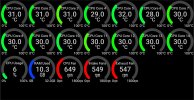
There's a pretty cool app I use with my BI PC called Remote system monitor. I can see all the hardware stats of my Blue Iris PC on an old cell phone. I just keep in on all the time. It comes in handy for things like AI to see how your system behaives as you set things up. Here's a recent thread about it.
 

Attachments

  • Specs.jpg
    Specs.jpg
    262.6 KB · Views: 11
  • Love
Reactions: sdkid
  • Like
Reactions: actran
After 24 hours the CPU usage has settled down to around 7-9% so I'm pleased with that.

Have noticed a lot more false positives though compared to Yolov5 6.2. Always had them with one camera as it is located near a central heating vent so impacted by vapour but now two more cameras are produing a lot of false positives with respect to parked cars. I did use to have the sensitivity setting very high so I have put these cameras back to default and that might sort it.

I think there was an issue with periodic scans and static objects that is fixed in 6.0.1.6, have you updated and still see issues with parked cars?

change log

[6.0.1.6] – 2025-12-23 Fixed
• An XML parsing issue when using ONVIF Find/Inspect
• Periodic AI scanning / Static object detection may not have been working properly

Added
• A new “Find in Clips” option to just stop at the next trigger rather than proceeding through to find the end of the trigger.
 
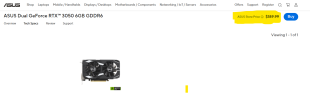
I was going to add an INexpensive graphics card....
This one requires NO extra power connectors-- runs purely on power drawn through the PCIE slot


View attachment 235044
I'd love to replace my Quadro P400 with this board. I have the slots but ASUS recommends a 450w PSU and my little guy is only 240w. Can anyone offer a suggestion on how I can measure my current load to see if there is enough headroom to support the 3050 at 70w?