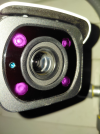
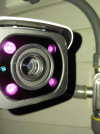
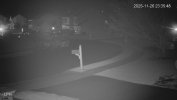
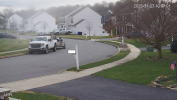
Picked it up a bit along with some other gear from EmpireTech, but just now got to installing it; it's just been sitting in a box. It's dark out right now, but upon inspection, it appears to be condensation...
Any ideas? So sad right now after getting it installed.
Looks like simple thermal-something or another when the camera has been sitting at one temp for too long and then gets installed in a much different temperature and the air condenses. Usually it's a nice warm camera gets installed in a much cooler temp.
If so, it will clear in a few days and likely won't happen again.
If the seal isn't good on the camera it might have absorbed all the humidity it can take. I have 2 older 5231-z12e that do this every night and sometimes clears up in the day. So I ordered some replacement desiccant packs.
have yet to tear into them again.
If it continues, and they're still a return window available maybe go that route?
Otherwise people have threads in here how to open the front of these cams and replace the moisture absorbing "Desiccant" bags.
Unfortunately the guy who made that video broke 1 of the 4 cap screws, FUBARRING the future of sealing it up normally.
I think I'll have to tape the camera(s) up at the reset door...I think the seals are getting too old.
Last edited:
As an Amazon Associate IPCamTalk earns from qualifying purchases.
Picked it up a bit along with some other gear from EmpireTech, but just now got to installing it; it's just been sitting in a box. It's dark out right now, but upon inspection, it appears to be condensation...
Any ideas? So sad right now after getting it installed.
If that is a new camera or in warranty, just return it for replacement. I chased a similar issue on an out of warranty unit once, tried sealing it every which way and problem persisted! not worth it in my opinion.
So return a perfectly good camera due to install error that will happen again if installed in the same situation?
Give it a few days and see if it resolves. We see threads here from time to time where this happens due to the temperature variation. I did it once too and the camera has been fine since.
If it doesn't resolve or happens again, ok, but when it happens at install it is usually a thermal issue that resolves itself in a few days. Your situation is different.
@Dave88LX ,
Should you decide to open up the camera, I suggest observing a few things concerning where and how the disassembly/re-assembly is performed:
I understand your frustration and that you seek to change camera brands but any camera, including Hikvision, can have moisture issues, as shown by the many instances here ==>> site:ipcamtalk.com hikvision moisture . If you decide to switch anyway, please consider the following in case your new cams have an issue in the future:
Cameras generally acquire and collect moisture inside them due to a process I call Thermal Differential Cycling.*
After being warmed up from the sun during the day, the camera case cools off as dusk approaches and it begins to draw in the...
Well that really sucks that it happened due to something during insulation. Thought I could just put it up there. Unfortunately this lens I don't think will ever see sunlight either unless I take it down.
I’ve taken it down
Replaced disecant pack
Sealed sd card trap door with silicone
Removed lens cover and resealed
Let dry out indoors
Replace on a sunny dry (low humidity) day
Well that really sucks that it happened due to something during insulation. Thought I could just put it up there. Unfortunately this lens I don't think will ever see sunlight either unless I take it down.
I have been here with a similar bullet, it got sun for most of the day, I dried it out for days indoors, added extra silica gel, sealed the outsides with silicon, you name it, I did it! Even tried the drying process and sealing up again in both cold and warm conditions, no luck, in the end it got shelved since out of warranty. I suspect the most likely point of failure on these is the lens/IR lamp cover assembly, I silicon sealed the heck out of mine but it didn't want to play ball.
If there is warranty, return it, simple as that. You could waste hours trying to resolve it, worse if the location is not easy to access. If you have no warranty then go ahead and try to resolve by just letting it dry out with the lens cover off indoors, maybe remove existing silica gel and add some new. I believe the reality is that cameras with these symptoms have a bad seal somewhere. I also totally sealed up the memory card door on mine, along with every other point on the camera which was a potential for air or moisture leak!! just could not get it right. You might want to check the plastic IR cover around the lens, closely, I have seen these fracture before as well.
Mine drove me almost crazy! at one point it was fine for a few weeks, then one fine morning it looked just like your image above, nice circle of moistuure around the lens
I appreciate all the advice everyone.
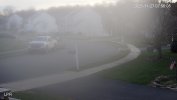
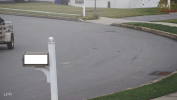
Interestingly, and hopefully it continues, it's starting to get better. Can see that the haze is now in the upper left corner of the field of view. This is going to be for LPR so I need the middle clear. Currently it's at max "out" zoom.
That truck never moves...but the damn mailbox is probably going to mess everything up.
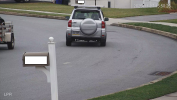
If that field of view doesn't work out because of mailbox being in way or IF that truck is gone and someone cuts the corner tight or you get too much IR bounce off the mailbox, I would consider a FOV like this. I think it would still capture all the plates and given the smaller sensor of that camera, you would benefit with a closer field of view as well.
OK well thankfully that fog cleared up...let's hope it stays gone!
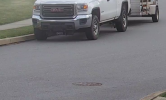
I'm zoomed in as far as I can go with this cam for LPR, hopefully in dark it's still enough to capture plates.
I had it in my house for probably 3-4 years haha. I believe I opened up the SD compartment to look in there at some point, but don't recall it "not" sealing properly if that makes any sense.