IPC-Color4M-T: got a false positive with IVS, what should i tweak?

pol

n3wb
Jan 15, 2025
20
5
Italy
Hello all,
I have some IPC-Color4M-T configured with: MD/SMD off, AcuPick off, IVS on, large scale ai models on. For IVS, I have just a basic intrusion rule with appear/cross for human and/or vehicle. Up until yesterday night, everything has been working beautifully. I have some cats running around and some big birds/whatever I don't even know the Italian name let alone the English one :rofl:
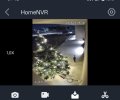
I never had a false positive in the past ~1.5 months (when I started using IVS) but yesterday night this cat triggered the "intrusion alert". I wonder why it happened and what I can tune what setting to avoid this from happening again.

The cat came running from the bottom of the frame to the top. Maybe because it was running/jumping fast it thought it was a human?

I'm using the latest NVR and camera firmware available from Andy's website. AI is by camera.

Thanks
 

Attachments

  • IMG_20260106_074326.jpg
    IMG_20260106_074326.jpg
    88.3 KB · Views: 22
Turn OFF large scale models and reboot the camera.
Go back and double check it is OFF
 
AI mumbo jumbo that in theory is better more precise detection at further distances and can detect various animals by type.

So if you have a problem with Giraffes in your backyard it may be beneficial to keeping it on.

I suspect it picks up birds too :idk:
 
I have disabled the large scale models. But still get the human intrusion when this cat appears.
It was walking slowly and video is very clear. No streaks or else.

Any idea what I could tweak?
 

Attachments

  • IMG_20260117_072353.jpg
    IMG_20260117_072353.jpg
    152.7 KB · Views: 15
Have you tried the global config or setting a min object size bigger than the cat?
 
I have disabled the large scale models. But still get the human intrusion when this cat appears.
It was walking slowly and video is very clear. No streaks or else.

Any idea what I could tweak?
I have the same issue in older camera, there is specific cat that trigger many false positives (cat detected as a human).
I think that the issue occurs more in cameras that are mounted high.
I don't have a fix for this issue.
 
  • Like
Reactions: bigredfish
The first is installed 235cm from ground, the second 303cm from ground.

I guess it should be okay for both right?
 
The global config you mean sensitivity? I only have ai large scale models on/off and sensitivity in the global config
Then in the rule itself I have sensitivity again.

I wanted to set a min size, but I'm unsure how to proceed.

1) where should I draw the box? Because the cat is obviously bigger close to the camera than it is from far away. To give an idea, the first camera from the first post is 6mt from the entry door

2) in the page after the min/max draw, there's also an "ai rule" button that can be toggled on/off. What's that?
 
Global config is where you measure the length of an object in several locations of the field of view to "calibrate" the camera to object sizes for your field of view.

As far as min size, where you draw the box is irrelevant. As you point out the size you make it does impact the size of an object based on proximity to camera. Have you noticed a particular spot where it triggers the camera?
 
I have the same issue in older camera, there is specific cat that trigger many false positives (cat detected as a human).
I think that the issue occurs more in cameras that are mounted high.
I don't have a fix for this issue.

Some cats are actually disguised humans, nothing you can do
 
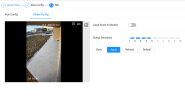
This is the camera web ui, but I cannot find the settings where I can measure the length of an object :(
I looked in the others menus, but still nothing about measuring an object.

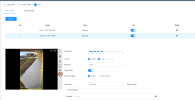
1) ah it's irrelevant because it scales the box size based on the location of the FoV? But this is true only if I can do that "measure object" thing you mentioned right?
2) anyone know that's the "ai rule" button I've circled in red?

No, I don't have enough data to tell you that. In the first camera (entrance) it triggered when it showed up from the bottom (close to the camera), but I have no idea whether it ever came from the other side (I would have to look at tons of recording data xD).
About the other one, it seems it was triggered when the cat went into a lowly lighted area far from the camera (close to the small gate). But again, that was one time so not enough data.
 

Attachments

  • camear1.png
    camear1.png
    190.4 KB · Views: 4
  • camera2.png
    camera2.png
    220.3 KB · Views: 4
This is the camera web ui, but I cannot find the settings where I can measure the length of an object :(
I looked in the others menus, but still nothing about measuring an object.

1) ah it's irrelevant because it scales the box size based on the location of the FoV? But this is true only if I can do that "measure object" thing you mentioned right?
2) anyone know that's the "ai rule" button I've circled in red?

No, I don't have enough data to tell you that. In the first camera (entrance) it triggered when it showed up from the bottom (close to the camera), but I have no idea whether it ever came from the other side (I would have to look at tons of recording data xD).
About the other one, it seems it was triggered when the cat went into a lowly lighted area far from the camera (close to the small gate). But again, that was one time so not enough data.
You just need min/max size. You can try resetting the minimum size to the default so that the AI takes over.
 
It's already at default, I have never changed those things because I'm not sure how to properly do it. Is it enough to create a box bigger than the cat in one point of the fov and then the camera will properly rescale it across the entire fov?
 
Yep just create a box bigger than the cat. Unfortunately it will not rescale across field of view, so it does mean people and cars further away won't trigger as they will be smaller than the box.
 
  • Like
Reactions: Chokolinho
I see. I could partially workaround that by creating 2 intrusion zones, one for "close objects" and one for "farther objects".