Hello all,
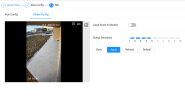
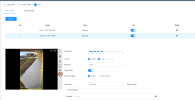
I have some IPC-Color4M-T configured with: MD/SMD off, AcuPick off, IVS on, large scale ai models on. For IVS, I have just a basic intrusion rule with appear/cross for human and/or vehicle. Up until yesterday night, everything has been working beautifully. I have some cats running around and some big birds/whatever I don't even know the Italian name let alone the English one
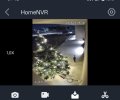
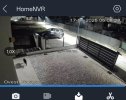
I never had a false positive in the past ~1.5 months (when I started using IVS) but yesterday night this cat triggered the "intrusion alert". I wonder why it happened and what I can tune what setting to avoid this from happening again.
The cat came running from the bottom of the frame to the top. Maybe because it was running/jumping fast it thought it was a human?
I'm using the latest NVR and camera firmware available from Andy's website. AI is by camera.
Thanks
I have some IPC-Color4M-T configured with: MD/SMD off, AcuPick off, IVS on, large scale ai models on. For IVS, I have just a basic intrusion rule with appear/cross for human and/or vehicle. Up until yesterday night, everything has been working beautifully. I have some cats running around and some big birds/whatever I don't even know the Italian name let alone the English one
I never had a false positive in the past ~1.5 months (when I started using IVS) but yesterday night this cat triggered the "intrusion alert". I wonder why it happened and what I can tune what setting to avoid this from happening again.
The cat came running from the bottom of the frame to the top. Maybe because it was running/jumping fast it thought it was a human?
I'm using the latest NVR and camera firmware available from Andy's website. AI is by camera.
Thanks