IMOU camera with Dahua NVR

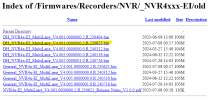
I wouldn't use this firmware from 2023 because there was a serious security vulnerability in Dahua cameras and NVRs in 2024, which even led to a firmware update for end-of-life devices – like my NVR2108-I, for example. If so, then a firmware after June 2024. So in this case, version 240716. The security vulnerability should have been fixed by that one. The firmware for my NVR2108-I, which fixed the security vulnerability, is dated July 29, 2024, and with this firmware, my Imou cameras are still directly recognized by my NVR2108-I and don't need to be integrated via Onvif. Of course, I don't know if this also applies to your model.

Should fit. No guarantee! :)
Index of /Firmwares/Recorders/NVR/_NVR4xxx-EI/old

View attachment 222938

I think that vulnerability had to do with P2P server implementation, not the camera/nvr so much. SmartPSS was a problem and is why it was discontinued
 
Unfortunately, I can't remember exactly why Dahua released the update for my EOL Dahua NVR2108-I in the summer of 2024, but it was definitely related to a (serious) security vulnerability, and I believe it affected various Dahua products. I was wondering myself why Dahua was suddenly releasing new firmware for a product that had been EOL for about two years and for which there hadn't been any firmware updates in that time. :) That's why I had considered and checked whether I should or even needed to install the firmware update. Especially with Dahua products, I only do that if I have a good reason to do so. :lol:
But regardless of that, I would still install a firmware version from 2024 for the NVR4116-EI instead of the very old one from 2023. :)
 
I wouldn't use this firmware from 2023 because there was a serious security vulnerability in Dahua cameras and NVRs in 2024, which even led to a firmware update for end-of-life devices – like my NVR2108-I, for example. If so, then a firmware after June 2024. So in this case, version 240716. The security vulnerability should have been fixed by that one. The firmware for my NVR2108-I, which fixed the security vulnerability, is dated July 29, 2024, and with this firmware, my Imou cameras are still directly recognized by my NVR2108-I and don't need to be integrated via Onvif. Of course, I don't know if this also applies to your model.

Should fit. No guarantee! :)
Index of /Firmwares/Recorders/NVR/_NVR4xxx-EI/old

View attachment 222938

For 4116-EI, none of the version from 2024 worked for me. Then I tried 230621, and it was able to successfully add the Imou cameras over private protocol.
1750513141997.png
Apart from missing those security upgrades, it also lacks couple of new features. The GUI of new version has slight differences. Anyways I will evaluate to what should I keep. Thank you for the help sir!
 
none of the version from 2024 worked for me.
I find it rather unusual that none of the 2024 firmware versions could be installed as a downgrade, but the old one from 2023 could. But okay, I don't have a DHI-NVR4xxx-EI here, so I can't say anything more about that. :)
 
I struggled to add IMOU Bullet 2C 4MP to Dahua DHI-NVR2108-I2 over wifi. This camera has both wifi and ethernet and when I connected the camera with cable to the router both wifi and corded connection started to work.

Just wanted to put that here for searchability if someone else has the same problem in the future.
 
After some research, I want to share what I found: Due to a serious security flaw in the some dahua NVR, the authentication protocol has been completely changed in the new firmware, and that is why IMOU cameras do not connect. If you do not update the firmware to maintain compatibility, you should take serious security precautions:
  • Remove Port Forwarding: Instantly delete any port forwarding rules (such as ports 80, 443, 554, 8000, or 37777) on your router pointing to the NVR.
  • Disable UPnP and P2P: Turn off Universal Plug and Play (UPnP) and any proprietary cloud/P2P connection toggles inside both the router and the NVR settings.
  • Deploy a Security VLAN: Place the NVR and all IP cameras onto a dedicated Virtual Local Area Network (VLAN) completely separated from your primary home or corporate data network
  • Block Internet Access: Configure explicit firewall rules on your router or gateway to drop all outbound and inbound traffic for the NVR's specific IP address.
  • Implement Secure Remote Access: To view the cameras remotely, do not connect directly to the NVR. Force all remote connections through a local self-hosted VPN gateway (e.g., WireGuard or OpenVPN) or a secure zero-trust tunnel (e.g., Tailscale).
  • Bind IP/MAC Addresses: Restrict local management access so that only specific authorized administrative IP or MAC addresses can open the NVR's login page.
  • Disable Unused Protocols: Turn off insecure or unnecessary network services within the NVR menus, specifically ONVIF, RTSP (if unused), FTP, Telnet, SSH, and SNMP.
  • Enforce Strong Credentials: Change default administrative usernames (like admin) if the system allows it, and set a complex password exceeding 16 characters.
  • DO NOT USE port forwarding under any circumstances!!
Also keep in mind that IMOU has began to block in new firmwares 3777, 554, 80 ports forcing to buy their cloud services

Hope this help.

 
After some research, I want to share what I found: Due to a serious security flaw in the some dahua NVR, the authentication protocol has been completely changed in the new firmware, and that is why IMOU cameras do not connect. If you do not update the firmware to maintain compatibility, you should take serious security precautions:
  • Remove Port Forwarding: Instantly delete any port forwarding rules (such as ports 80, 443, 554, 8000, or 37777) on your router pointing to the NVR.
  • Disable UPnP and P2P: Turn off Universal Plug and Play (UPnP) and any proprietary cloud/P2P connection toggles inside both the router and the NVR settings.
  • Deploy a Security VLAN: Place the NVR and all IP cameras onto a dedicated Virtual Local Area Network (VLAN) completely separated from your primary home or corporate data network
  • Block Internet Access: Configure explicit firewall rules on your router or gateway to drop all outbound and inbound traffic for the NVR's specific IP address.
  • Implement Secure Remote Access: To view the cameras remotely, do not connect directly to the NVR. Force all remote connections through a local self-hosted VPN gateway (e.g., WireGuard or OpenVPN) or a secure zero-trust tunnel (e.g., Tailscale).
  • Bind IP/MAC Addresses: Restrict local management access so that only specific authorized administrative IP or MAC addresses can open the NVR's login page.
  • Disable Unused Protocols: Turn off insecure or unnecessary network services within the NVR menus, specifically ONVIF, RTSP (if unused), FTP, Telnet, SSH, and SNMP.
  • Enforce Strong Credentials: Change default administrative usernames (like admin) if the system allows it, and set a complex password exceeding 16 characters.
  • DO NOT USE port forwarding under any circumstances!!
Also keep in mind that IMOU has began to block in new firmwares 3777, 554, 80 ports forcing to buy their cloud services

Hope this help.

This is a true of any system and is what most of us have preached for years.

Btw the security flaws in Dahua NVRs and SmartPSS are connected and are related to pre-August 2024 FW

Current versions of Dahua P2P are not a problem.

Port forwarding and UPnP have ALWAYS been a security issue for ANY system and still are.
 
This is a true of any system and is what most of us have preached for years.

Btw the security flaws in Dahua NVRs and SmartPSS are connected and are related to pre-August 2024 FW

Current versions of Dahua P2P are not a problem.

Port forwarding and UPnP have ALWAYS been a security issue for ANY system and still are.
Agree.
But this thread above says that with a firmware update, IMOU cameras stop working. Its true for me too. Therefore, I have to stay on the old firmware and be careful.
Or change the entire system, but this is an expense
 
  • Like
Reactions: bigredfish
I would like to share some achievements that I have achieved through a long journey.
Firstly, I bought nvr-4208-ei. Of course, IMOU cameras connect to it only via ONVIF. The only event that can be seen is scene change. No SMD, no smart event. Nada))
Here's how I got IVS to work correctly:
IVS functionality relies on snapshot and if this feature is not available (and this is exactly the case with IMOU cameras on ONVIF), the entire event is not triggered. That's why I enabled snapshot general recording. But this turned out to be not enough. In the event trigger, in addition to recording the corresponding channel, you must specify send by email, even if this is not defined in the global settings. Apparently this triggers the mechanism for sending messages to dmss. As a result, IVS with IMOU cameras using the ONVIF protocol was fully operational. I hope this proves useful to anyone looking for such a solution.
 
  • Like
Reactions: bigredfish
I struggled to add IMOU Bullet 2C 4MP to Dahua DHI-NVR2108-I2 over wifi. This camera has both wifi and ethernet and when I connected the camera with cable to the router both wifi and corded connection started to work.
Most likely, Wireless User Isolation was enabled on your Wifi network.
After you connected the camera directly, the NVR learned its mac address and everything worked.
This is just my guess, of course.
 
  • Like
Reactions: bigredfish
IMOU cameras connect to it only via ONVIF
To be honest, I can't really follow much of what you've written here. :)

Of course, I don't know how things work with an NVR4208-EI, but here I can still connect Imou cameras - even those running firmware from 2026 - directly to my Dahua NVR2108-I via port 37777, rather than relying solely on ONVIF. My NVR2108-I is still running the firmware version from July 2024 that was already mentioned in this thread.

NVR2108-I.png

This worked with my Imou DB61i doorbell (which is unfortunately broken now) and a firmware version from 2025, as well as with my Imou Cruiser Dual (IPC-S7X-8M0WED). The latter currently has firmware version 3.11.0000000.1.R 2026-04-09 installed, and as you can see, it is connected directly to the NVR2108-I via port 37777.

NVR_Kameras.png

Here's how I got IVS to work correctly:
I don't quite understand that either. Imou cameras do not have IVS (except for the very old, initial Imou models). so it cannot be activated in any way. However, if you connect Imou cameras to a Dahua NVR, you can utilize the recorder's AI for Dahua IVS or SMD. This example shows that for channel 5 and one of the two lenses on an Imou Cruiser Dual camera.

NVR_Imou_KI_by_Recorder.png

Result

NVR_Imou_IVS_Event_by_Recorder.png

I don't know what settings you configured - or had to configure - for snapshots, email or anything else. But then again, I'm not familiar with the specifics of the NVR4208-EI or other Imou camera models either. :)
 
  • Like
Reactions: bigredfish
I can still connect Imou cameras - even those running firmware from 2026 - directly to my Dahua NVR2108-I via port 37777, rather than relying solely on ONVIF
Yes, the entire series "I" still supports IMOU on a private protocol.
. Imou cameras do not have IVS (except for the very old, initial Imou models). so it cannot be activated in any way. However, if you connect Imou cameras to a Dahua NVR, you can utilize the recorder's AI for Dahua IVS or SMD. This example shows that for channel 5 and one of the two lenses on an Imou Cruiser Dual camera.

If you use a private protocol, everything is much simpler. 4208-EI only supports ONVIF with IMOU cameras.
And since you use a private protocol, all this is less important in your case: the equipment does almost everything itself.
Everything I described is a way to use built-in analytics of 4208 -EI on the ONVIF protocol.
I believe this is true for many ONVIF cameras, not just IMOU.
In general, I proposed a solution on how to use analytics without depending on the manufacturer.
The biggest problem is that each manufacturer implements ONVIF differently.
 
Last edited:
Yes, the entire series "I" still supports IMOU on a private protocol.
As I said, I have no experience with the NVR4208-EI, :) but according to the technical specifications, the NVR4208-EI also supports the private protocol via port 37777; that is why I find it a bit surprising that the/your Imou cameras cannot be detected and integrated using that port.

Yes, manufacturers tend to interpret protocol specifications - such as those for ONVIF Profile S - quite loosely or idiosyncratically. I’ve certainly encountered this time and again over the years with a wide variety of camera manufacturers and models. :) These days, you’re lucky if ONVIF has been implemented at all. :rofl:
 
but according to the technical specifications, the NVR4208-EI also supports the private protocol via port 37777;
I wrote above that IMOU cameras in new NVR firmwares and series are not supported using the private protocol.
4208 also does not allow you to connect private - it just lights up red and that’s it.