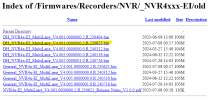
After some research, I want to share what I found: Due to a serious security flaw in the some dahua NVR, the authentication protocol has been completely changed in the new firmware, and that is why IMOU cameras do not connect. If you do not update the firmware to maintain compatibility, you should take serious security precautions:
- Remove Port Forwarding: Instantly delete any port forwarding rules (such as ports 80, 443, 554, 8000, or 37777) on your router pointing to the NVR.
- Disable UPnP and P2P: Turn off Universal Plug and Play (UPnP) and any proprietary cloud/P2P connection toggles inside both the router and the NVR settings.
- Deploy a Security VLAN: Place the NVR and all IP cameras onto a dedicated Virtual Local Area Network (VLAN) completely separated from your primary home or corporate data network
- Block Internet Access: Configure explicit firewall rules on your router or gateway to drop all outbound and inbound traffic for the NVR's specific IP address.
- Implement Secure Remote Access: To view the cameras remotely, do not connect directly to the NVR. Force all remote connections through a local self-hosted VPN gateway (e.g., WireGuard or OpenVPN) or a secure zero-trust tunnel (e.g., Tailscale).
- Bind IP/MAC Addresses: Restrict local management access so that only specific authorized administrative IP or MAC addresses can open the NVR's login page.
- Disable Unused Protocols: Turn off insecure or unnecessary network services within the NVR menus, specifically ONVIF, RTSP (if unused), FTP, Telnet, SSH, and SNMP.
- Enforce Strong Credentials: Change default administrative usernames (like admin) if the system allows it, and set a complex password exceeding 16 characters.
- DO NOT USE port forwarding under any circumstances!!
Also keep in mind that IMOU has began to block in new firmwares 3777, 554, 80 ports forcing to buy their cloud services
Hope this help.