How to troubleshoot missing alerts?

dockdoc

Young grasshopper
Dec 27, 2021
51
18
Charlotte NC
I'm on V6.0.0.1 and I've been going through all my settings and checking things. I've noticed that I'm not getting some alerts, and I'm not sure why.

Example: Cam3 is on my driveway (front) and Cam2 is on my driveway (Rear). So coming down the driveway, Cam3 is triggered first, then Cam2. They're both configured to be triggered by motion (with high sensitivity), which starts recording and triggers an Alert, which must be confirmed by AI. I'm using the standard CPAI and ipcam-combined and ipcam-dark (for my overnight profile).

Last night I came home around midnight. Cam3 picked up my vehicle, triggered motion recording and an alert, and pushed it to my phone, as configured.

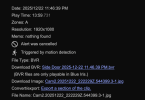
Cam2 did NOT trigger an alert or a push notificataion. However when I go check the recording, I do see the motion was detected, so it did record, and in "Analyze AI" mode I can see the red box around the truck showing that it did seem to be confirmed with AI. And yet, no recording. When I walked past the camera a couple minutes later, it picked me up no problem and alerted/notified.

I also had this happen yesterday on a front porch camera that simply didn't alert for a person there, but when I looked at the motion-triggered recording, there was someone there, and they had a red box around them.

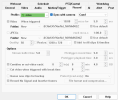
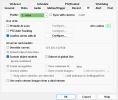
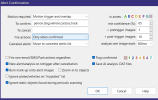
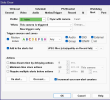
Any suggestions? And how can I troubleshoot this further? Here are some screenshots of my Cam2 settings.
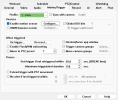
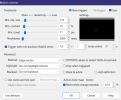
1766502374341.png1766502382908.png
1766502399529.png1766502408928.png

1766502418396.png1766502429974.png
 
Of course It is going to say nothing found, as the alert was canceled, but what does the video show! If it shows what should be a detectable object, you can hopefully open the DAT file by <CTRL> double clicking the video and see what AI tried to do! This is where it starts to get more difficult!
 
Of course It is going to say nothing found, as the alert was canceled, but what does the video show! If it shows what should be a detectable object, you can hopefully open the DAT file by <CTRL> double clicking the video and see what AI tried to do! This is where it starts to get more difficult!
Yeah the video shows the truck with the red boxes around it, which as I understand means it recognized it.

I thought the DAT file was only created if there was an alert? Are you saying there should be one somewhere?
 
My system has a DAT file for my canceled alerts! Check camera properties on the AI tab, then click the "Configure..." button, look for the check box "Save AI analysis .DAT files" if it is not checked then check it, with out this info you will never figure out what is happening!
 
My system has a DAT file for my canceled alerts! Check camera properties on the AI tab, then click the "Configure..." button, look for the check box "Save AI analysis .DAT files" if it is not checked then check it, with out this info you will never figure out what is happening!
I know that button is checked for me. I’ll see if I can find it.
 
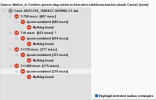
OK so I found the dat file for a known missed alert and put it into the AI inspector. Here's a screen shot of what it found. I'm seeing "nothing found". But on the preview window I can clearly see a picture of a person and a dog on its leash, in plain view on the camera, with a yellow box around them. So it seems to me like the AI is just not picking up on this. Any idea why it wouldn't? Two other cameras that tracked the guy and the dog walking from the driveway to the house both detected and alerted appropriately. Only this one didn't, and it seems to be the only one that's missing alerts.


1767045659972.png
 
Are you <CTRL>double clicking on the canceled alert image on the left side of the screen, it should also show the image for you also!
I see that you are trying to detect all sorts of critters, do you really need them all. There is a long list of detectable objects, that you could exclude from checking which would probably speed up your detection times.
I would check the setting on that camera to see if they are set the same as the working camera, also you detection times are much longer than mine, none of mine exceed 142msec and I am using the onboard GPU only, many of my detection times are under 100msec!
 
Are you <CTRL>double clicking on the canceled alert image on the left side of the screen, it should also show the image for you also!
I see that you are trying to detect all sorts of critters, do you really need them all. There is a long list of detectable objects, that you could exclude from checking which would probably speed up your detection times.
I would check the setting on that camera to see if they are set the same as the working camera, also you detection times are much longer than mine, none of mine exceed 142msec and I am using the onboard GPU only, many of my detection times are under 100msec!

So actually most of my other cameras are simply copying the settings on this camera... and yet the others work fine. So I don't think it's setting related.

How do I reduce the detection time? That seems like a potential issue.
 
Close the BI console, then locate this file C:\BlueIris\AI\models\coco.names, make a copy of the file as a backup, then open it with notepad and place a "-" dash in front of each item that you are not interest in detecting, then save the file, then restart the computer or at leaset restart the BI service
If windows explorer is not set to show the file extensions, the file name will only be shown as "coco" I would recommend that you always have file explore set to show file extension!

Something like this

person
bicycle
car
motorbike
-aeroplane
bus
-train
truck
-boat
-traffic light
-fire hydrant
-stop sign
-parking meter
-bench
-bird
 
  • Like
Reactions: Broachoski
Close the BI console, then locate this file C:\BlueIris\AI\models\coco.names, make a copy of the file as a backup, then open it with notepad and place a "-" dash in front of each item that you are not interest in detecting, then save the file, then restart the computer or at leaset restart the BI service
If windows explorer is not set to show the file extensions, the file name will only be shown as "coco" I would recommend that you always have file explore set to show file extension!

Something like this

person
bicycle
car
motorbike
-aeroplane
bus
-train
truck
-boat
-traffic light
-fire hydrant
-stop sign
-parking meter
-bench
-bird
Strange, I don't have that directory. I think there's something else at play here, I have a doorbell camera that literally uses the front porch camera's settings (it just links to those settings) and it's capturing all of the alerts that my front porch camera is missing... I really don't get it. Emailed support.
 
Strange, I don't have that directory. I think there's something else at play here, I have a doorbell camera that literally uses the front porch camera's settings (it just links to those settings) and it's capturing all of the alerts that my front porch camera is missing... I really don't get it. Emailed support.
Are you using the builtin AI in Version 6x, if so then did you download the models using the link on the AI tab in BI
 
OK that will explain why you don't have that folder, I have switched to the internal AI in version 6, my knowledge of optimizing the separate CPAI system is very limited, perhaps someone else with a better understanding of that system can jump in with some suggestions.
 
  • Like
Reactions: dockdoc