I'm on V6.0.0.1 and I've been going through all my settings and checking things. I've noticed that I'm not getting some alerts, and I'm not sure why.
Example: Cam3 is on my driveway (front) and Cam2 is on my driveway (Rear). So coming down the driveway, Cam3 is triggered first, then Cam2. They're both configured to be triggered by motion (with high sensitivity), which starts recording and triggers an Alert, which must be confirmed by AI. I'm using the standard CPAI and ipcam-combined and ipcam-dark (for my overnight profile).
Last night I came home around midnight. Cam3 picked up my vehicle, triggered motion recording and an alert, and pushed it to my phone, as configured.
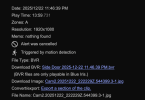
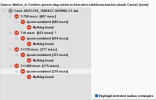
Cam2 did NOT trigger an alert or a push notificataion. However when I go check the recording, I do see the motion was detected, so it did record, and in "Analyze AI" mode I can see the red box around the truck showing that it did seem to be confirmed with AI. And yet, no recording. When I walked past the camera a couple minutes later, it picked me up no problem and alerted/notified.
I also had this happen yesterday on a front porch camera that simply didn't alert for a person there, but when I looked at the motion-triggered recording, there was someone there, and they had a red box around them.
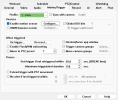
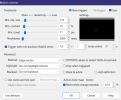
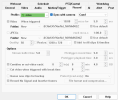
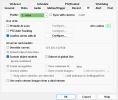
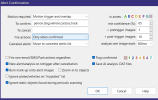
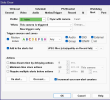
Any suggestions? And how can I troubleshoot this further? Here are some screenshots of my Cam2 settings.
Example: Cam3 is on my driveway (front) and Cam2 is on my driveway (Rear). So coming down the driveway, Cam3 is triggered first, then Cam2. They're both configured to be triggered by motion (with high sensitivity), which starts recording and triggers an Alert, which must be confirmed by AI. I'm using the standard CPAI and ipcam-combined and ipcam-dark (for my overnight profile).
Last night I came home around midnight. Cam3 picked up my vehicle, triggered motion recording and an alert, and pushed it to my phone, as configured.
Cam2 did NOT trigger an alert or a push notificataion. However when I go check the recording, I do see the motion was detected, so it did record, and in "Analyze AI" mode I can see the red box around the truck showing that it did seem to be confirmed with AI. And yet, no recording. When I walked past the camera a couple minutes later, it picked me up no problem and alerted/notified.
I also had this happen yesterday on a front porch camera that simply didn't alert for a person there, but when I looked at the motion-triggered recording, there was someone there, and they had a red box around them.
Any suggestions? And how can I troubleshoot this further? Here are some screenshots of my Cam2 settings.