I got this to work (sort of. See my edit at the end).
I am using a ITC431-RW1F-IRL8
software version 5.000.0000000.1.R, Build: 2025-03-12 11:13:25
ITSAPI protocol version V1.19
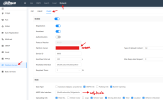
My problem has been that I can define a path for the keep-alives, and I was able to receive those, but I could not define a path for the ANPR data. See below:
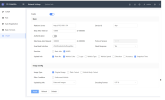
See where I've defined the keep-alive location as /NotificationInfo/KeepAlive. Well, I'm using Node Red, which only listens for webhooks on paths relative to /endpoint. So, when I had set the server at the top of the ITSAPI page to
http://192.168.1.101:1880 (Node Red listens on port 1880) and the keep-alive location to
/endpoint/NotificationInfo/KeepAlive, the keep-alives were coming into Node Red! So I knew the camera was sending keep-alives.
What I did not know was whether the camera was sending ANPR images and data, because I could not define a path. Perhaps the images and data were indeed being sent, but since the path wouldn't natively include /endpoint, I wasn't receiving them. Now I know. They were being sent.
Here is the solution:
You will need Nginx Proxy Manager (NPM). I am running a Home Assistant server, so I
added the app. And then I configured it to intercept the webhooks from the camera (listening on port 80 ...in the ITSAPI server field I can omit the :80, as I have done, or enter
http://192.168.1.101:80 and have the same result) and pass them along to Node Red at port 1880/endpoint. Here is what I did in NPM:
- Go to the NPM web UI on port 81. So, for me it's http://192.168.1.101:81
- Go to Proxy Hosts
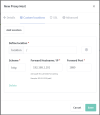
- Add Proxy Host. The Domain Name is the IP address I've entered into the ITSAPI server field. The Forward Hostname/IP is the IP address where Node Red resides. And port 1880 for Node Red. Websockets Support doesn't seem to be needed, but I turned it on anyway.
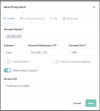
- Then go to the Custom Locations tab. Add location. Enter the details for Node Red again. Notice that I have / in the Define location field. Now click that little Settings gear just above the Forward Port field. And in the window below, paste the following:
location / {
proxy_pass http://192.168.1.101:1880/endpoint/;
proxy_set_header Host $host;
proxy_set_header X-Real-IP $remote_addr;
proxy_set_header X-Forwarded-For $proxy_add_x_forwarded_for;
proxy_set_header X-Forwarded-Proto $scheme;
}
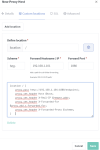
- Click Save
Now all the webhooks sent to 192.168.1.101:80 will be forwarded to 192.168.1.101:1880/endpoint/* (Node Red). And I do get keep-alives at /endpoint/NotificationInfo/KeepAlive as well as the images and data from the camera. The strange thing is that the camera will send the ANPR webhook repetitively. So Node Red is getting flooded. I am using a response node with a 200 status, but that isn't helping.
I don't know yet how to try to remedy this. But at least I'm getting ANPR images and data. If anyone has any idea, please post a reply.
Edit: I think the problem stems from the response not being received by the camera. And, if I don't have the Need Response setting set to Yes, the webhooks are not received in Node Red. So, it seems I need to figure out what response the camera is expecting, because the 200 isn't doing the trick. Or, perhaps the 200 is fine but the camera is also expecting to see certain headers in the response. Also, the ANPR webhook isn't replaced with a new one when a new car drives through. It keeps sending the old one. So, I've proven that the camera is indeed sending ANPR data, but I'm not yet able to get it to work as it should.