How to get snapshot infos on a Dahua camera ITC413 with a restapi?

fergant

n3wb
Jan 15, 2025
3
0
Italy
Hi everyone, first post here. My company is about to start a project that relies on dahua cameras for license plate recognition. I can successfully make tests and tried to take a snapshot through the api given in the documentation. The api is this one: "http://{camera_ip}/cgi-bin/snapshot.cgi".
Im wondering, is there an api that can give the infos about my last snapshot(not the snapshot itself) like plate number, vehicle color/type etc? I also saw on the camera client that snapshot are ordered with an id. In the documentation I'm using there's a guide n how to configure camera for sending to an FTP server the snapshot, but I should develop a web application that gets the information on the last snapshot i made. is there an api to get these info or another way to do this?
 
Don't know the camera or if you are using NVR but something to try
/cgi-bin/eventManager.cgi?action=getEventIndexes&code=ANPR

Also if the camera or NVR keeps a buffer you might try
/cgi-bin/snapshot.cgi?lastEventImage=1

I can't say they will work but something to try?
 
Don't know the camera or if you are using NVR but something to try
/cgi-bin/eventManager.cgi?action=getEventIndexes&code=ANPR

Also if the camera or NVR keeps a buffer you might try
/cgi-bin/snapshot.cgi?lastEventImage=1

I can't say they will work but something to try?
I tried both the apis and from the first one i get the message "Error: No events" tough the test snapshot I did is marked as "Event Type : ANPR" and from the second i get a snapshot of the camera like it did with "/cgi-bin/snapshot.cgi".
I would like the camera to send me an event whenever it catches something, so I presume i need to develop an application that is listening for events on the camera i guess? Or should i configure the camera to send event on a server/dispatcher? Sorry for these questions but its my first time working with an iP Cameras and I dont know how should I approach the problem
 
I would personally setup for Snapshot to go to your email. Then when it takes the snapshot you would get an email of the event with the added image.. Another option as you already mentioned was FTP but email if you have your own server anyway is the fastest way. FTP can work but always seems to have some setup drama. But once setup works great then on.. The codes used are not for all devices just what came to mind to try and see if it might work for your needs. Sorry wasn't more helpful.
 
I would personally setup for Snapshot to go to your email. Then when it takes the snapshot you would get an email of the event with the added image.. Another option as you already mentioned was FTP but email if you have your own server anyway is the fastest way. FTP can work but always seems to have some setup drama. But once setup works great then on.. The codes used are not for all devices just what came to mind to try and see if it might work for your needs. Sorry wasn't more helpful.
Yeah I thought the same thing about the FTP way, the problem here is that I found some apis and implementation on github that uses a rest api to get the snapshot itself, not the infos linked. I need something like a json, an xml or something that contains the data about the snapshot to save it on a local DB, so they could log the accesses and exits of the vehicle into the structure, so when the vehicle with the same plate number tries to access again the user can see every log related to that vehicle and decide to open the gate manually.
On the user manual and on the web interface of the camera I cant find a way to get only these informations whenever the event triggers, maybe with a cache system like Redis or Kafka, any other way... I'm really losing my head on it
 
Yeah I thought the same thing about the FTP way, the problem here is that I found some apis and implementation on github that uses a rest api to get the snapshot itself, not the infos linked. I need something like a json, an xml or something that contains the data about the snapshot to save it on a local DB, so they could log the accesses and exits of the vehicle into the structure, so when the vehicle with the same plate number tries to access again the user can see every log related to that vehicle and decide to open the gate manually.
On the user manual and on the web interface of the camera I cant find a way to get only these informations whenever the event triggers, maybe with a cache system like Redis or Kafka, any other way... I'm really losing my head on it
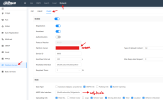
You can try using ITSAPI events, namely, create a server and receive events from the camera via a web hook, which you specified a server for in ITSAPI. It sends metadata about the car and a picture
On server it will be like:
Python:
@routes.post("/NotificationInfo/TollgateInfo")
def someFunction(request):
    data = request.json()
    image_data = data["Picture"]["NormalPic"]["Content"]
    image = base64.b64decode(image_data)
    meta_data = data["Picture"]["SnapInfo"]
...
 

Attachments

  • Снимок экрана 2025-08-07 135706.png
    Снимок экрана 2025-08-07 135706.png
    70.7 KB · Views: 32
Hi! there i need to configure something else? becasuse the KeepAlive is hitting my service, but the anpr events never get fired.
 
Hello, I have an IT413 but the platform server didn't work. How can I retrieve license plates and images via API for my own software? Thank you.
 
I got this to work (sort of. See my edit at the end).

I am using a ITC431-RW1F-IRL8
software version 5.000.0000000.1.R, Build: 2025-03-12 11:13:25
ITSAPI protocol version V1.19

My problem has been that I can define a path for the keep-alives, and I was able to receive those, but I could not define a path for the ANPR data. See below:
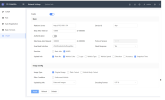
1783189962892.png

See where I've defined the keep-alive location as /NotificationInfo/KeepAlive. Well, I'm using Node Red, which only listens for webhooks on paths relative to /endpoint. So, when I had set the server at the top of the ITSAPI page to http://192.168.1.101:1880 (Node Red listens on port 1880) and the keep-alive location to /endpoint/NotificationInfo/KeepAlive, the keep-alives were coming into Node Red! So I knew the camera was sending keep-alives.

What I did not know was whether the camera was sending ANPR images and data, because I could not define a path. Perhaps the images and data were indeed being sent, but since the path wouldn't natively include /endpoint, I wasn't receiving them. Now I know. They were being sent.

Here is the solution:

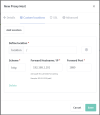
You will need Nginx Proxy Manager (NPM). I am running a Home Assistant server, so I added the app. And then I configured it to intercept the webhooks from the camera (listening on port 80 ...in the ITSAPI server field I can omit the :80, as I have done, or enter http://192.168.1.101:80 and have the same result) and pass them along to Node Red at port 1880/endpoint. Here is what I did in NPM:

  1. Go to the NPM web UI on port 81. So, for me it's http://192.168.1.101:81
  2. Go to Proxy Hosts
  3. Add Proxy Host. The Domain Name is the IP address I've entered into the ITSAPI server field. The Forward Hostname/IP is the IP address where Node Red resides. And port 1880 for Node Red. Websockets Support doesn't seem to be needed, but I turned it on anyway.
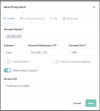
    1783191386119.png

  4. Then go to the Custom Locations tab. Add location. Enter the details for Node Red again. Notice that I have / in the Define location field. Now click that little Settings gear just above the Forward Port field. And in the window below, paste the following:

    location / {
    proxy_pass http://192.168.1.101:1880/endpoint/;
    proxy_set_header Host $host;
    proxy_set_header X-Real-IP $remote_addr;
    proxy_set_header X-Forwarded-For $proxy_add_x_forwarded_for;
    proxy_set_header X-Forwarded-Proto $scheme;
    }
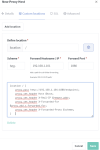


    1783191800958.png

  5. Click Save

Now all the webhooks sent to 192.168.1.101:80 will be forwarded to 192.168.1.101:1880/endpoint/* (Node Red). And I do get keep-alives at /endpoint/NotificationInfo/KeepAlive as well as the images and data from the camera. The strange thing is that the camera will send the ANPR webhook repetitively. So Node Red is getting flooded. I am using a response node with a 200 status, but that isn't helping.

I don't know yet how to try to remedy this. But at least I'm getting ANPR images and data. If anyone has any idea, please post a reply.

Edit: I think the problem stems from the response not being received by the camera. And, if I don't have the Need Response setting set to Yes, the webhooks are not received in Node Red. So, it seems I need to figure out what response the camera is expecting, because the 200 isn't doing the trick. Or, perhaps the 200 is fine but the camera is also expecting to see certain headers in the response. Also, the ANPR webhook isn't replaced with a new one when a new car drives through. It keeps sending the old one. So, I've proven that the camera is indeed sending ANPR data, but I'm not yet able to get it to work as it should.

 

Attachments

  • 1783191602244.png
    1783191602244.png
    31.7 KB · Views: 0
Last edited: