Everstra Live — a free ACAP app to stream your Axis camera to YouTube, Twitch & RTMP (no PC, no cloud, no subscription)

DirkJensen

Getting the hang of it
Jul 14, 2017
53
74
nowhere
Hi everyone,

Some of you may have seen earlier versions of this app that I posted here over the past months and then took down. I owe you a short explanation before anything else, because I don't want it to look like I was playing games with the threads.

The truth is simple: I kept iterating. Every time I shared a build, I learned something, reworked it, and eventually wasn't satisfied that it was solid enough to deserve a permanent home here. Rather than leave half-finished versions sitting around with broken links and outdated instructions, I deleted them. I'd rather post nothing than post something I'm not confident in. This post is the result of that process — a proper, ground-up rebuild that I'm finally comfortable putting my name behind.

What it is

Everstra Live is a free ACAP application that runs directly on your Axis camera and streams live to YouTube, Twitch, or any RTMP destination. No external server, no PC running in the background, no cloud middleman, no subscription. The camera does the work itself, and the stream goes straight from the sensor to your platform of choice.

A few technical points this community will care about:
  • It remuxes the camera's H.264 stream rather than re-encoding it — minimal CPU and power load.
  • Automatic reconnect with configurable exponential backoff or fixed delay.
  • Silent audio track by default; optional uploaded audio files (internal storage or SD card) or a network audio URL.
  • E-mail notifications for stream events: unexpected stop, restart-threshold exceeded, and reminders if you manually stop and forget to restart.
  • Web UI served directly from the camera's own settings page — no separate app, no login, no portal.
  • Settings export/import (secrets excluded), dark mode, and optional auto-start on camera boot.
Why "Live" and not just "the app"

Everstra is designed to be modular. Live (streaming) is the first module and the one that's available now. The idea is that each module does one job well, rather than one bloated app trying to do everything. More modules will follow over time, but I'd rather ship one solid, finished thing than promise a roadmap I can't yet stand behind. So for now: it streams, and it streams reliably.

Camera compatibility — honestly

I want to be straight with you here, because this community knows its hardware. The app is built for Axis cameras with ACAP support, in both the 64-bit (aarch64, most current models) and 32-bit (armv7hf) architectures. Firmware 10.x or later is recommended.

What I've personally tested it on is an AXIS P1455-LE (ARTPEC-7) — and that's not just a lab claim: it's the exact camera that runs my Schlüttsiel ferry-harbour webcam, streaming continuously, 24/7, in all weathers. You can see it live on the References page. I've also run it on an AXIS Q1728 (ARTPEC-9, AXIS OS 12).

Beyond those, "built for" and "tested on" are not the same thing, and I won't pretend otherwise. If you have a different model, I'd genuinely like to hear whether it works for you — that real-world feedback is how the compatibility picture gets filled in properly. Tell me your model and I'll tell you what I know.

How it respects you and your camera

A few principles guide how this project treats you and your camera:
  • No phone-home. The app never contacts external servers on its own. No telemetry, no usage reporting, nothing sent from the camera.
  • No cloud dependency. Everything runs on the camera itself, on your local network. No account, no subscription, no external service to keep alive.
  • Free, hardware-bound license. Each license is tied to an individual camera and issued at no charge — just request one by email from the app's settings page. No account, no form, no payment. And what's free stays free: any license you already hold remains free for the lifetime of that camera.
  • Verifiable binaries. A SHA-256 checksum is published next to every download, so you can confirm the file you install is the file I built.
  • Transparent components. Every bundled open-source library (FFmpeg, cJSON, TweetNaCl, Bootstrap, and an MIT-licensed ACAP helper) is listed with its license, and the FFmpeg source is available for download.
This is a personal project, built carefully and offered freely. It's not a company trying to upsell you — it's one developer who has worked with Axis cameras and YouTube streaming since 2008, and who wanted a cleaner way to do a simple thing and decided to share it.

This is a niche tool, and that's exactly why it's free — it solves a specific problem for a small group of people, and I wanted it available to anyone who needs it, without a paywall in the way. I'll be honest with you: if demand ever turns out much higher than I expect, I might one day ask for a small contribution toward continued development and support — more users inevitably means more support questions, and I'm just one person. But that's a "someday, maybe" thought, not a plan. And as I said: anything you've already activated for free stays free for that camera.

You can find it here: everstra.com

I'll be around in this thread to answer questions, take bug reports, and hear how it runs on your hardware. Thanks for reading — and thanks to this community, which has been a genuinely useful place over the years.

— Dirk Jensen
 

Attachments

  • everstra-og.jpg
    everstra-og.jpg
    44.9 KB · Views: 4
Last edited:
Update: AXIS M3085-V (Ambarella CV25 / aarch64) now supported

Quick sign of life with actual news: Everstra Live now runs on Ambarella CV25 cameras. Tested on an M3085-V under AXIS OS 12.10.73 — installs cleanly, streams reliably (RTSP→RTMP remux), and holds up after a factory reset + reinstall.

Getting there was instructive. The M3085-V was the first camera to force a particular device-info fallback path, and that path exposed two latent bugs that never showed up on the ARTPEC models. One of them was a pointer truncation that only bites on 64-bit hardware — on 32-bit ARM it's physically invisible, since pointers there are 32-bit anyway. Both are fixed. If anyone's into that kind of debugging story, I'm happy to write up the details in a follow-up.

Where you can help: I've only tested one CV25 camera so far. If you're running Everstra on other Ambarella or aarch64 models — or you try and it fails — your feedback is genuinely useful. Model + AXIS OS version + "works / doesn't work" is all I need to start building out a proper compatibility list.

You can find it here: everstra.com
 
  • Like
Reactions: 12K and iwanttosee
A free remote-access tip that pairs well with Everstra

One tip worth sharing (not mine, but I use it): for reaching a camera remotely without a public IP, there's a free open-source Tailscale ACAP — Mo3he/Axis_Cam_Tailscale on GitHub. It runs on the camera and puts it on your Tailscale network, so you get remote access with no port forwarding and no monthly cloud fee. It pairs nicely with an Everstra streaming setup, and it covers the one thing people most often reach for a paid cloud tier to get.

Tailscale ACAP: https://github.com/Mo3he/Axis_Cam_Tailscale
 
Last edited:
  • Like
Reactions: Valiant
RTMPS support — v0.2.0 is out

Everstra Live now supports RTMPS (RTMP over TLS) with full certificate validation:
  • Facebook Live now works (it mandates RTMPS)
  • YouTube over rtmps:/ works and is the recommended path
  • RTMPS runs on port 443, so it gets through networks where the usual RTMP port 1935 is blocked — corporate and school networks, mainly
Plain RTMP still works exactly as before; nothing breaks for existing setups.

FFmpeg is now built with GnuTLS. Verified on an M3085-V (aarch64) and a P1455-LE (armv7hf), both streaming to YouTube over rtmps. Firmware requirement: AXIS OS 11.11 (LTS 2024) or later — older firmware lacks the required glibc and the app won't start.

Next up — 0.3.0, in progress: multitarget streaming + view areas

Up to 3 independent streams from one camera, in parallel. The interesting part: each stream can use its own view area. Axis cameras let you define view areas freely — cropped regions of the sensor — so one camera can serve three completely different framings at once. A wide shot to YouTube, a tight crop to your own server, a third framing somewhere else. Each with its own destination, settings and audio source.

A question to you all

After that: an Overlay module (graphics, data, logos in the image) and a Capture module (recording, time-lapse, long-term snapshots, star trails).

There's also a fourth module I'm considering, and here your input matters most — a utility module for the small things that make a 24/7 camera easier to run.

Two examples:
  • Sunrise/sunset-driven actions: automatically adjust exposure, sharpness and other image parameters at dawn and dusk, with the times recalculating themselves through the year
  • Scheduled auto-reboot
What would actually be useful to you? Concrete use cases beat feature wishlists.
I can't promise to implement everything — one-person project, and I have to be realistic about scope. But I'd rather build what people need than guess.

Dirk Jensen
everstra.com
 
Last edited:
  • Like
Reactions: 12K
v0.3.0 is out — multiple streams from one camera

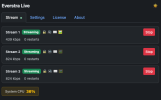
Up to 3 independent streams in parallel, each with its own destination, resolution, audio source and e-mail notifications.

The part I find most useful: each stream can use its own view area. Axis cameras let you crop regions of the sensor, so one camera can serve three completely different framings at once — a wide shot to YouTube, a tight crop to your own server, a third somewhere else.

Next up, 0.4.0: keep-alive. If the camera drops out, an external Linux box (Raspberry Pi, or a rented server) takes over the stream with a maintenance image, so the YouTube session doesn't die. Heartbeat over plain FTP — no cloud, no extra service.

Dirk Jensen
everstra.com


screenshot-stream.png

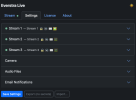
screenshot-settings.png

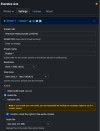
screenshot-settings-2.png

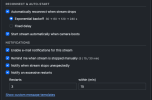
screenshot-settings-3.png
 
  • Like
Reactions: 12K
v0.4.0 — keep-alive failover

A 24/7 stream gets interrupted eventually — power cut, network drop, a reboot. Normally YouTube then ends the broadcast, and resuming means a new broadcast: new URL, new video. Everything tied to the old one starts from zero — likes, view count, chat, and every link, embed or bookmark pointing to it. For a webcam that's been live for years, one long outage can wipe out the reach built up over all that time.

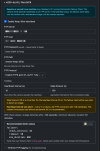
0.4.0 adds an optional failover to prevent exactly that. Two self-hosted parts, no cloud:

  • The camera writes a small heartbeat to an FTP server you already have (timestamp + state only — never the stream key).
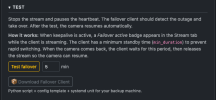
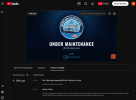
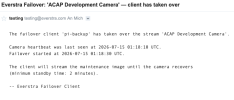
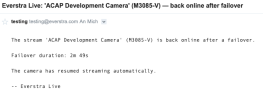
  • A standby client on a separate Linux box (Raspberry Pi, small VPS) watches it. If the heartbeat stops, or the camera reports it can't reach its target, the client takes over and streams a still maintenance image to the same destination. When the camera returns, it hands back and the camera restarts itself.
keepalive_failover_settings.png keepalive_failover_test.png

Safeguards: it won't take over if you stopped the stream yourself (so maintenance doesn't trigger a takeover), and it holds a minimum time before handing back, so a flapping link can't bounce the stream back and forth. You get an e-mail when the client takes over and when the camera resumes — the camera's mail reports how long it was down.

maintenance_still_image.png mail_takover.png mail_back_online.png

Honest limits: main stream only, still image (not live video — it keeps the session and the URL alive, it doesn't replace the picture), and it only works while your standby client is actually running: if that box is off, nothing takes over. The client ships inside the app as a ZIP (script + systemd unit + README); setting it up needs basic Linux, it's not plug-and-play.

Dirk Jensen
everstra.com
 
  • Like
Reactions: 12K
Everstra Overlay 0.1.0 is out — overlays on the camera itself


Second Everstra module. Runs as an ACAP, draws into the encoder pipeline.

0.1.0 includes:
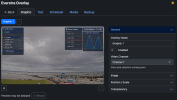
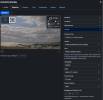
  • Text overlays — static or scrolling ticker (left/right), custom fonts, colours, background with opacity and rounded corners. Up to 5.
  • Graphic overlays — PNG/JPEG, free positioning and scaling. Up to 5.
  • Media Manager — images and fonts on internal storage or SD card. Usage tracking, bulk operations.
  • Scheduler — weekly plan, hourly plan, sunrise/sunset (local calculation, no external API), date exceptions.
  • Backup & Restore — JSON config export/import, media ZIP download.
  • Auto-save — every change applies immediately. Preview is the actual camera stream.
overlay_dashboard.png overlay_graphic.png overlay_scheduler.png overlay.png

Builds for armv7hf (ARTPEC-7) and aarch64 (ARTPEC-8/9). Tested on a P1455-LE. 7-day trial, free licence per camera (separate from Live licences).

Weather overlay is next. It's visible as "coming soon" in the app but not shipped yet.

Dirk Jensen
everstra.com
 
  • Like
Reactions: 12K
Everstra Overlay 0.2.0 is out — weather overlay

Last time I wrote that the weather overlay was next. It's shipped.

overlay_weather_1.png overlay_weather_2.png

Live conditions from Open-Meteo, fetched by the camera itself. No API key, no account, no cloud service in between.
  • Five layouts — compact, current + clock, sunrise/sunset, wind, and a detailed card with feels-like, precipitation, wind direction, gusts and Beaufort.
  • Per overlay: units, language, colour scheme, time format, font, corner radius. Icons switch between day and night automatically.
  • Location by coordinates, refresh interval from 60 s up. Overlays sharing a location share a single fetch.
  • Attribution is its own overlay — position, size and style are yours to set, the credit itself isn't removable. Open-Meteo's free data is non-commercial; commercial use needs their paid plan, and the app asks you to acknowledge that once before a weather overlay runs.
  • Up to 2 weather overlays, schedulable with the existing weekly / hourly / sunrise-sunset rules.
Builds for armv7hf (ARTPEC-7) and aarch64 (ARTPEC-8/9). Free licence per camera, separate from Live licences.

Full changelog for every version is now on the site.

Dirk Jensen
everstra.com
 
  • Like
Reactions: 12K
Everstra Capture is out — free on-camera recording, startrails & timelapse

Four independent capture modes, all running on the camera itself — no PC, no cloud:
  • Long Term — scheduled snapshots on an hourly or custom rhythm, over weeks, months or years. Date range, capture window, resolution and storage location per job.
  • Startrail — one automatic star-trail composite per night, timed to sunset/sunrise at the camera's location. Raw frames are always archived, so a night can be recomposited later with different settings.
  • Timelapse — interval capture encoded to H.264 MP4 on the camera. Triggers by fixed time window, daylight, dusk-till-dawn or a lookback period; daily/weekly/monthly/yearly repetition; automatic splitting of long runs.
  • Intraday — a rolling clip that always shows the most recent window (last 15–180 min), rebuilt block by block and self-replacing. Handy for a webcam page that wants a continuously fresh short timelapse.
Plus, shared across all four:
  • One media library, tagged by mode and job — filter, ZIP-download, delete.
  • Storage overview per disk with configurable warn/stop thresholds and an optional low-space email alert.
  • FTP upload of finished videos and composites, with a fixed remote filename option (overwrites on your webspace for embedding) and independent remote retention.
Encoding uses the camera's own bundled FFmpeg with the OpenH264 encoder — H.264 MP4 that plays everywhere, including iOS/Safari.

Builds for armv7hf (ARTPEC-7) and aarch64 (ARTPEC-8/9). Full changelog is on the site.

One ask: I mostly built this for my own cameras, so I honestly don't know which parts are useful to anyone else. If you try it, I'd love to hear what worked and what didn't. I'm slowly building another module (Everstra Toolbox) and would rather base it on what people actually need than guess.

Any feedback is really appreciated — thanks :)

Dirk Jensen
everstra.com

capture_dashboard.png capture_storage.png capture_media.png capture_timelapse.jpg
 
  • Like
Reactions: 12K
Walkthrough videos for the three modules + a YouTube channel

Finally recorded proper walkthroughs for each module. Screenshots never showed the flow — where you click, what happens next — so I just screen-recorded the real app setting each one up, start to finish. No slideware, nothing scripted.

Live — from licence upload to a running YouTube/RTMP stream (~1:40):


Overlay — text, weather and graphic overlays on the image, plus the scheduler (~2:30):


Capture — long-term stills, timelapse, star trails, the rolling intraday clip (~3:00):


All on the channel, later ones go there too:

Subtitles are on all three, with auto-translations if English isn't your first language.

If something's unclear or I skipped a step that isn't obvious, say so and I'll re-cut it. And if there's a specific thing you'd want shown, like a particular setup or some corner case, post it. Saves me guessing what's useful to people.

Dirk Jensen
everstra.com
 
Everstra 0.6.0 / 0.3.0 — a privacy manager that shows everything the app touches (and: on-camera recording)

Filed under "problems a normal person doesn't have": I wanted to prove, not just claim, Everstra's DNA — nothing leaves the camera unless you send it there. The new Privacy page does exactly that.

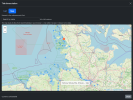
It lists every connection each module opens, built from your real config — stream, upload and mail destinations, any external service in use, and the local interfaces on the camera — each with live status and the data it exchanges. Stream keys are never shown. Exports to PNG/CSV.

Two things worth calling out:
  • A build check fails the build if any connection the code can open is missing from the report. That one's for me — it's how the page stays honest as the code grows.
  • Per module: Capture contacts no third party at all; Overlay's only outside call is the weather overlay's Open-Meteo fetch, and only while it runs; Live talks only to the destinations you set.
(The page covers the interfaces Everstra opens — not bundled components like FFmpeg, or the firmware — and isn't a legal guarantee. More on the approach: https://everstra.com/approach.html )

Also shipped: recording to SD card (Live + Capture)
Older news I never posted here. Live records the stream it's sending straight to the SD card, alongside the broadcast. It stores the profile the camera already produces — nothing is re-encoded — and the extra load was measured, not guessed. Recording follows the stream: starts when it starts, stops when it stops.

The nice part is the two modules meeting: Live records, you browse/export/delete in Capture — recordings shown as real time periods, any stretch exported as one MKV/MP4 without re-encoding. Every stream can record its own feed; an extra one costs real load (~9 points on the reference camera), so the app names the price and asks before you enable it.

Free, per-camera licence, builds for armv7hf (ARTPEC-7) and aarch64 (ARTPEC-8/9). Changelog: https://everstra.com/download.html

everstra.com — if you run it on hardware I haven't tested, tell me the model + AXIS OS version and how it went.

Dirk Jensen

privacy_1.png privacy_2.png Recordings_1.png Live_1.jpg
 
A compatibility list

I'd asked here before to let me know which cameras it runs on. Figured it makes sense to also show what I've got so far, so there's now a page for it.

It covers 262 Axis models across the three modules. 8 are confirmed on actual hardware so far, the rest is derived from architecture and OS version — the page marks which is which, so you can tell what's tested from what should just work. There's a search and a few filters if you want to find your model quickly.

Requires AXIS OS 11.11 or later, ARTPEC-6 or newer.

https://everstra.com/compatibility.html

If you're running it on something that's only listed as compatible, not yet tested, let me know and I'll update it.


One thing I should mention: the apps aren't signed yet. On AXIS OS 10 and 11 they install fine; from OS 12 signing is the default and on OS 13 it's required. I've applied to the Axis Technology Integrator Programme to sort that out properly for all modules — until that's approved they ship unsigned rather than me holding releases back.

More on that here: https://everstra.com/design-decisions.html

Dirk Jensen
everstra.com
 
A big one: all three modules are now Axis-signed

everstra-logo-horizontal@2x.png

This is, honestly, the biggest milestone the project has hit so far — so allow me a moment of quiet celebration before the details.

Following up on my last post, where I said the apps weren't signed yet: that's now sorted, for all three modules. And it changes what Everstra can be. Signing is what takes a hobby project from "install it and click past the warning" to something that belongs in serious, security-conscious setups — it's the single biggest step for the project's credibility, its reach, and its future.

Everstra Live, Overlay and Capture are now digitally signed and countersigned by Axis. Before an app runs, the camera verifies the signature against Axis's own trust chain — from the device firmware up to the application — so you can be sure the file you install comes from a trustworthy source and reaches the camera untampered.

The practical part that matters:

  • Installs on hardened cameras. They now install even where "Allow unsigned apps" is turned off — the strict setup a lot of corporate and security-conscious networks require. Previously that toggle had to be on.
  • Verified at the camera, not just claimed. The signature is checked by the device itself, not something you take on my word.
  • Future-proof. From AXIS OS 12/13 onward signing becomes the default/requirement — so this keeps the apps installable on current and future firmware without loosening any security setting.

To be straight about what this is and isn't: signed means the origin and integrity are verified — it's not an Axis certification or endorsement of the apps themselves. And for anyone wondering about the TIP route I mentioned last time: in the end it went through the standard ACAP signing service, no partner membership required. Same apps you already know — now delivered signed.

New versions carrying the signature: Live 0.6.2, Overlay 0.3.3, Capture 0.3.2. Existing installs keep working; you only need to reinstall if you want it on a camera that rejects unsigned apps. Checksums are published next to every download as before.

For a one-person project that started as a cleaner way to do a simple thing, this feels like a real turning point. Thanks to everyone here who's followed along — more to come.

everstra.com

— Dirk Jensen
 
  • Like
Reactions: 12K
Everstra Hub is out — your Axis camera as a Home Assistant citizen
everstra-logo-horizontal@2x.png

Fourth module, and a different kind of one. Live, Overlay and Capture all do something to the video. Hub doesn't touch the image at all — it connects the camera to Home Assistant over MQTT.

And I mean properly connected, not the handful of sensors Home Assistant reads from an Axis camera on its own. Hub reads out what the camera actually knows — and it does that dynamically, per model: temperatures, CPU, uptime, network, stream state, view areas, image settings, and on a PTZ model the PTZ side too. Whatever your camera exposes shows up; what it doesn't have simply isn't there. You pick, per value, what goes to Home Assistant — nothing is forced on you, and the sensitive stuff (serial, targets) stays off unless you switch it on yourself.

The part I think this crowd will like: it goes both ways. Hub can write back into the camera. So from a Home Assistant automation you can flip day/night, nudge sharpness, contrast, exposure — the image parameters — and start/stop streams or capture jobs. Writing is off by default and per-value opt-in, because pointing an automation at your camera settings should be a deliberate choice, not an accident.

What that unlocks is combinations that just weren't possible before, because now your sensors and your logic meet the camera's:
  • A motion/radar/PIR sensor in Home Assistant fires → the camera starts recording or a stream. Quiet for a few minutes → off again.
  • Camera getting hot (Hub reports the temperature) → Home Assistant switches a fan or pings you.
  • A physical button — and this is where it gets fun with Tailscale. Say the button sits here with me, and the cameras sit in Munich, Paris, wherever. One press, and streams start on all of them at once. Different sites, different countries, one button. That's the Tailscale bit doing the heavy lifting: the camera reaches your broker over the tailnet, so "across sites" is just... normal.
The automation itself always lives in Home Assistant. Hub only hands you the building blocks — the sensors and the switches — and you wire them up however you want. Your logic, your rules.

Security is the same story as the rest of Everstra: MQTT over TLS (own bundled LibreSSL, not the firmware's), certificate verification on by default, upload your own CA for a self-signed Home Assistant Mosquitto. Nothing leaves the camera except to a broker you name. There's a Privacy page in Hub that shows exactly what goes where, same as the other modules.

Honest limits, as always: the setup is the one thing that needs a bit of care — TLS certificate, Tailscale proxy, Mosquitto — so there's a full step-by-step guide with screenshots, because getting that part right is what makes the rest just work. And PTZ control (moving to presets) is on a camera model I haven't tested yet — it's built to work dynamically, but I'll confirm it properly once the PTZ cam is here.

Free, per-camera licence, separate from the others. Builds for armv7hf and aarch64.

Setup guide: everstra.com/setup-hub.html

If you run Home Assistant and Axis cameras, I'd genuinely love to hear what you build with it — the whole point is that I can't predict the combinations you'll come up with.

everstra.com

— Dirk Jensen
 
  • Like
Reactions: 12K
Update: there's now a full roadmap.

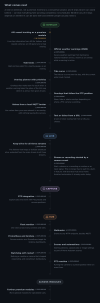
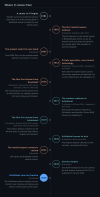
I've put together a timeline of the project — every release so far (36 across the four modules) and a section on what's being considered next: Everstra Roadmap — where it comes from and what's next

It also goes back to where this comes from: the first market-square webcam in 2001, the harbour cam since 2017, and how that turned into building my own ACAP tooling.

The "what comes next" part is deliberately marked considered, not scheduled — no dates, no promises. It's a one-person project and I only put my name to what I can actually stand behind. AIS vessel tracking is the one thing currently in progress (as an Overlay premium module); the rest is direction, not commitment.

Full screenshots below
 

Attachments

  • roadmap_1_history.png
    roadmap_1_history.png
    529.4 KB · Views: 1
  • roadmap_2_releases.png
    roadmap_2_releases.png
    1.5 MB · Views: 1
  • roadmap_3_next.png
    roadmap_3_next.png
    611.2 KB · Views: 1
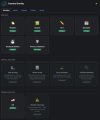
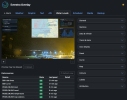
Overlay 0.3.4 — AIS ship tracking on the camera

The AIS module I mentioned on the roadmap is shipped. It's the first premium module in Everstra Overlay.

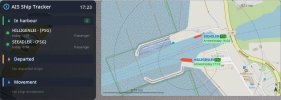
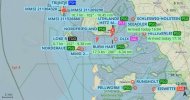
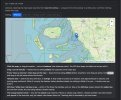
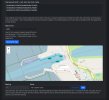
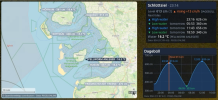
If you have an AIS receiver on the same network as your camera, the overlay draws live vessel positions on an interactive map — directly into the camera image, rendered on the device. No external service, no cloud, no PC.

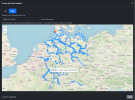
Two views switch automatically: a classic view with a map next to the camera image for nearby traffic, and a wider overview showing all tracked vessels when nothing is moving close by.

It tracks arrivals, departures, berth assignments, and draws vessel silhouettes to scale. Labels use a three-stage fallback so a crowded harbour still shows as many names as possible, with leader lines when labels have to sit further from their symbol.

The map uses OpenStreetMap tiles fetched by the camera, or optionally MapTiler. Both listed on the Privacy page; with a plain background no tiles are fetched at all.

What you need:
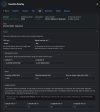
— An AIS receiver sending NMEA over UDP on your local network
— Everstra Overlay 0.3.4 with an AIS licence
— Axis camera with ARTPEC-6/7 or ARTPEC-8/9, AXIS OS 11.11+

This is a harbour/coastal tool, not open-ocean tracking — built for a camera that watches a fixed area. Range depends on your antenna, not on the software.

Full changelog: https://everstra.com/download.html
Dirk Jensen
everstra.com
 

Attachments

  • everstra_overlay.jpg
    everstra_overlay.jpg
    44.4 KB · Views: 4
  • classic_view.jpg
    classic_view.jpg
    77.4 KB · Views: 5
  • overview_map.jpg
    overview_map.jpg
    60.8 KB · Views: 5
  • tracker_settings.jpg
    tracker_settings.jpg
    65.4 KB · Views: 5
  • gps-box.jpg
    gps-box.jpg
    138.2 KB · Views: 4
  • berth.jpg
    berth.jpg
    119.3 KB · Views: 4
Overlay 0.4.0 — tides and water levels on the camera

Shortly after the AIS module, the second premium module for Everstra Overlay is ready: Water Levels. Both had been in the pipeline in parallel for a while; AIS reached release first, and Water Levels has now matured to the same point, so it ships today.

The overlay shows tide and water-level information directly in the camera image, rendered on the device. No external service, no cloud, no PC.

Three parts, each independent:
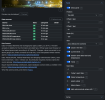
— A panel with the current water level and its trend, the next high and low waters with time and height, water temperature, and optionally the mean high/low water values.
— A tide curve showing the measured level and the forecast over the day, with high/low water markers and a "now" marker. Where no official curve is available, an approximate one is drawn and labelled as such.
— A map with the station and nearby stations and their current values, on an OpenStreetMap background, with scale bar, north arrow and a colour that reflects high, normal or low water.

Data comes from the German services BSH (tides, curve, forecast) and PEGELONLINE (level, trend, water temperature). Coverage is the North Sea and Baltic coasts as well as inland rivers and waterways across Germany — so it also works for a camera on a river or canal, where it shows level and trend without tides. You can also upload a BSH tide prediction file as a source or fallback.

The water temperature can also be shown as an extra line in the weather overlay.

What you need:
— Everstra Overlay 0.4.0 with a Water Levels licence
— A station within the covered area (German BSH / PEGELONLINE network)
— Axis camera with ARTPEC-6/7 or ARTPEC-8/9, AXIS OS 11.11+

For now this draws on the German BSH and PEGELONLINE networks, so the coverage is Germany. That is explicitly only the starting point. Extending Water Levels to other countries is firmly on the plan: I'm actively surveying which open data services are available internationally — public tide and gauge APIs from national agencies — with the clear goal of supporting as many regions as possible. Wherever a country offers a suitable open interface, I intend to integrate it. This is in the research and assessment phase now, and it will follow as those interfaces are available.

Full changelog: https://everstra.com/release-notes-overlay.html

Dirk Jensen
everstra.com
 

Attachments

  • waterlevels_2.png
    waterlevels_2.png
    956 KB · Views: 3
  • waterlevels_overlay.png
    waterlevels_overlay.png
    805.5 KB · Views: 3
  • waterlevels_1.png
    waterlevels_1.png
    461.5 KB · Views: 3
  • waterlevels_3.png
    waterlevels_3.png
    1.3 MB · Views: 3
  • waterlevels_panel.png
    waterlevels_panel.png
    269.7 KB · Views: 3
  • waterlevels_4.png
    waterlevels_4.png
    107.7 KB · Views: 4