Empiretech camera Onvif alert types?

oldspyguy

Young grasshopper
Jan 8, 2026
41
17
Cold North
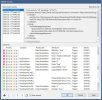
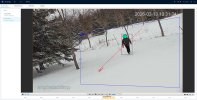
Sorry, just getting my test rig setup and still learning. I have a Reolink (uggh) camera that alerts specific types of Onvif triggers to BI (RED) but the Empiretech only sends a motion A alert as shown in the pictures below.
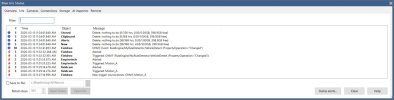
Empiretech Onvif Alerts3.jpg
Here
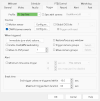
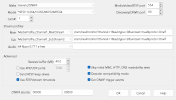
is the BI setting

Empiretech Onvif Alerts.jpg


Should it specify human in the Onvif message?
I have smart motion detection enabled with human and vehicle checked.

I can post the camera setting if that would help
Thank you from a new guy.
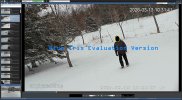
Empiretech Onvif Alerts2.jpg
 
Sadly no it won't specify what triggered it. One of the few things a Reolink is better at.

You will have to either rename IVS-2 to human or add human to the memo.

If you want to trigger for cars and human, then you need a minimum of two IVS rules - one labeled for car and the other for human.
 
  • Like
Reactions: oldspyguy
Ah, that makes sense now. So the target filter for each rule is specific, one for car and one for person.
OK, I was planning on using the Onvif triggers for home automation if my brain doesnt melt first.
Thank you....
 
I set it up as described but the event is still labled Motion_A in BI clips.
The camera is detecting each rule correctly in the playback on the camera from the SD card.
There is probably something I am missing here, again the objective eventally would be to tie in these events into home automation.
I have read so much documentation my head is spinning, God, I used to be good at this stuff.
 
Just did that and did another walk test , the camera triggered on the tripwire/human and recorded to the sd card but did not trigger anything in BI.
thanks again.
 
The camera is working perfectly and recording events properly to the SD card. Followed everyones instructions, read on line for days and the camera WILL NOT send any onvif messages to blue iris regarding IVS. Going to set up a test jig in my shop and start from scratch tomorrow. I will post every setting screen from BI and the camera in hopes someone spots an issue or maybe asks for a log?
If I cant get this simple issue fixed the camera along with the other three in rout will probably go back.
Hey, venting is better than throwing it in the lake right, lol.
My humble appoligy from a frustrated camper lol:banghead::wtf:
 
Did you go into the camera and start changing things thinking you made it more secure?

Sadly we see that as we are used to people running the system as it came, and find out they changed it to https or changed the port number or disabled something like CGI service or Onvif service in the camera GUI and that caused the problem (and hint none of it makes the camera more secure).

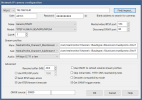
Go the the camera settings in BI and hit the find/inspect button and post the popup window here - that usually gives us a clue.
 
Oh thank god , Thanks wittaj...
And no, I didnt touch anything else in the camera for that very reason.
BTW I am on a demo version of BI but the Reolink never missed a beat.
After pulling my hair out all day I switched to two other Vikylin cameras and I cant get thier IVS to to send an onvif message either, just motion_a and I have all the motion and smart motion off on them as well.
If you were closer I would buy you a box of cold beverages :)

1773785817885.png
1773785893843.png
 
The only difference I see between my Z12E and yours is I have the buffer at 40MB and decoder compatibility mode checked and the 2nd ONVIF source has 00000 in it.

Maybe try that?

1773788171700.png
 
  • Like
Reactions: oldspyguy
Found the problem. or should i say Empiretechandy did and it was a simple newbie one.
No one asked "did you set up a custom rule to listen for the IVS rules name" I was using the default list of items and the rules/line crossing one. uugghhh :banghead: :idk:

Sorry guys for not catching that one, I will get better....

I did come across some great information during my search from wittaja like the IE access in windows 10/11 which will help with my hikvision clone cameras.
And there was a great post from him that clearly explained the interconection of motion detection, SMD, and IVS in these cameras but I cant seem to find it again but it was a light bulb moment regarding how IVS has human, vehicle, etc identification built in and you dont need the others at all. That would be a great sticky post for others.

Thanks again for your help. :iloveipct: I will get there......

How to enable native Internet Explorer in Windows 10 and 11:
  • Open Notepad:
    • Copy then paste the single line of code below into Notepad:
    • CreateObject("InternetExplorer.Application").Visible=true
    • Save as OpenIE.vbs
  • Make sure the the file name ends in .vbs not .txt, If it ends in .txt you must rename to .vbs
  • Create a shortcut to the above file and double-click it anytime you want native Internet Explorer.