EmpireTech aka Dahua LPR Settings

Be nice if the camera would reference it's local time and/or nearest big City or a gps plot or a zipcode to pull sunrise/sunset schedule from a global database or a north american database, from one of those Sunrise sunset websites.
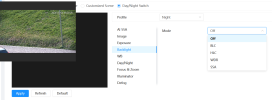
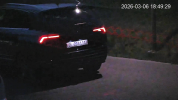
We gained over an hour of daylight in the last month and the DST is coming march 8th, so I will wait to adjust some of the cameras scheduled for sunrise sunset. The NVR sometimes adjusts correctly for DST but sometimes some of the camera's do not seem to follow along. So I have both timestamps on screen to see which cams act goofy.
 
Last edited:
Be nice if the camera would reference it's local time and/or nearest big City or a gps plot or a zipcode to pull sunrise/sunset schedule from a global database or a north american database, from one of those Sunrise sunset websites.
We gained over an hour of daylight in the last month and the DST is coming march 8th, so I will wait to adjust some of the cameras scheduled for sunrise sunset. The NVR sometimes adjusts correctly for DST but sometimes some of the camera's do not seem to follow along. So I have both timestamps on screen to see which cams act goofy.
While we're on the topic, it would be interesting to consider an extension to NTP, or perhaps some service that runs in parallel to it on the same server, so that a client device, e.g. a camera, can ask, "What is UTC, and what is our current offset including DST?"

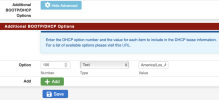
I run NTP on my pfense router, so all my cameras get their time from it. It's a bit insane that I need to manually set the DST offset on every single frickin' device on my network.
 
  • Like
Reactions: Flintstone61
yeah i will have to do that its difficult as im sure will have to use some help by having someone from the house park the car in middle, and then i will have to adjust with laptop at home.
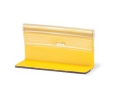
If you can't park a car for any useful length of time, and/or if you can't fiddle with the camera while your car is parked (e.g. no connectivity), one workaround is to use a few of these adhesive temporary traffic markers that they use in construction zones:

1771266106859.png
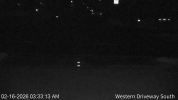
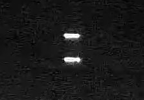
They're designed to reflect light back to its original source, no matter the direction, and they show up as a thin, bright strip when properly focused:

1771266242803.png

1771266284680.png
If possible, place two of them at least 6' apart, along the sight axis of your camera, "bracketing" the expected distance to target, to help dial in the focus.

It also helps if you turn 3D Noise Reduction up to 100% while you focus, but remember to set it back to where it was once you're done!
 
Is there a way to manage this in any way other than dragging the mouse and/or copying one month to other months within the same camera?

View attachment 238309

I found this table of sunrise/sunset time for Los Angeles:

View attachment 238310

If I could reformat that data into a CSV file or similar, plus or minus an offset, could I construct a script to push the desired Time Plan Settings to a camera via HTTP?

Ideally I'd want all 5 of my EmpireTech cameras to operate on the same schedule, and that's extremely cumbersome to do if I have to mouse around with 12 individual months on 5 different cameras, and try to get them all the same. And then if I want to change anything, like changing my offset from -60 minutes to -45 minutes or similar, I have to do it all over again, manually.

Even worse is the fact that it's whole-month only, and DST does not change on the first of the month. But I suppose that's an American problem (minus AZ and HI).
I miss that Dahua sunrise/sunset utility
 
I miss that Dahua sunrise/sunset utility
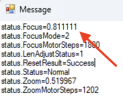
EmpireTech didn't blow up the API completely, because the sunrise/sunset utility will still read back the zoom/focus positions:

1771272088989.png
so there are bits and pieces that still work.

And it's open source, so if someone could snoop our browser traffic and reverse engineer those calls, someone might be able to fix it.
 
  • Like
Reactions: Arjun