Blue Iris Version 6 License Plate Custom Model

MikeLud1

IPCT Contributor
Apr 5, 2017
2,752
4,860
Brooklyn, NY
After using the built-in ALPR I found the model used to detect the license plate did not perform well at night. I trained a new plates.onnx model that performs well now during the day and at night. Below is the link to the new model. To use the new model save the model in folder C:\BlueIris\AI\models. Then after saving the model restart Blue Iris service.

Recommended min confidence setting
Day 80%
Night 85%

 
Thanks @MikeLud1 this is great! Should I use To confirm: DayPlate,NightPlate for this model like I was doing with your old YOLOv5 license-plate.onnx model?

Also, is this new model now included with BI's downloadable models? I went to copy it into my C:\BlueIris\AI\models directory and there was already a plates.onnx there that I overwrote.
 
Should I use To confirm: DayPlate,NightPlate for this model like I was doing with your old YOLOv5 license-plate.onnx model?
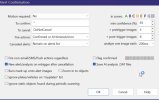
No, for a dedicated license plate camera the To confirm should be blank
Also, is this new model now included with BI's downloadable models?
No, I am going to let Ken know about this model so he can include it. The model that is include does not perform well at night
 
Thank you. This is a dedicated LPR with a narrow FOV, so I will give that a try! If I want that camera to only use your new plates.onnx model, how do I exclude the others?

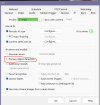
Ken said the "Primary object detection" checkbox should be unchecked in this case:
"The only time you don't want it checked is if you are strictly looking for faces or plates, too zoomed-in to find people or cars."
I didn't know what that option was for, and it's not explained anywhere in the help file, so I had to ask.
 
Last edited:
Thank you. This is a dedicated LPR with a narrow FOV, so I will give that a try! If I want that camera to only use your new plates.onnx model, how do I exclude the others?

Ken said the "Primary object detection" checkbox should be unchecked in this case:

I didn't know what that option was for, and it's not explained anywhere in the help file, so I had to ask.
Set it like the below

1767126380091.png
 
  • Like
Reactions: aesterling
@MikeLud1 is this correct too?

I’m getting a bunch of fake confirmations where BI is selecting the incorrect plate even though there are 2/3 later confirmations which have the correct plate with a higher confidence
 

Attachments

  • IMG_4740.jpeg
    IMG_4740.jpeg
    91.4 KB · Views: 16
The new model seems to be working great so far. I have a dedicated LPR camera at my gate and use the license plates to automatically open the gate. The new model recognized the plate but the only way I could get the trigger event was to add "license-plate" in to the to confirm, once I did that the proper events started to trigger in BL again and I now see recognized plates in the confirmed alerts. Thanks for the help with this and hopefully this helps others that are triggering events based on LPR.
 
  • Like
Reactions: Flintstone61
I don't even see a path inside C:\BlueIris that has \AI\models ( edit) nevermind found it\created it with the onnx download.
 
Last edited:
It’s picking up tail lights at plates for me

Happening a lot for me for some reason

Would you happen to have the .pt for this model? Maybe I can add some of my night shots into it. Thanks Mike
 
Last edited:
It’s picking up tail lights at plates for me

Happening a lot for me for some reason

Would you happen to have the .pt for this model? Maybe I can add some of my night shots into it. Thanks Mike
View attachment 236374
I just uploaded it to the below Git Hub repo

 
Thank you Mike. I did however it's still reporting both plates to @algertc ALPR Database. I know its a bug and I'm sure it will be fixed eventually.
Its been like 98% good for me, just at night it sometimes picks up the headlights/tail lights
 
Thank you Mike. I did however it's still reporting both plates to @algertc ALPR Database. I know its a bug and I'm sure it will be fixed eventually.
Its been like 98% good for me, just at night it sometimes picks up the headlights/tail lights
Maybe this weekend I will try making some changes to the training dataset and retrain the model to hopefully eliminate the detections of headlights & tail lights