This LPR thing is up and down with each new version..
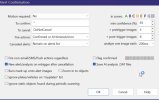
I was getting this and if I put the to confirm as license-plate everything would work.
T-1002 msec [278 msec]
[
{
"api":"alpr",
"found":{
"success":true,
"error":null,
"message":"",
"predictions":[
{
"category":2,
"label":"license-plate",
"plate":"AABBCCDD",
"confidence":0.972608268260956,
"x_min":1674,
"x_max":1799,
"y_min":113,
"y_max":253}
]
,
"count":1,
"moduleId":"plates.onnx",
"executionProvider":"ONNXRunTime: 1 (Microsoft Basic Render Driver)",
"analysisRoundTripMs":259}
}
]
With the latest update I now get this:
T+599 msec [258 msec]
[
{
"api":"alpr",
"found":{
"success":true,
"error":null,
"message":"",
"predictions":[
{
"category":2,
"label":"AABBCCDD",
"confidence":0.9682856798172,
"x_min":1366,
"x_max":1583,
"y_min":421,
"y_max":578,
"plate":"AABBCCDD"}
]
,
"count":1,
"moduleId":"plates.onnx",
"executionProvider":"ONNXRunTime: 1 (Microsoft Basic Render Driver)",
"analysisRoundTripMs":164}
}
]
The plate is the label and the to confirm can't be defined with an always changing plate number as the label. No triggers can happen....