Blue Iris in a VM.

I haven't yet checked the power settings in Windows - so I am unsure what power profile it was running in the above test.

I suppose this could help reduce the consumption a little, but I am not familiar with power management settings in Proxmox / Debian, so not sure if I would be able to make use of this if running PVE anyway...
 
And sorry to write so many posts, but another thing I just thought of - what about swapping the Xeon E5-1630 in the box currently for something more moderate / efficient, with the same socket?

For example maybe a Xeon E5-2630L v3 - TDP only 55w, slower clock speed than the E5-1630, but 4 more cores - and I understand BI can make use of multiple cores, to might not be a bad thing... The 2630's seem to be going quite cheap online. Comparison.
 
Yes Blue Iris can use multiple cores pretty effectively but you lose quite a lot of single thread performance going to that lower TDP part and that will likely make certain tasks like web streaming 4K video suffer -- BI is already not great at that if you aren't using direct-to-wire.

Check the difference in power consumption of the E5-1630 at idle versus under a significant load (e.g. running a CPU benchmark like Prime95). You can also run hwinfo to see an estimate of the amount of power certain components are using (CPU, GPU in particular). That should tell you more about how much of the idle load is what.

You can still build around an N305 for example and have 6 SATA slots, but expandability is severely limited, only one DDR5 SODIMM slot for example.

You are probably better off going with a more powerful desktop platform like an Intel Core Ultra 5 225 or Ryzen 5 9600X. Comparison: Intel Xeon E5-1630 v3 vs i3-N305 vs Xeon E5-2630L v3 vs Ultra 5 225 vs AMD Ryzen 5 9600X [cpubenchmark.net] by PassMark Software
Then you get vastly higher single threaded performance and dual channel memory and a PCI-E slot or two that could run a GPU, faster network adapter, etc.

And we can't forget what has happened to RAM prices in the last few months, which certainly makes older server systems look more favorable. Just buying 32-64 GB of RAM could take years to pay for itself in energy savings from using a newer platform.
 
Thanks again for the helpful responses!

I left the E5-1630 machine running a while, and then came back to check the power consumption (I wondered if before Windows may have been doing some post-startup 'stuff'). Anyway it had certainly stabilized to about 80-85w at the PDU, with the CPU at idle, 2 SSD's powered up (no HDD, I was mistaken), and the Nvidia Quadro 4000 running at idle.

I installed Open Hardware Monitor, and CPU-Z, and inspected some of the more detailed power stats, at idle and then at 100% with a CPU-Z stress test running. The strange thing is, at idle, OHM was only reporting about 8w for the CPU Package, which seems quite low - where is all that 80w being consumed?

I did notice (only remembered to take a photo when the stress test was running, not at idle), that OHM seems to fail to report any value for CPU Cores - so I do wonder if this could be what is consuming the power, and OHM is just failing to read properly?

20251210_160637.jpg
** Notice the 0.0W for CPU Cores **

I think the system was drawing about 150w measured at the PDU when under full load, from memory.

You are probably better off going with a more powerful desktop platform like an Intel Core Ultra 5 225 or Ryzen 5 9600X. Comparison: Intel Xeon E5-1630 v3 vs i3-N305 vs Xeon E5-2630L v3 vs Ultra 5 225 vs AMD Ryzen 5 9600X [cpubenchmark.net] by PassMark Software
Then you get vastly higher single threaded performance and dual channel memory and a PCI-E slot or two that could run a GPU, faster network adapter, etc.
The other thing to consider, in addition to @bp2008 comment about RAM prices, is that I got this system free. Whilst the above mentioned desktop-style systems would likely be better, by the time I have paid for a system like this, vs using this surplus server I got for nothing, it may be worth using the less efficient system...

And if I could run some other VM's on the same hardware in addition to BI, I may be able to make the system pay for itself in other ways. Including replacing some of the other bare metal systems I have running at the moment, somewhat cancelling out the increased power cost.

 
Right by the time you buy something more efficient and calculate it out it might be years before you actually get the $$ back from saved electricity usage. I'm in the same boat. My sans is costing me ~$25-30 a month in electricity, but if I bought bigger drives for my server I could get rid of the sans. But even buying used drives it would be take me a year to recoup the cost at $25/ month. The return is not really worth the hassle.
 
Thinking of deploying a new BI machine, and wondering whether to run in a VM or not.

Blue Iris, as a Windows application, runs as well in a VM as on bare metal, provided you're comparing like with like. This means providing the same amount of resources, such as CPU power and RAM.
Many are running BI on Proxmox, I am running it on XCP-ng.

More complex it gets when you want to use a GPU or AI accelerator by PCI passthrough or USB passthrough. Here a generic answer is difficult.
If you do so you also will loose some of functionalities like snapshots, live migration or online backup, depending on the system you are using.

I did install a quick Windows Server Eval copy in a tiny VM on a fairly low-spec Proxmox server
Windows Server is a good choice for a headless system to run BI as service in, if you can get your hands on a licence.
 
Many are running BI on Proxmox, I am running it on XCP-ng.
Yes, I have the physical host now, so I think I will try using Proxmox, as I have used it in the past and liked it.

More complex it gets when you want to use a GPU or AI accelerator by PCI passthrough or USB passthrough. Here a generic answer is difficult.
If you do so you also will loose some of functionalities like snapshots, live migration or online backup, depending on the system you are using
I am interested in this comment. I have not looked into doing this sort of thing with Proxmox much, only enough to know it is in theory possible.

Currently my idea was to passthrough a GPU to the BI VM, A) for AI tasks, and B) so I can get a genuine local video output from the BI VM if needed. I was also thinking about putting some large disks in the system, and simply doing a passthrough to BI VM for video storage, instead of creating large virtual disks on the physical disk(s) for BI - since these disks will be dedicated to BI it seemed silly to do that. But maybe passthrough will cause more problems than it solves?

Windows Server is a good choice for a headless system to run BI as service in, if you can get your hands on a licence.
Quite. Currently running the Eval version on my test system, I will certainly look for a license, as would prefer Windows Server, but if I cannot find one that isn't hugely expensive, I will have to settle for probably Windows 10 Pro.

The other thing is I have been having some issues accessing the IPCT store. I sent a message to IPCT support a few days ago, but have not had any response as of yet. Is this normal?
 
I am interested in this comment. I have not looked into doing this sort of thing with Proxmox much, only enough to know it is in theory possible.

Currently my idea was to passthrough a GPU to the BI VM, A) for AI tasks, and B) so I can get a genuine local video output from the BI VM if needed.

This comment is not only related to BI. PCI passthrough is a more complex topic in the context of virtualisation. It requires the features to be supported by the involved hardware. This makes it difficult to make specific recommendations for your environment. However, since you already have the necessary hardware, you can simply try it out.

Whether you need a GPU also depends on your specific use case. My server runs on an old CPU without a built-in GPU, and it does not have a GPU PCI card. But I am fine with this. I don't do any significant transcoding work. I just store the data as it comes from the camera. I don't have a local screen connected. To access BI, I use either the web interface or a Remote Desktop connection. I don't use AI in BI. I use motion and object detection from the camera. All of this works without a GPU.

I was also thinking about putting some large disks in the system, and simply doing a passthrough to BI VM for video storage, instead of creating large virtual disks on the physical disk(s) for BI - since these disks will be dedicated to BI it seemed silly to do that. But maybe passthrough will cause more problems than it solves?

Both will have the same pros and cons as GPU passthrough, such as: You can take a snapshot and backup of the VM.
The only advantage of using disk passthrough is that you can easily connect your disk to any other Windows PC to access the data if your system breaks down.

To avoid write errors of BI when other VMs keep the disk busy, I recommend using a dedicated disk for BI video storage.
 
My recommendation is to not try to do any GPU or pci pass through. It limits the hypervisor choices and adds a lot of complexity that isnt needed. You also generally cant do any snapshots of the vms also when using anything pass-through, which is very nice to have for those oh crap moments after installing an update. RDP and BI UI3 are plenty for accessing BI. If you are doing any AI like code project, put it on a separate machine. Even for that a GPU is not necessary.
 
  • Like
Reactions: TobiasF
My recommendation is to not try to do any GPU or pci pass through. It limits the hypervisor choices and adds a lot of complexity that isnt needed.
I have decided that the first port of call for hypervisor is going to be Proxmox. Point taken about the possible added complexity though.

Whether you need a GPU also depends on your specific use case. My server runs on an old CPU without a built-in GPU, and it does not have a GPU PCI card. But I am fine with this. I don't do any significant transcoding work. I just store the data as it comes from the camera. I don't have a local screen connected. To access BI, I use either the web interface or a Remote Desktop connection. I don't use AI in BI. I use motion and object detection from the camera. All of this works without a GPU.
As you have stated, is seems in many cases the GPU is not required for a good BI system. However, since I already have a GPU in my system (which was effectively free), I couldn't help but wondering if it would be good to try it with BI, or at least the AI which I may run on BI (possibly for any cameras that don't support it on-camera).

Both will have the same pros and cons as GPU passthrough, such as: You can take a snapshot and backup of the VM.
The only advantage of using disk passthrough is that you can easily connect your disk to any other Windows PC to access the data if your system breaks down.

To avoid write errors of BI when other VMs keep the disk busy, I recommend using a dedicated disk for BI video storage.
I will certainly be using a dedicated disk (perhaps 2) for the BI video storage. Its just a case of whether to pass through the disk, or to create a virtual disk on the physical disk (only the BI Vdisks on the disk, so it is BI only).

I am not totally clear on the implications of passing hardware through on snapshots etc. I have not yet looked into this. If I passed a disk through, does it mean I cannot snapshot the whole VM, or just the disk that is passed through?

For example, I am unlikely to want to snapshot the video disks - they are large (so snapshots will take up another large amount of storage), and the data on them is mostly unimportant - and will soon be overwritten by BI anyway. But the OS disk (Windows, BI, configs, etc), which will be a Virtual Disk on the physical SSD, is another case, and I suppose it would be good to be able to snapshot this.

Thanks for the helpful information.
 
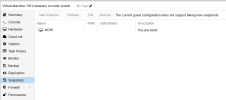
I can confirm in Proxmox passing through any physical disks does appear to prevent taking normal snapshots of the VM even if the VM's boot disk is a normal virtual disk. Supposedly you may still be able to snapshot the virtual boot disk via command line but I have not confirmed that.

If you ask me, losing snapshot-ability for a Blue Iris VM is not of much consequence. I've never missed it.

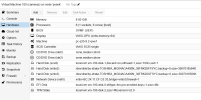
It might have some impact on backup-ability via proxmox backup server. Of that I am just not sure. Below are screenshots of the only VM I have configured to run Blue Iris in proxmox with disks passed through, and I don't use proxmox backup server there.


1765645709323.png

1765645720831.png
 
I believe all of the common hypervisors out there can't do snapshots if hardware is passed through. I am using pass through for a couple of physical disks in my bi vm and can't utilize snapshots. For me this is not a deal breaker as BI is so easy to stand up and get going if the VM blew up or if one of the physical disks crapped out and I lost some video footage, but everyone's use case is different. I do also have the main VM files and os install running on a raid 1 NVME mirror for redundancy.
 
Good to have some real experience from people running passthrough-ed disks. I suppose the question is, what is the advantage of passing through the disks?

Why have you passed through disks? For the same reasons I have mentioned above?
 
Passthrough slightly improves efficiency. There is less overhead for read and write operations, which results in theoretically higher speed. And also if you need to move the disk to another machine it will just work. Whereas if you use a virtual disk it will not be readable in another machine without jumping through hoops.
 
I can confirm in Proxmox passing through any physical disks does appear to prevent taking normal snapshots of the VM even if the VM's boot disk is a normal virtual disk. Supposedly you may still be able to snapshot the virtual boot disk via command line but I have not confirmed that.

If you ask me, losing snapshot-ability for a Blue Iris VM is not of much consequence. I've never missed it.

It might have some impact on backup-ability via proxmox backup server. Of that I am just not sure. Below are screenshots of the only VM I have configured to run Blue Iris in proxmox with disks passed through, and I don't use proxmox backup server there.


View attachment 234336

View attachment 234337
How are you determining it’s not working? I’ve been doing daily backups of my BI VM for years in Proxmox. The virtual disk of the BI vm that holds the OS is on a SSD but I pass through several hard drives for BI to actually write recordings to. I don’t backup those. I only backup the root BI OS VM.

Edit: Oh, I see your screenshot now, I’ve never attempted a manual snapshot like that. I do the full backup of the VM every day.
 
Passthrough slightly improves efficiency. There is less overhead for read and write operations, which results in theoretically higher speed. And also if you need to move the disk to another machine it will just work. Whereas if you use a virtual disk it will not be readable in another machine without jumping through hoops.
Makes sense. For video storage, it's probably simpler just to pass through and run the disks in a normal Windows format, thus eleminating another layer.
How are you determining it’s not working? I’ve been doing daily backups of my BI VM for years in Proxmox. The virtual disk of the BI vm that holds the OS is on a SSD but I pass through several hard drives for BI to actually write recordings to. I don’t backup those. I only backup the root BI OS VM.
This is pretty much exactly the setup I am working to achieve. Interesting you have it working.

I am however unfamiliar with the exact difference between "Snapshots" and the "Full backup of the VM daily"...

EDIT: Just read some docs regarding the above, so now understand the main differences. If passing through hardware prevents snapshots, but allows backups, I can certainly live with that for a BI VM. What I did notice is that some of the backup methods require some downtime to get the VM in a consistent state. How have you been handling that? Does your VM go down for a period each day while the backup starts? Or do you use a method that doesn't require downtime?
 
Last edited:
I am however unfamiliar with the exact difference between "Snapshots" and the "Full backup of the VM daily"...

Let me explain in simple words. This is not BI or Proxmox specific.
  • A backup is a full copy stored at a different location (disk, server). This allows a recovery if you system is broken incl. full disk lost.
    Each backup uses the size of the vm and backup time is slow. (compression and deduplication taken out for now)
  • A snapshot is frozen state on the same disk. This does not protect from a broken hdd. It helps to recover a previous state, e.g. before starting an update.
    A snapshot uses minimum of space.
  • A incremental backup combines both. It is a full backup + a copy of a snapshot each time.
    This is fast and saves storage space if you want to keep multiple versions of your backups to be able to go back to different times.
Depending on the backup software, for incremental backups the snapshot function of the hypervisor is needed. This is not possible with pasthrought.
 
Thank you, I understand. I am familiar with using incremental backups in general, just not in PVE specifically.

@biggen, do you shutdown your VM when running backups?
 
Thank you, I understand. I am familiar with using incremental backups in general, just not in PVE specifically.

@biggen, do you shutdown your VM when running backups?
No. I exclude the backup of the passthrough drives. Proxmox then backs up the virtual disk of the BI VM only. No downtime required.