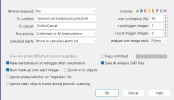
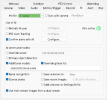
Thought I would start a new thread so not to plug up the bot thread. I am getting these results running these settings on my demo.
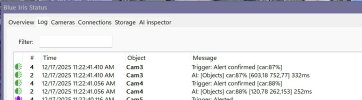
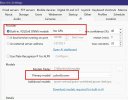
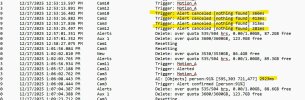
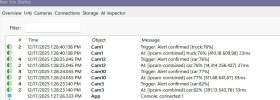

The issue is the JSON format from v6.0.1, the api is just objects, not alpr. This is something that Ken will need to fix because @algertc’s alpr database app only recognizes the api alpr or @algertc’s needs to look for the label plate and use this for the plate.Has anyone figured out what the alert post/payload needs to be to in this new version for @algertc’s alpr database app?
LPR.20251217_211126Z.253663.3-5.dat

[
    {
        "api":"objects",
        "found":{
            "success":true,
            "error":null,
            "message":"",
            "predictions":[
                {
                    "category":"vehicle",
                    "label":"truck",
                    "confidence":0.802895486354828,
                    "x_min":5,
                    "x_max":1335,
                    "y_min":1,
                    "y_max":787,
                    "plate":"XMW6099"}
                ,
                {
                    "category":"vehicle",
                    "label":"XMW6099",
                    "confidence":0.964644551277161,
                    "x_min":1167,
                    "x_max":1277,
                    "y_min":504,
                    "y_max":578}
                ,
                {
                    "category":"vehicle",
                    "label":"car",
                    "confidence":0.787121057510376,
                    "x_min":966,
                    "x_max":1917,
                    "y_min":168,
                    "y_max":912,
                    "plate":"XMW6099"}
                ,
                {
                    "category":"vehicle",
                    "label":"XMW6099",
                    "confidence":0.95627498626709,
                    "x_min":1165,
                    "x_max":1275,
                    "y_min":502,
                    "y_max":580}
                ]
            ,
            "count":4,
            "moduleId":"",
            "executionProvider":"ONNXRunTime",
            "analysisRoundTripMs":1244}
        }
]T+300 msec [22430 msec]
[
{
"api":"objects",
"found":{
"message":"Found car,
car",
"count":2,
"predictions":[
{
"label":"car",
"confidence":0.9540823,
"y_min":190,
"x_min":410,
"y_max":923,
"x_max":1918}
,
{
"label":"car",
"confidence":0.8068814,
"y_min":1,
"x_min":2,
"y_max":770,
"x_max":1384}
]
,
"inferenceDevice":"GPU:0",
"inferenceMs":2124,
"processMs":2124,
"analysisRoundTripMs":6736,
"success":true,
"moduleName":"ObjectDetectionYOLO11Net",
"moduleId":"ObjectDetectionYOLO11Net",
"command":"detect",
"requestId":"b5fd2c86-7beb-4f53-b532-b468a36f2d4c",
"processedBy":"localhost",
"timestampUTC":"Wed,
17 Dec 2025 21:13:58 GMT"}
}
,
{
"api":"alpr",
"found":{
"message":"Found 1 license plate(s): LP4634",
"count":1,
"predictions":[
{
"confidence":0.9014773,
"is_day_plate":true,
"label":"LP4634",
"plate":"LP4634",
"x_min":563,
"y_min":474,
"x_max":706,
"y_max":580,
"top_plates":[
{
"plate":"LP74634",
"confidence":0.9014773}
]
,
"corners":[
[
589.8317,
494.9086]
,
[
687.16003,
503.5963]
,
[
681.8087,
557.60144]
,
[
584.1287,
547.7939]
]
,
"track_id":4103,
"speed_mph":18.143211,
"tracking_frames":1}
]
,
"inferenceDevice":"GPU:0",
"inferenceMs":288,
"processMs":506,
"analysisRoundTripMs":526,
"success":true,
"moduleName":"ALPRYOLO11NET",
"moduleId":"ALPRYOLO11NET",
"command":"alpr",
"requestId":"2ad0bb71-790a-48ff-b82c-458cc87f7d8c",
"processedBy":"localhost",
"timestampUTC":"Wed,
17 Dec 2025 21:13:58 GMT"}
}
]I sent an email to Ken and he found the issue. He said it will likely be fixed in the next release (6.0.1.2).The issue is the JSON format from v6.0.1, the api is just objects, not alpr. This is something that Ken will need to fix because @algertc’s alpr database app only recognizes the api alpr or @algertc’s needs to look for the label plate and use this for the plate.
6.0.1.3 was just released and the JSON format issues are resolved.I updated to 6.0.1.2 but it didn't fix the issue. I sent another email to support.

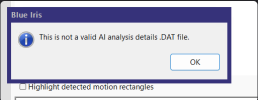
I was having the same issue and Ken told me that you can't open a dat created by 6.0.1.2 in anything earlier because the format has changed.I've installed v 6.0.1.2 and can't analyse dat files anymore. I get an error:
View attachment 234613
this seems to be related to the dat file itself, as I can analyse v6.0.0.1 dat files correctly.
Furthermore, is there a way to fine-tune ALPR with parameters like MikeLud's module with the internal ALPR? I was able to achieve very good results with CPAI module only after some fine tuning.
Also, parameter &PLATE in alert actions is empty, even if the plate has been found.
thank you!

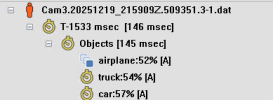
Thought I would try it quick on my main BI, after many attempts and restarts, I never could get it to work with my GPU Nvidia RTX A2000, it just would always return nothing found. I then just tried "NO GPU" and I did manage to get it to detect, but terrible time.
NO GPU:
View attachment 234485
Back to 6.0.0.1 and using GPU:
Finally got mine to work by stopping the CPAI service. See this thread:My Nvidia GPU has the same results, confirms nothing at all. CPU works fine. Switched back to CPAI for now. Tested using version 6.0.1.2 / 6.0.1.3 / 6.0.1.4
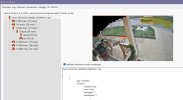
Finally got mine to work by stopping the CPAI service. See this thread:
Ok, I went in and manually stopped the CPAI service and then went for the BI yolo8. I am usinf the m size model and it is working but seems to not be as acurate. Seems to be working now that I killed the CPAI service.
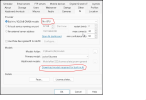
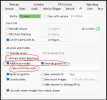
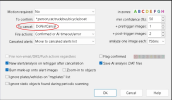
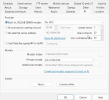
Post screenshots of your main and license plate camera AI settingsAnyone know how to get license plate working on the built in AI? I had it working with codeproject but doesnt seem to be working with the internal one.
Thank you MikeLud. Im pretty sure that is where my issue lies. Here are some screenshotsPost screenshots of your main and license plate camera AI settings
I got it working Mike! thank you for your help!Post screenshots of your main and license plate camera AI settings
The below change should fix it. One recommended change is to clone this camera and use the Clone camera just for license plate detection and the Clone Mater camera for object detection.Thank you MikeLud. Im pretty sure that is where my issue lies. Here are some screenshots