- Aug 9, 2017
- 27
- 3
Hi,
I hope someone can help me. I just bought BI 6 and it connected with my HQCam and HIKVision cameras OK. HIKVision was used before on the trial version of BI some time ago and it picked up the old configuration.
I have a problem with the HQCam though. I can't get it to record after any motion. It has motion detection set and records after a manual alert but doesnt want to trigger with real motion.
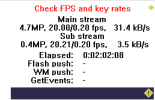
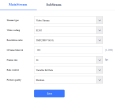
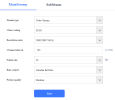
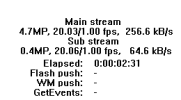
I am seeing 'Check FPS and key rates' in General/Status. I've set the max rate in Video to the 20FPS that the camera setup says it has. Not sure if this is a factor?
I know the camera produces alerts OK as it worked fine on Agent DVR. HIKVision works fine.
Any ideas what I need to do here?
PC is ancient as am I: Intel(R) Core(TM) i5-4590S CPU @ 3.00GHz, 3001 Mhz, 4 Core(s), 4 Logical Processor(s)
I hope someone can help me. I just bought BI 6 and it connected with my HQCam and HIKVision cameras OK. HIKVision was used before on the trial version of BI some time ago and it picked up the old configuration.
I have a problem with the HQCam though. I can't get it to record after any motion. It has motion detection set and records after a manual alert but doesnt want to trigger with real motion.
I am seeing 'Check FPS and key rates' in General/Status. I've set the max rate in Video to the 20FPS that the camera setup says it has. Not sure if this is a factor?
I know the camera produces alerts OK as it worked fine on Agent DVR. HIKVision works fine.
Any ideas what I need to do here?
PC is ancient as am I: Intel(R) Core(TM) i5-4590S CPU @ 3.00GHz, 3001 Mhz, 4 Core(s), 4 Logical Processor(s)