Add Sunrise Sunset to Time Plan Settings

CamCrazy

Getting comfortable
Aug 23, 2017
899
753
UK
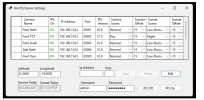
It has been a few weeks since I began using the newer cameras with the Time Plan Settings schedule. Previously a user (still am for older cams) of Dahua Sunrise Sunset application, this worked flawlessly for years now, even setting focus on ALPR cams.

Now I know it has been raised before by others, but am I surely not alone in wondering why Dahua have not yet implemented Sunrise/Sunset times into the Time Plan Settings. Assuming other feel the same, what do we need to do for Dahua to take notice, I doubt this can be that hard to implement. I did flag it with @EMPIRETECANDY but at this point I would love a direct line to Dahua just to offer some 'feedback' for this and the new Pro camera range.

Currently testing the api commands via Blue Iris schedule/trigger but this is not only painful, relatively speaking, but simply another unnecessary link in the chain.

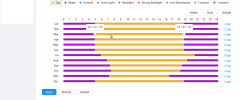
The Time Plan Settings is far too basic, the transition windows has to be very large to cover each month. Often you simply require a 15-30 delay or advance for the switch from day to night. Those who think that leaving the cameras in one profile for day and night, need not apply to this one :thumb:

**Update - this could be location dependant to some degree, so more important for those I guess who have a sunrise sunset window which can vary up to 1 hour from beginning to end of the month.
 
Last edited:
To me it’s a losing game and not worth the effort.

Some observations
  • adjusting camera settings specific to dawn or dusk is usually a poor choice. More important to adjust for the 11-12 hours of daylight/night
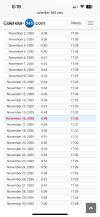
  • an example for Orlando for Nov shows a max of 21 min diff in sunrise and about 15 for sunset
IMG_0053.png
- I see little benefit for adjusting for 6:40 vs 6:50am. So I’ll typically set night profile to end 6:45am
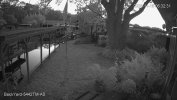
Currently there is light at 6:27am as I type this but not enough for color daytime settings. Official sunrise is 20 minutes from now
  • overcast or bright clear mornings/evenings mess with the time anyway
  • one could setup a 3rd or even 4th profile to allow for specific dawn/dusk settings for roughly 20-30 min but…
  • Each camera location/scene is different anyway

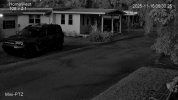
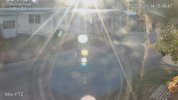
IMG_0054.jpeg IMG_0055.jpeg
1763292912739.jpeg
 
I added to original post that this is more of a concern when the sunrise/sunset variation window can be up to 1 hour difference for any given month.
 
  • Like
Reactions: bigredfish
LOL - it has been asked for a LONG TIME for this, longer than you have been a member here. But their primary customer is a business with tons of light and don't need sunrise/sunset capabilities as they can get by with one profile.

Maybe one day the general public will be their primary business and they will listen to us, but if this stuff keeps getting banned in the USA, that will hamper moving in that direction.

And then the whole thing about it being 30-40 year old firmware that nobody wants to touch adds more complexity.

And it sucks they changed the APIs on the new GUI because the utility created by a member here works great for sunrise/sunset but it only works on older GUIs.

Now on the flip side, for their cameras on the new GUI that do have a day/night radio button option, it does FINALLY work the way we expect it to and will switch the entire profile (not just to color or B/W on a single profile like the older cameras) and that can take care of this issue.

Sadly not every new GUI includes that button, which means either using the 12 month schedule or figuring out the painstaking API in BI.

Personally, I set the camera up for the middle of the month and accept that maybe the image doesn't look perfect 15 minutes per day, but it still serves the primary purpose of being able to ID a perp, so I live with it.

YMMV.
 
  • Like
Reactions: Flintstone61
I use a script to populate all my cameras time plan settings that run version 5.

It is a vb.net script that runs inside homeseer. It works great and I update my plans every night.

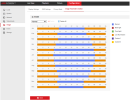
For it to work, you must manually populate the camera's Time Plan Settings so there are night - day - night hours each month. See pic. Then the script can adjust as needed.

If you know coding, you can adjust to your needs.

time plan settings.png
 

Attachments


Yes indeed, I have been using a similar program called Dahua Sunrise/Sunset, but more basic, although it did allow the focus and zoom to also be set manually, this is great for ALPR if you get any focus shift from day to night. I am mourning the loss of this on the new cameras. We need something similar to the above for Dahua, would be very nice indeed :love: If it can also have focus and zoom settings then fantastic, but I am greedy and would take basic function as above.

I just realised you are the creator of this solution, great work and no doubt many grateful users on the Hikvision platform :clap:
 
Last edited:
  • Like
Reactions: johnfitz
Last edited:
Any guidance on targeting best times to go from Day to Night given fluctuation in sunrise / sunset and limitations of the Time Plan GUI interface?
  • Night starts x before or after sunset?
  • Day starts x before or after sunrise?
 
Last edited:
Any guidance on targeting best times to go from Day to Night given fluctuation in sunrise / sunset?
  • Night starts x before or after sunset?
  • Day starts x before or after sunrise?

Most will switch to night 30min before sunset and switch to day 30min after sunrise.

But lots of variables come into play - which direction are cameras facing, for example, cameras facing east will see the light before cameras on the west, etc.

Are there trees or hills in the way that could delay sunrise/sunset.

I'd suggest start at 30min and then adjust based on what your field of view dictates. Mine all over the place from right at sunrise/sunset up to an hour difference.
 
  • Like
Reactions: bigredfish
Most will switch to night 30min before sunset and switch to day 30min after sunrise.

But lots of variables come into play - which direction are cameras facing, for example, cameras facing east will see the light before cameras on the west, etc.

Are there trees or hills in the way that could delay sunrise/sunset.

I'd suggest start at 30min and then adjust based on what your field of view dictates. Mine all over the place from right at sunrise/sunset up to an hour difference.
(Cam1) - faces due east (so would get first sunrise with no obstructions, sunset blocked by house)
(Cam2) - faces due west (sunrise blocked by house, so would get last bit of sunset with some trees)
(Cam3) - faces northwest (blocked by house sunrise so little bit of sunset)
(Cam4) - faces northwest (blocked by house sunrise, so little bit of sunset)
(Cam5) - faces northwest (sunset blocked by house, so little bit of sunrise early)
(Cam6) - faces due west (sunrise no blocked behind it, would get last bit of sunset)
 
Do you have a walk through on how to set this up please?
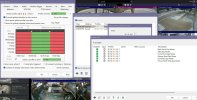
I have talked about using the "action set" feature that is under each cameras/settings/schedule/events schedule. Here is how mine is set up:

Screenshot 2025-12-28 160623.jpg

You can read how in Blueiris's forum here:


Note: when you put string in the web request use these for ver4 dahua gui

user:[email protected]/cgi-bin/configManager.cgi?action=setConfig&VideoInMode[0].Config[0]=0 (day)

user:[email protected]/cgi-bin/configManager.cgi?action=setConfig&VideoInMode[0].Config[0]=1 (night)

and use these strings for the new ver5 dahua gui:

user:[email protected]/cgi-bin/configManager.cgi?action=setConfig&VideoInMode[0].ConfigEx=Day&VideoInMode[0].Mode=4 (day)

user:[email protected]/cgi-bin/configManager.cgi?action=setConfig&VideoInMode[0].ConfigEx=Night&VideoInMode[0].Mode=4 ( night)


Its not a easy fast setup, but it works perfect :)
 
I have talked about using the "action set" feature that is under each cameras/settings/schedule/events schedule. Here is how mine is set up:

View attachment 235220

You can read how in Blueiris's forum here:


Note: when you put string in the web request use these for ver4 dahua gui

user:[email protected]/cgi-bin/configManager.cgi?action=setConfig&VideoInMode[0].Config[0]=0 (day)

user:[email protected]/cgi-bin/configManager.cgi?action=setConfig&VideoInMode[0].Config[0]=1 (night)

and use these strings for the new ver5 dahua gui:

user:[email protected]/cgi-bin/configManager.cgi?action=setConfig&VideoInMode[0].ConfigEx=Day&VideoInMode[0].Mode=4 (day)

user:[email protected]/cgi-bin/configManager.cgi?action=setConfig&VideoInMode[0].ConfigEx=Night&VideoInMode[0].Mode=4 ( night)


Its not a easy fast setup, but it works perfect :)
Found the thread in the Blue Iris forum......thanks!!
 
@bp20089 has instructions for something like this in his post where he said he has stopped using his sunrise/sunset app.