1/1.2" 8MP Varifocal

Frankly I use Smartpss 99% of the time. The AI search is handy if you have a buttload of events and need to see say 50 white cars to find one “bad guy white car” when you have no rough timeframe.

But for day to day, I just zip through my IVS events on SmartPSS each morning over coffee to see what tripped overnight.

If I need to search for a specific event that happened at 3:34pm involving a vehicle crash, I don’t need to look through 6 cameras that face the canal and backyard.
Pretty easy to narrow it down. When you have an idea what you’re looking for and a rough timeframe.
 
Last edited:
  • Like
Reactions: JDreaming
You’ll find over time you lose the need/urge to know about every vehicle/bycycle/human/possum that trips an event everyday.

I have 3 cameras that are critical entry cams. I get real time alerts and an email from them.
On the other 9 cameras, if I need to see something I can always go look. If it happened more than a week ago, I probably don’t give a shit.
 
  • Like
Reactions: JDreaming
This is a N54B3P12 on the latest firmware available to it. Maybe that one doesn't have export capabilities. I've tried the browsers, and I usually just use Pale Moon.
 
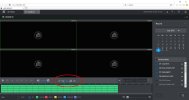
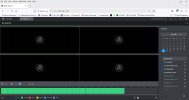
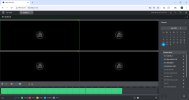
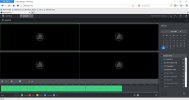
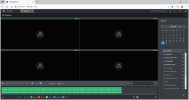
I don't know the US model #s but if its the older dark gray GUI there are a few tabs where you will NOT see all of the controls without IE or Edge in IE mode. FYI

Playback/Search tab is one
IE.jpg


Firefox, Chrome, Pale Moon, then Edge in IE mode
firefox.jpg chrome.jpg palemoon.jpgIEMode.jpg
 
  • Like
Reactions: JDreaming
I'm just tired of fighting with the Dahua stuff. Use this browser for this, plugin for this, this app on this phone for some things, this app for that. I've had 20 something cameras for these last 11 years that I search through for things like, "we had a customer pick up something last Wednesday or Thursday in a brown SUV, probably at this yard next to this warehouse. Can you send us footage of that?" Or, "we need to see how many bags of this was loaded on a delivery truck last Tuesday. It was probably loaded outside somewhere in the middle of yard 2. And it was covered with a tarp after". I'm ready for something easier. When I saw what I could do with Protect from both the App and the browser, I was excited. ...now, if only I can get better night vision, for when someone breaks in to steal catalytic converters from trucks parked out in a lot.
 
I know I'm polluting the thread, but here's a 4K camera that sees in the dark and doesn't need any wires pulled for it. Definitely fulfills the easy button!

- Solar Camera Outdoor Wireless
-4K Security Camera with Solar Panel
-Face Recognition AI
-Nighttime That's as Bright as Day
-Captures exceptionally detailed surveillance footage in every frame
-Offering day-like image clarity even in ultra-low light conditions
-Dual motion detection system, combining radar and passive infrared (PIR)
-Aperture: F1.0
-Field of View: 135°

Even if all of this were only half true, aren't we wasting our time with Dahua gear?

eufy Security eufyCam S3 Pro 4-Cam Kit, Solar Camera Outdoor Wireless, MaxColor Night Vision, 4K Security Camera with Solar Panel, Face Recognition AI, Expandable Local Storage, No Monthly Fee - Newegg.com
 
It seems all we're getting out of China lately is cheap, noisy sensors, and all of the manufacturers are trying to offset it with AI, NR, etc.
Putting lipstick on a Pig

The problem is big names sell to consumers (look at celebrity brands), and AI is the biggest name atm. I'm guessing manufacturers see bigger profits on less capable sensors which are then "boosted" by AI.

There's no getting away from the fact size wins. No better example still than the Sony VB770 from 2016. 10 yrs and still no other camera comes close:

 
Like this stuff. I'm just tired of dealing with it. I do want the easy button at this point.

View attachment 244967
That - I agree with you on that part - this plugin nonsense has to stop, another reason why I threw UniFi Protect into my setup to cut out the fluff and skip the half-baked features of Dahua products
 
  • Like
Reactions: benallgood
Again...this upcoming Black Friday, I plan to purchase several more AI-Ports just to let several of my other Dahua cameras join the UniFi Protect family :lol:
Blue Iris is great, but the UniFi Protect interface is just more intuitive all-around and follows that "it just works" mentality
Also, the value for the UNVR just can't be beaten. I would still stick with a UNVR versus the newer G2 NVRs as the detections need to be polished out in the G2 NVRs in order to be a more lucrative buy in addition to making ONVIF compatibility actually work.
 
  • Like
Reactions: benallgood
I know I'm polluting the thread, but here's a 4K camera that sees in the dark and doesn't need any wires pulled for it. Definitely fulfills the easy button!

- Solar Camera Outdoor Wireless
-4K Security Camera with Solar Panel
-Face Recognition AI
-Nighttime That's as Bright as Day
-Captures exceptionally detailed surveillance footage in every frame
-Offering day-like image clarity even in ultra-low light conditions
-Dual motion detection system, combining radar and passive infrared (PIR)
-Aperture: F1.0
-Field of View: 135°

Even if all of this were only half true, aren't we wasting our time with Dahua gear?

eufy Security eufyCam S3 Pro 4-Cam Kit, Solar Camera Outdoor Wireless, MaxColor Night Vision, 4K Security Camera with Solar Panel, Face Recognition AI, Expandable Local Storage, No Monthly Fee - Newegg.com

It meets all but "Captures exceptionally detailed surveillance footage in every frame", but to most of us here, that is the most important aspect.

But they would probably say it meets that as they don't make mention about motion LOL.
 
@wittaj @CCTVCam @tigerwillow1 Though if we're being honest, with an F1.0 lens on a 1/1.8" 4K sensor, that eufy S3 Pro camera probably performs in the same range as the Ubiquiti G6 Pro! I don't think Ubiquiti is going to be able to fix the G6 Pro via firmware—it is handicapped by its slow varifocal lens. Perhaps they can drop the shutter speed from 1/120 to 1/60 to allow the sensor to reduce gain/grain somewhat—there is no use running the shutter at 1/120 if that means stacking 4 frames together (puts you right back at an effective 1/30 second exposure) to bring the noise back down. And if it has enough processing power, they could bin 4 pixels together (temporal 2D NR) on the initial moving edge to allow them to open the 3D NR frame stacking filter further without revealing too much grain. And if they're really sophisticated, they could use the motion vectors from the video encoder to clean up the trailing edge (unfortunately doesn't help the leading edge as it's one frame late). As it is now, it's streaking/ghosting because they're not opening the 3D NR filter enough on areas with motion, but even still it's already letting a lot of grain through in those areas.
 
@wittaj @CCTVCam @tigerwillow1 Though if we're being honest, with an F1.0 lens on a 1/1.8" 4K sensor, that eufy S3 Pro camera probably performs in the same range as the Ubiquiti G6 Pro! I don't think Ubiquiti is going to be able to fix the G6 Pro via firmware—it is handicapped by its slow varifocal lens. Perhaps they can drop the shutter speed from 1/120 to 1/60 to allow the sensor to reduce gain/grain somewhat—there is no use running the shutter at 1/120 if that means stacking 4 frames together (puts you right back at an effective 1/30 second exposure) to bring the noise back down. And if it has enough processing power, they could bin 4 pixels together (temporal 2D NR) on the initial moving edge to allow them to open the 3D NR frame stacking filter further without revealing too much grain. And if they're really sophisticated, they could use the motion vectors from the video encoder to clean up the trailing edge (unfortunately doesn't help the leading edge as it's one frame late). As it is now, it's streaking/ghosting because they're not opening the 3D NR filter enough on areas with motion, but even still it's already letting a lot of grain through in those areas.
This is what happens when you give companies maximum control over the products you own - today, they can work decently, tomorrow, it can become total crapshoot. No wonder I had to RMA things with Ubiquiti on several accounts this year - coincidentally right around the 2 year mark. :lmao:
 
And yet you plan to move to their eco system lol
Not entirely, just their networking stuff for the most part which is convoluted honestly :facepalm:
Maybe Andy can explore and expand his product selection into the networking category in case his current inventory stagnates due to Dahua's emerging lack of innovation, lol
 
Ubiquiti network equipment has worked great for me over the years. I have a ton of their stuff. That's the whole reason I even considered their cameras. What may make sense for me is having their cameras set for overview areas, and then Dahua for detail areas. That way, I get the fast, easy to use Protect VMS to go along with the great clarity of Dahua hardware.
 
Ubiquiti network equipment has worked great for me over the years. I have a ton of their stuff. That's the whole reason I even considered their cameras. What may make sense for me is having their cameras set for overview areas, and then Dahua for detail areas. That way, I get the fast, easy to use Protect VMS to go along with the great clarity of Dahua hardware.
You and I think alike. Can we be friends? :headbang:
 
  • Like
Reactions: benallgood
Like this stuff. I'm just tired of dealing with it. I do want the easy button at this point.
I'm in the same boat. I messaged Arjun a few months back because I wanted to know their experience with 3rd party cameras on Unifi Protect. I just picked up 10 Empiretech cameras to rebuild my system and will be using a UNVR with Unifi protect plus 2 AI Ports. I'm planning to integrate with Home Assistant for some more advanced alerting and features. If it doesn't work out, I'm not opposed to using Unifi Protect/UNVR for continuous record and live viewing, and using a secondary system like Fregata if it doesn't work out for the more advanced stuff.
 
  • Like
Reactions: benallgood
I'm in the same boat. I messaged Arjun a few months back because I wanted to know their experience with 3rd party cameras on Unifi Protect. I just picked up 10 Empiretech cameras to rebuild my system and will be using a UNVR with Unifi protect plus 2 AI Ports. I'm planning to integrate with Home Assistant for some more advanced alerting and features. If it doesn't work out, I'm not opposed to using Unifi Protect/UNVR for continuous record and live viewing, and using a secondary system like Fregata if it doesn't work out for the more advanced stuff.
Have you used Fregata at all before?