0.17.0 with OpenVino - great improvement!!

Pentagano

Getting comfortable
Dec 11, 2020
680
302
Uruguay
Been running Frigate for a while now as a backup to Blueiris.
Most recent version using openvino only on an intel appears to have improved performance and detection especially for small animals like dogs and cats. (night time is still a bit hit and miss though - that's where CPAI with BI comes into play with Yolo)

About ready to give up on BlueIris (with Codeproject) or swap Frigate as my main system for detection. BI great for recording etc but I've removed my old GTX970 GPU due to rising energy costs and the heat it produces. New more efficient cards are just too expensive also.

Got Frigate now running on a tiny lenovo, debian 13 with docker. Simple. Pulls only 11-14w also!
Only downside of a dedicated debian pc is backups and restores.
Any easy way of making compressed backups? Possibly agent Veeam?
 
Last edited:
Been running Frigate for a while now as a backup to Blueiris.
Most recent version using openvino only on an intel appears to have improved performance and detection especially for small animals like dogs and cats. (night time is still a bit hit and miss though - that's where CPAI with BI comes into play with Yolo)

About ready to give up on BlueIris (with Codeproject) or swap Frigate as my main system for detection. BI great for recording etc but I've removed my old GTX970 GPU due to rising energy costs and the heat it produces. New more efficient cards are just too expensive also.

Got Frigate now running on a tiny lenovo, debian 13 with docker. Simple. Pulls only 11-14w also!
Only downside of a dedicated debian pc is backups and restores.
Any easy way of making compressed backups? Possibly agent Veeam?
how many cams, and what resolutions and frame rates?
 
I already moved my home off of BI. About to move my father off as well. Frigate is great. Blows my mind what it's capable of.
 
  • Like
Reactions: flynreelow
what kind of hardware?

how many cams, resolution, and fps?
5 cams. Mix of 4MP and 8MP. Hardware is a Minisforum MS-02 Ultra 2 (235HX version) for the host (Debian and running Frigate via Docker) connected to a Ugreen 2 Bay NAS for the actual storage. Also run an expensive RTX Pro 4000 SFF for local generative AI. That is definitely not needed. Just a fun bit of extra kit.
 
I'm in the proces of getting a new Unraid NAS/server, as replacement for old Qnap TS-212. Not planning for heavy use, mostly Frigate, Immich and the like.
Thinking about getting a used HP Elitedesk SFF, at least G4 or newer (that's 8th gen. Intel).
Would a i5-8500 be fine for Frigate with something like ~6 camera's?

Newer Elitedesk are harder to get and much, MUCH more expensive (even G4 Elitedesk have risen in price) and I'm thinking they may probably be overkill.
 
Last edited:
I'm in the proces of getting a new Unraid NAS/server, as replacement for old Qnap TS-212. Not planning for heavy use, mostly Frigate, Immich and the like.
Thinking about getting a used HP Elitedesk SFF, at least G4 or newer (that's 8th gen. Intel).
Would a i5-8200 be fine for Frigate with something like ~6 camera's?

Newer Elitedesk are harder to get and much, MUCH more expensive (even G4 Elitedesk have risen in price) and I'm thinking they may probably be overkill.
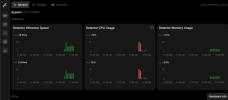
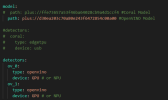
I actually own a Elitedesk G4 SFF with a i5-8600 and that currently runs my Frigate Instance. I have one 8MP camera, 2 5MP cameras, and 4 4MP cameras, and it's been working great. I use a USB Coral for my detection, but I did try the openvino model running on the integrated GPU, and it runs fine, though I did notice the GPU usage can spike really high when there is a lot going on, but this is likely caused by my high-res detection streams.Screenshot 2026-04-05 115036.pngScreenshot 2026-04-05 115332.png
 
  • Like
Reactions: Iemand91
I actually own a Elitedesk G4 SFF with a i5-8600 and that currently runs my Frigate Instance. I have one 8MP camera, 2 5MP cameras, and 4 4MP cameras, and it's been working great. I use a USB Coral for my detection, but I did try the openvino model running on the integrated GPU, and it runs fine, though I did notice the GPU usage can spike really high when there is a lot going on, but this is likely caused by my high-res detection streams.

Thank you.
Apart from the initial install of Immich (and ingress of all photo's); Frigate is likely the most intensive thing the NAS/server has to do, so it's probably going to fine for me (most of the time, not much going on around here). Don't think the extra price (like twice as expensive) for a more recent Elitedesk compared to a G4 model is worth it.
 
Thank you.
Apart from the initial install of Immich (and ingress of all photo's); Frigate is likely the most intensive thing the NAS/server has to do, so it's probably going to fine for me (most of the time, not much going on around here). Don't think the extra price (like twice as expensive) for a more recent Elitedesk compared to a G4 model is worth it.
And the neat thing is you can always upgrade it too incase you want even faster detection and/or handle more cameras, I am looking to sell my coral and get an Intel Arc A310 Eco to replace it.
 
running 12 cameras on old dell/intel desktop (10years old) with coral...no problem at all with detection on all cameras...BI is now in the trash bin...I'm done with Windows/BI...and if you have any setup question just ask ChatGPT....it will do the entire config yaml for you, and integrate with home assistant...
 
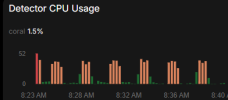
Every 2 minutes I see these blips of detector CPU usage regardless of activity and consistent.
Any idea what could be causing this?

UPDATE: Solved - 1 camera had a preset PTZ tilt and was moving a fraction to the left and right every 2 minutes!! haha

1776255166408.png
 
Last edited:
Can't wait till the next version of frigate. Lots cool features coming up. For example, there will finally be fully configurable options via the GUI. Hand editing the config.yml file will still be available but potentially no longer needed. Also, the chat ai help bot will be built-in and you won't have to go to the docs site to talk. to it.
 
  • Like
Reactions: Pentagano
i couldnt get frigate working properly as a LXC in proxmox.
iGPU is made passthru then i tried changing other config around ... but no-go ... just with 1 camera and click on detect then frigate busts with CPU max... i cant even see the config page with inference speed ...
granted i have no linux skills aside from asking the gpt
 
i couldnt get frigate working properly as a LXC in proxmox.
iGPU is made passthru then i tried changing other config around ... but no-go ... just with 1 camera and click on detect then frigate busts with CPU max... i cant even see the config page with inference speed ...
granted i have no linux skills aside from asking the gpt

use proxmox frigate helper script. it will detect everything and add it to the yml
 
i couldnt get frigate working properly as a LXC in proxmox.
iGPU is made passthru then i tried changing other config around ... but no-go ... just with 1 camera and click on detect then frigate busts with CPU max... i cant even see the config page with inference speed ...
granted i have no linux skills aside from asking the gpt
Did you change the default detector to openvino? It sounds like you're using the CPU detectors with no hardware acceleration. Please take a look at the documentation I have linked.

Video Decoding | Frigate

and

Object Detectors | Frigate

I used to run Frigate inside an LXC container, but I have since opted for Docker install on Bare-metal hardware.
 
  • Like
Reactions: swoozle
thx ! i re-installed the LXC and it detected and configured GPU stuff and openvino this time !
and CPU is not spiking anymore ... but still no go

its still not wanting to detect, it disables it after i turn it on. and the system page is still not loading (one w detectors/gpus)
even if i have only 1 cam and the detect stream switched to the low resolution stream 640x480
 
  • Like
Reactions: mannyqwerty
If you're able to provide the logs and/or config, I could try to help you figure out what could be causing the detection issue.
 

Attachments

  • Screenshot from 2026-05-10 13-30-15.png
    Screenshot from 2026-05-10 13-30-15.png
    63.8 KB · Views: 5
thx ! i re-installed the LXC and it detected and configured GPU stuff and openvino this time !
and CPU is not spiking anymore ... but still no go

its still not wanting to detect, it disables it after i turn it on. and the system page is still not loading (one w detectors/gpus)
even if i have only 1 cam and the detect stream switched to the low resolution stream 640x480
If the AI you've been using isn't the one on the frigate docs site, give it a try. It's very good at looking at configs and logs and figuring out what's wrong.
 
  • Like
Reactions: mannyqwerty
If you're able to provide the logs and/or config, I could try to help you figure out what could be causing the detection issue.
thank you !

the video stream i setup 640x480 is still slow to start when going to view camera mode, it blacks out for like a minute intermittently. then when i select Detect button, it stays on for like a minute then it blacks out and turns off detection.
below is the log that keeps repeating in the same pattern ... frigate starts, something with detection, frigate exits, repeat
the config is below the log

log
--------------------------------------------------------------------
2026-05-11 18:33:38.221109 [INFO] Preparing Frigate...
2026-05-11 18:33:38.599047 [INFO] Starting Frigate...
2026-05-11 18:33:42.217496 [2026-05-11 18:33:42] frigate.util.config INFO : Checking if frigate config needs migration...
2026-05-11 18:33:42.230291 [2026-05-11 18:33:42] frigate.util.config INFO : frigate config does not need migration...
2026-05-11 18:33:42.373336 [2026-05-11 18:33:42] frigate.util.services INFO : Automatically detected vaapi hwaccel for video decoding
2026-05-11 18:33:42.377304 [2026-05-11 18:33:42] frigate.app INFO : Starting Frigate (0.17.1-)
2026-05-11 18:33:42.394045 [2026-05-11 18:33:42] peewee_migrate.logs INFO : Starting migrations
2026-05-11 18:33:42.394581 [2026-05-11 18:33:42] peewee_migrate.logs INFO : There is nothing to migrate
2026-05-11 18:33:42.406793 [2026-05-11 18:33:42] frigate.app INFO : Recording process started: 1988052
2026-05-11 18:33:42.419759 [2026-05-11 18:33:42] frigate.app INFO : Review process started: 1988065
2026-05-11 18:33:42.421222 [2026-05-11 18:33:42] frigate.app INFO : go2rtc process pid: 34858
2026-05-11 18:33:42.653684 [2026-05-11 18:33:42] frigate.app INFO : Embedding process started: 1988075
2026-05-11 18:33:42.693473 [2026-05-11 18:33:42] frigate.app INFO : Output process started: 1988126
2026-05-11 18:33:42.723191 [2026-05-11 18:33:42] frigate.camera.maintainer INFO : Camera processor started for patio: 1988175
2026-05-11 18:33:42.760453 [2026-05-11 18:33:42] frigate.camera.maintainer INFO : Capture process started for patio: 1988232
2026-05-11 18:33:42.849526 [2026-05-11 18:33:42] frigate.api.fastapi_app INFO : Starting FastAPI app
2026-05-11 18:33:42.992613 [2026-05-11 18:33:42] frigate.api.fastapi_app INFO : FastAPI started
2026-05-11 18:33:43.089148 Process frigate.detector:detector01:
2026-05-11 18:33:43.089192 Traceback (most recent call last):
2026-05-11 18:33:43.089206 File "/usr/lib/python3.11/multiprocessing/process.py", line 314, in _bootstrap
2026-05-11 18:33:43.089218 self.run()
2026-05-11 18:33:43.089229 File "/opt/frigate/frigate/object_detection/base.py", line 143, in run
2026-05-11 18:33:43.089240 object_detector = LocalObjectDetector(detector_config=self.detector_config)
2026-05-11 18:33:43.089251 ^^^^^^^^^^^^^^^^^^^^^^^^^^^^^^^^^^^^^^^^^^^^^^^^^^^^^^^^^
2026-05-11 18:33:43.089263 File "/opt/frigate/frigate/object_detection/base.py", line 62, in init
2026-05-11 18:33:43.089274 self.detect_api = create_detector(detector_config)
2026-05-11 18:33:43.089285 ^^^^^^^^^^^^^^^^^^^^^^^^^^^^^^^^
2026-05-11 18:33:43.089296 File "/opt/frigate/frigate/detectors/init.py", line 18, in create_detector
2026-05-11 18:33:43.089307 return api(detector_config)
2026-05-11 18:33:43.089318 ^^^^^^^^^^^^^^^^^^^^
2026-05-11 18:33:43.089329 File "/opt/frigate/frigate/detectors/plugins/openvino.py", line 45, in init
2026-05-11 18:33:43.089340 self.runner = OpenVINOModelRunner(
2026-05-11 18:33:43.089351 ^^^^^^^^^^^^^^^^^^^^
2026-05-11 18:33:43.089362 File "/opt/frigate/frigate/detectors/detection_runners.py", line 316, in init
2026-05-11 18:33:43.089373 self.compiled_model = self.ov_core.compile_model(
2026-05-11 18:33:43.089389 ^^^^^^^^^^^^^^^^^^^^^^^^^^^
2026-05-11 18:33:43.089418 File "/usr/local/lib/python3.11/dist-packages/openvino/_ov_api.py", line 610, in compile_model
2026-05-11 18:33:43.089442 super().compile_model(model, device_name, {} if config is None else config),
2026-05-11 18:33:43.089453 ^^^^^^^^^^^^^^^^^^^^^^^^^^^^^^^^^^^^^^^^^^^^^^^^^^^^^^^^^^^^^^^^^^^^^^^^^^^
2026-05-11 18:33:43.089463 RuntimeError: Exception from src/inference/src/cpp/core.cpp:126:
2026-05-11 18:33:43.089474 Exception from src/inference/src/dev/plugin.cpp:58:
2026-05-11 18:33:43.089490 Exception from src/plugins/auto/src/auto_schedule.cpp:428:
2026-05-11 18:33:43.089501 [AUTO] compile model failed, GPU.0:Exception from src/inference/src/dev/plugin.cpp:58:
2026-05-11 18:33:43.089511 stoi
2026-05-11 18:33:43.089522 ;
2026-05-11 18:33:45.635799 2026-05-11 18:33:43.089532
2026-05-11 18:33:45.635809 2026-05-11 18:33:43.089542
2026-05-11 18:33:45.635812 2026-05-11 18:33:43.089552
2026-05-11 18:33:47 | frigate.watchdog | Detection appears to have stopped. Exiting Frigate...
2026-05-11 18:33:57 | frigate.watchdog | Detection appears to have stopped. Exiting Frigate...


--------------------------------------------

this is the config :
------------

mqtt:
enabled: false
cameras:
patio:
enabled: true
ffmpeg:
inputs:
- path:
rtsp:/admin:[email protected]:554/cam/realmonitor?channel=1&subtype=1&unicast=true&proto=Onvif
roles:
- detect
- path:
rtsp:/admin:[email protected]:554/cam/realmonitor?channel=1&subtype=0&unicast=true&proto=Onvif

roles: []
detect:
width: 640
height: 480
live:
streams:
Stream 1: patio_1
Stream 2: patio_2
auth:
enabled: false
detect:
enabled: false
ffmpeg:
hwaccel_args: auto
detectors:
detector01:
type: openvino
device: AUTO
model:
width: 300
height: 300
input_tensor: nhwc
input_pixel_format: bgr
path: /openvino-model/ssdlite_mobilenet_v2.xml
labelmap_path: /openvino-model/coco_91cl_bkgr.txt
version: 0.17-0
go2rtc:
streams:
patio_1:
- rtsp:/admin:[email protected]:554/cam/realmonitor?channel=1&subtype=1&unicast=true&proto=Onvif
patio_2:
- rtsp:/admin:[email protected]:554/cam/realmonitor?channel=1&subtype=0&unicast=true&proto=Onvif