EmpireTech aka Dahua LPR Settings

Be nice if the camera would reference it's local time and/or nearest big City or a gps plot or a zipcode to pull sunrise/sunset schedule from a global database or a north american database, from one of those Sunrise sunset websites.
We gained over an hour of daylight in the last month and the DST is coming march 8th, so I will wait to adjust some of the cameras scheduled for sunrise sunset. The NVR sometimes adjusts correctly for DST but sometimes some of the camera's do not seem to follow along. So I have both timestamps on screen to see which cams act goofy.
 
Last edited:
Be nice if the camera would reference it's local time and/or nearest big City or a gps plot or a zipcode to pull sunrise/sunset schedule from a global database or a north american database, from one of those Sunrise sunset websites.
We gained over an hour of daylight in the last month and the DST is coming march 8th, so I will wait to adjust some of the cameras scheduled for sunrise sunset. The NVR sometimes adjusts correctly for DST but sometimes some of the camera's do not seem to follow along. So I have both timestamps on screen to see which cams act goofy.
While we're on the topic, it would be interesting to consider an extension to NTP, or perhaps some service that runs in parallel to it on the same server, so that a client device, e.g. a camera, can ask, "What is UTC, and what is our current offset including DST?"

I run NTP on my pfense router, so all my cameras get their time from it. It's a bit insane that I need to manually set the DST offset on every single frickin' device on my network.
 
  • Like
Reactions: Flintstone61
yeah i will have to do that its difficult as im sure will have to use some help by having someone from the house park the car in middle, and then i will have to adjust with laptop at home.
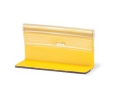
If you can't park a car for any useful length of time, and/or if you can't fiddle with the camera while your car is parked (e.g. no connectivity), one workaround is to use a few of these adhesive temporary traffic markers that they use in construction zones:

1771266106859.png
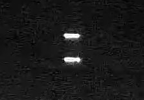
They're designed to reflect light back to its original source, no matter the direction, and they show up as a thin, bright strip when properly focused:

1771266242803.png

1771266284680.png
If possible, place two of them at least 6' apart, along the sight axis of your camera, "bracketing" the expected distance to target, to help dial in the focus.

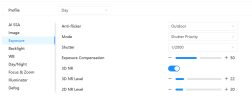
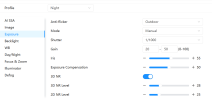
It also helps if you turn 3D Noise Reduction up to 100% while you focus, but remember to set it back to where it was once you're done!
 
Is there a way to manage this in any way other than dragging the mouse and/or copying one month to other months within the same camera?

View attachment 238309

I found this table of sunrise/sunset time for Los Angeles:

View attachment 238310

If I could reformat that data into a CSV file or similar, plus or minus an offset, could I construct a script to push the desired Time Plan Settings to a camera via HTTP?

Ideally I'd want all 5 of my EmpireTech cameras to operate on the same schedule, and that's extremely cumbersome to do if I have to mouse around with 12 individual months on 5 different cameras, and try to get them all the same. And then if I want to change anything, like changing my offset from -60 minutes to -45 minutes or similar, I have to do it all over again, manually.

Even worse is the fact that it's whole-month only, and DST does not change on the first of the month. But I suppose that's an American problem (minus AZ and HI).
I miss that Dahua sunrise/sunset utility
 
I miss that Dahua sunrise/sunset utility
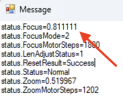
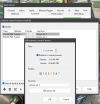
EmpireTech didn't blow up the API completely, because the sunrise/sunset utility will still read back the zoom/focus positions:

1771272088989.png
so there are bits and pieces that still work.

And it's open source, so if someone could snoop our browser traffic and reverse engineer those calls, someone might be able to fix it.
 
  • Like
Reactions: Arjun
Is there a way to manage this in any way other than dragging the mouse and/or copying one month to other months within the same camera?

View attachment 238309

If you can't park a car for any useful length of time, and/or if you can't fiddle with the camera while your car is parked (e.g. no connectivity), one workaround is to use a few of these adhesive temporary traffic markers that they use in construction zones:

View attachment 238315
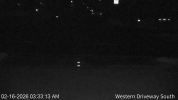
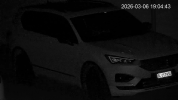
Now that I've got the cameras switching to Night mode at the desired time, I've got some shots that show how these doohickeys help with focus:

1772297479285.png

At this time of day the camera gain isn't all the way up, so the reflective strips don't bloom/wash out, and you can see that the focus is nice and crisp, which also "reflects" in a nice plate capture.
 
  • Love
Reactions: Flintstone61
Now that I've got the cameras switching to Night mode at the desired time, I've got some shots that show how these doohickeys help with focus:


At this time of day the camera gain isn't all the way up, so the reflective strips don't bloom/wash out, and you can see that the focus is nice and crisp, which also "reflects" in a nice plate capture.
Yeah the reflector trick has helped me with this camera.
1772424181154.png
 
Last edited:
^^^^^
This

Its handy if you have vehicle headlights pointing directly at the camera, but I read rear plates so dont care as much.

I have used it as a general tool to help cut down on noise in low light when I'm running color ona few caemras, though thats not really what its intended for. Its more of a hack
 
While we're on the topic, it would be interesting to consider an extension to NTP, or perhaps some service that runs in parallel to it on the same server, so that a client device, e.g. a camera, can ask, "What is UTC, and what is our current offset including DST?"

I run NTP on my pfense router, so all my cameras get their time from it. It's a bit insane that I need to manually set the DST offset on every single frickin' device on my network.
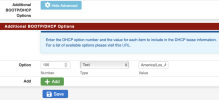
After more reading, it appears that the modern solution to this might be to turn on DHCP Option 100, Time Zone Strings: in my DHCP server (pfsense):

1772833670640.png

But of course this relies on the client camera requesting Option 100, and then doing the correct thing with it, which I'm not hopeful about. My cameras won't even accept an NTP server address via DHCP; I have to specify it manually.

Smarter "things" like computers can use DHCP Option 100 to then look up what the local DST offset and calendar should be, but I'm skeptical that IP cameras will be doing that any time soon. And the lookup part is also a potential stumbling block for those of us to keep our cameras away from the open internet, which I do by DHCPing them a bogus gateway address.

So this still comes back around to wanting some way to push UTC and my local DST offset to my cameras.
 
Now that I've got the cameras switching to Night mode at the desired time, I've got some shots that show how these doohickeys help with focus:

View attachment 238959

At this time of day the camera gain isn't all the way up, so the reflective strips don't bloom/wash out, and you can see that the focus is nice and crisp, which also "reflects" in a nice plate capture.
And as sundown drifts further and further-er, I get junk like this:

1772837709747.png

This is why I want real sunrise/sunset timing.

30 minutes before this or 30 minutes afterward, I could get plates:
1772837953797.png

1772837939906.png
 
  • Like
Reactions: bigredfish
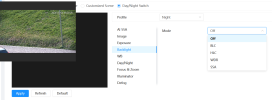
One way to get closer is to use LUX in place of a sunrise/set offset. This takes into account sunny vs cloudy days and switches cameras based on light intensity in place of time.

More complex to setup - this is not a turn key solution.
 
Last edited:
  • Like
Reactions: looney2ns
I simply have mine switch profiles 30-45 min before sunset and same after sunrise. I use a schedule

Works 100% of the time and as times differ still gives me enough buffer that I only change maybe 3-4x per year. Basically quarterly.
 
Simple is better.

Here in the north country, the sun is now gaining close to 6 minutes per day. Thus a lower 48 solution does not work well here at the end of the trail.
 
  • Like
Reactions: bigredfish
EmpireTech didn't blow up the API completely, because the sunrise/sunset utility will still read back the zoom/focus positions:

And it's open source, so if someone could snoop our browser traffic and reverse engineer those calls, someone might be able to fix it.

I asked ChatGPT if it could give me the corrected curl commands to program my camera, and it produced replacement http calls that correctly set my IPC-B52IR-Z12E S2 to Day or Night mode on command:

Bash:
curl -g --digest -u 'admin:passw0rd!' "http://192.168.50.40/cgi-bin/configManager.cgi?action=setConfig&VideoInMode[0].ConfigEx=Night&VideoInMode[0].Mode=4"

curl -g --digest -u 'admin:passw0rd!' "http://192.168.50.40/cgi-bin/configManager.cgi?action=setConfig&VideoInMode[0].ConfigEx=Day&VideoInMode[0].Mode=4"

I've verified this both by watching the live camera stream, and by dumping
Code:
curl --digest -u 'admin:passw0rd!' "http://192.168.50.40/cgi-bin/configManager.cgi?action=getConfig&name=VideoInMode"

and correctly reading back either

table.VideoInMode[0].ConfigEx=Night or table.VideoInMode[0].ConfigEx=Day

as expected.

So I asked ChatGPT:


and it came back with a bunch of suggested fixes in a bunch of different places in the project, but 1) I'm not a programmer, and 2) I'm on a Mac, so I would have a hard time implementing, compiling, and doing any of the debugging.

Anyone want to take a crack at resurrecting this nifty little program to work with our Dahua/EmpireTech cameras for proper sunrise/sunset toggling?
 
It looks like your are using BI on Windows 11. Assume that when the day/night URL is placed in the BI browser FireFox address bar that the camera switches mode from day to night and the other way around. If yes, then this is a step in the right direction.

The issue, which your are aware of, is that for Web 4 cams (gray) and Web 5 cams (blue) the API has changed. Thus the old utility will not work on Web 5 cams.

Solutions could include:

1) Use BI to switch cams with the appropriate API. See thread on this site for the how to.

2) Use power shell to run a script using "Invoke REST Method" to run the URL or URLs. Then use task scheduler to run the power shell script when needed. Try "Sunwait" as a add on to set sun rise/set times by location or another script from GetHub.

3) Look into Hubitat, either the C7 or C8 hub, to run an app to change camera modes based on local sunrise/sunset plus a time offset.

4) Try either HA or a Raspberry Pi to run your script.

5) Use Hubitat to change the monthly schedule (orange/purple) on Web 5 cams to a daily schedule to increase accuracy. i.e. local rise/set with selectable time offset.
 
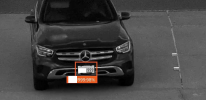
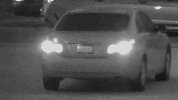
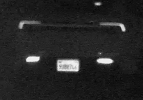
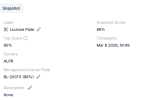
the picture quality is abysimal.... but but the plate is properly detected ^^
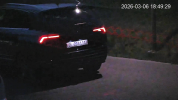
Funny how the red lights still create trailes... shouldn't happen at 1/1000 shutter should it?`Some kind of Software computational picture enhancement?
1772874591988.png1772874628339.png1772876314542.png

Edit...

That MIGHT still have been day mode!
This one should be night mode for sure.


1772876240244.png1772875136592.png
 
Last edited:
  • Like
Reactions: bigredfish
the picture quality is abysimal.... but but the plate is properly detected ^^

That's the goal with LPR! We don't care about anything except the plate. Use a second camera if you want to see the car.

Funny how the red lights still create trailes... shouldn't happen at 1/1000 shutter should it?`Some kind of Software computational picture enhancement?
Tha's the 3D Noise Reduction, which is a kind of computational picture enhancement . 3DNR attempts to reduce noise by averaging successive frames, which can cause ghosting like this. Dial down your 3DNR setting until it improves.
 
  • Like
Reactions: Haldi
1) Use BI to switch cams with the appropriate API. See thread on this site for the how to.
Ah, this thread? That links to this thread on the BI Forum?

1772903483906.png

I did see that awhile back, but I remember that this solution seemed error-prone, because all the configuration was being done manually, in a fairly obscure, hidden part of BI (e.g deep in the bowels of one particular camera's settings). So I got intimidated and never pursued it.

But I suppose the existence of this API is partly why the bp2000's utility never got updated.

My ChatGPT thread seems to have a pretty decent understanding of what's going on under the hood, e.g. it knows how to query a camera to see which API it supports, and the different calls for each. If I get ambitious I may ask it to write a utility that sort of mimics bp2000's utility. As I said, I'm not a programmer, so it won't be slick, but I'll see if I can get it to work, at least for my purposes, and if it does I'll share it.
 
  • Like
Reactions: samplenhold