

First 4 cameras cover the backyard gate entrance, the driveway SW, driveway NW and front doorDo your cameras cover all the ways to access you house?
If so, try to watch a playback according to the suspicious log entries in the NVR.
RF Detector?
- Thread starter JPmedia
- Start date
You are using an out of date browser. It may not display this or other websites correctly.
You should upgrade or use an alternative browser.
You should upgrade or use an alternative browser.
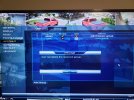
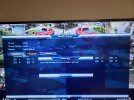
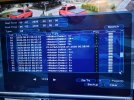
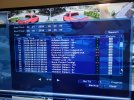
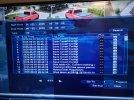
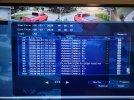

What is COVERT?
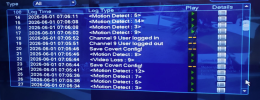
Is Video Loss : 9 a camera? Could someone have unplugged the cam and plugged in a laptop? What was happening at 7:05 this morning?
I have always wondered if access could be made using the ethernet cable from a cam. I have always maintained that my cam system was not accessible from outside since it is not physically connected to the internet. But using the cam's cable, one could get into the network that way.
Is Video Loss : 9 a camera? Could someone have unplugged the cam and plugged in a laptop? What was happening at 7:05 this morning?
I have always wondered if access could be made using the ethernet cable from a cam. I have always maintained that my cam system was not accessible from outside since it is not physically connected to the internet. But using the cam's cable, one could get into the network that way.
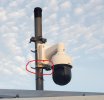
Yes, channel 9 is a regular PTZ camera. Unless that someone is on a ladder 14 feet in the air, I doubt that's how they are accessing the NVR. I just think there's a failing connection at the camera since the camera pole mount is rusted. And there's another camera right below that PTZ that definitely would have captured the perpWhat is COVERT?
View attachment 244397
Is Video Loss : 9 a camera? Could someone have unplugged the cam and plugged in a laptop? What was happening at 7:05 this morning?
Have NO idea what "Covert" means
Attachments

Looked at the system logs on the NVR, there's a lot of activity I don't recognize. And there's an admin and user account. I tried deleting the user account and it will not let me. Even though user account has no "system" permissions, it has "Playback" and "Covert" permissions for all channels which I cannot deselect and save the changes. And remember this NVR is NOT connected to the net, so how is someone accessing it?
I think the "cannot delete reserved group" with "admin" and "user" groups is quite normal. Just sloppy phrasing by Dahua. Have any actual users appeared, and if so, what are they called exactly?
I have never heard of covert before. I wonder if it could be to do with the function where a live feed for a camera is hidden on the NVR monitor when no users are logged in. This basically: Hide cameras on a Dahua NVR when it is logged out - Learn CCTV.com. An easy way to test would be to find that setting, toggle it on / off for a few cams, save, and check the log, see if it generates the same entry.
The "Playback" event at 10:07 - was this you, or part of the mystery? Also, 5:38 actually!
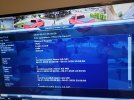
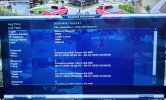
What is the photo if the "Detailed Information - Record Search" - did this come up by itself? Or is the record search the oddity?
Finally, apologies if already mentioned but is the NVR a PoE model or not? Are the cams connected directly or via a switch?
The Record search events you mention were NOT me. The one at 5:38 happened while I was still sleeping and the one at 10:07 happened when I was away from the house doing my morning errands.I think the "cannot delete reserved group" with "admin" and "user" groups is quite normal. Just sloppy phrasing by Dahua. Have any actual users appeared, and if so, what are they called exactly?
I have never heard of covert before. I wonder if it could be to do with the function where a live feed for a camera is hidden on the NVR monitor when no users are logged in. This basically: Hide cameras on a Dahua NVR when it is logged out - Learn CCTV.com. An easy way to test would be to find that setting, toggle it on / off for a few cams, save, and check the log, see if it generates the same entry.
The "Playback" event at 10:07 - was this you, or part of the mystery? Also, 5:38 actually!
What is the photo if the "Detailed Information - Record Search" - did this come up by itself? Or is the record search the oddity?
Finally, apologies if already mentioned but is the NVR a PoE model or not? Are the cams connected directly or via a switch?
If you look at the details screen, you can see:
Record search details
Device: HDD
IP Address: Login Local
Group Name: user
User: default
I believe someone created or modified the "default" user group account so that they can gain access to the NVR. While they have no system permissions, the user group either automatically has access to Playback and Covert permissions, or someone has created access. Either way, the record search screen is activated by someone outside this household with the NVR not connected to the internet. Scary thought
And yes, this is a POE model NVR so the cameras are connected directly to it.
Last edited:
Exceedingly odd. Do you have any cameras covering near your NVR as mentioned?The Record search events you mention were NOT me. The one at 5:38 happened while I was still sleeping and the one at 10:07 happened when I was away from the house doing my morning errands.
The reason I asked about PoE - if the cams were connected to a switch, you could get a cheap hub (or switch port mirror, even better), and mirror the port the NVR is on. Run a Wireshark trace on it, filter heavily (So you dont drown your machine in packets that are just RTSP camera streams), and then you would be able to spot anyone disconnecting a camera, jacking into the camera LAN from outside and accessing the NVR. Not sure how best to do that if the cameras are wired into the back of the NVR though.
I would seriously rule out physical access to the indoor kit first and foremost.
We have enough cameras that they overlap and an attack on one camera will likely be seen by another.
I would think it would be a HIGHLY risky operation to actually set foot on our property and try to physically connect to one of the cameras. Not to mention that all the cameras they can physically reach outside the yard are turrets where the connections are buried inside the soffit. Nothing is impossible, but that's a lot of work to go that route and I would bet doing so would make some noise and take time, with a good chance of being caught.
Haven't had the time yet, but I will look for gaps in the recording timeline. I know cams 1 - 4 have no gaps when the events took place, just have to check the others. I do know that 9 has gaps due to a failing connection at the camera
I'll keep updating as this unfolds
I would think it would be a HIGHLY risky operation to actually set foot on our property and try to physically connect to one of the cameras. Not to mention that all the cameras they can physically reach outside the yard are turrets where the connections are buried inside the soffit. Nothing is impossible, but that's a lot of work to go that route and I would bet doing so would make some noise and take time, with a good chance of being caught.
Haven't had the time yet, but I will look for gaps in the recording timeline. I know cams 1 - 4 have no gaps when the events took place, just have to check the others. I do know that 9 has gaps due to a failing connection at the camera
I'll keep updating as this unfolds
None.Any updates or changes?
All readings since have been normal. And I run it 24/7
Still trying to determine if the NVR is compromised. I did a test over the last few days to verify some thoughts I was having. My thought was that there is malicious code on either my laptop or the NVR. I say this because if the NVR hasn't been connected to the web for sometime, it seems like there is no bad behaviors. But if I connect the NVR temporarily to review footage or make adjustments to the cameras, within 24 hours I will see either a single camera screen or the record search page randomly when the monitor is turned on. Once that happens, if I do not connect again for a while, I get no issues. The malware seems to know the state of the monitor, which I guess would be easy enough if it is monitoring the HDMI ports for activity.Any odd equipment behaviours?
Now to rule out the laptop as the culprit of the malware, I tried disconnecting the laptop from the network and connecting the NVR directly to the laptop to eliminate the internet as a part. It's been over 24 hours and no weird behavior so far. I also ran every test for malware on the laptop, including online scanner, and came up empty.
I think it's time to either try and reset the NVR to default or replace it. I am leaning on replacing it because if the NVR is compromised and has malware, it is likely embedded into the OS and likely cannot be removed, even with a factory reset.
But before I replace it, I need to read up on securing the new NVR from initialization, so it does not happen again

Now that is the piece of information you left out - you connect it to the internet every once in awhile.
You likely have P2P turned on or scanned the QR code at some point or UPnP turned on and likely have an NVR that accessed the older compromised P2P servers.
Doesn't mean your neighbor isn't still nuts, but having your NVR access the internet every once in awhile isn't the same as a closed system that was implied at the beginning.
You likely have P2P turned on or scanned the QR code at some point or UPnP turned on and likely have an NVR that accessed the older compromised P2P servers.
Doesn't mean your neighbor isn't still nuts, but having your NVR access the internet every once in awhile isn't the same as a closed system that was implied at the beginning.
So when you do make adjustments or check footage, you're plugging the NVR into your network, rather than directly into a laptop? Or you have been up to now?But if I connect the NVR temporarily to review footage or make adjustments to the cameras
Were you able to perform some of the steps I detailed in your other thread, regarding your network?
I'm not to completely divert this thread down the network rabbit hole, but what router do you have at the moment? Is it capable of logging traffic? Are you familiar with Wireshark?
If your theory with the NVR being compromised, reaching out to some servers was true, you should be able to see evidence of it with decent traffic logging.
I suggest this is a good place to start.
To try and put your mind at rest regarding this statement:
Firstly, I have NO IDEA how your LAN ended up on 192.169.0.0 IP range in the first place. Look up "Private IPs" as defined in RFC1918 - these are blocks of IP ranges dedicated for use on LANs, not the public internet...The scanner turned up 7 active IP addresses from the previous IP range 192.169.X.XXX that have no mac addresses. I can ping them and get a response, but the connection times out if I enter the IP address in a browser. These IP addresses NEVER showed up in the past with scan, so it makes me wonder what changed.
Could be.Now that is the piece of information you left out - you connect it to the internet every once in awhile.
You likely have P2P turned on or scanned the QR code at some point or UPnP turned on and likely have an NVR that accessed the older compromised P2P servers.
Doesn't mean your neighbor isn't still nuts, but having your NVR access the internet every once in awhile isn't the same as a closed system that was implied at the beginning.
I need to have the NVR connected to the internet when I review footage, otherwise it's a painful process to do via the NVR graphic interface. I cannot connect to review footage without having the internet connected. And just to be clear, the NVR is only physically connected to the network when I am reviewing footage. When I finish the task, the ethernet cable is physically disconnected from the NVR.
As far as I know, one can only view the NVR in a web browser when internet is connected, but maybe I am wrong.
Either way, I need to figure out how to proceed with a clean slate and prevent it from happening again.
Honestly, I am not well versed when it comes to networking. Logging traffic and using software to detect malicious traffic is, for the most part, over my head. I do not know if the router I have can do any of these things as I'm afraid to go looking for fear of opening a portal into the Abyss. It's an ASUS router I purchased last year on the recommendation of the fine folks here.So when you do make adjustments or check footage, you're plugging the NVR into your network, rather than directly into a laptop? Or you have been up to now?
Were you able to perform some of the steps I detailed in your other thread, regarding your network?
I'm not to completely divert this thread down the network rabbit hole, but what router do you have at the moment? Is it capable of logging traffic? Are you familiar with Wireshark?
If your theory with the NVR being compromised, reaching out to some servers was true, you should be able to see evidence of it with decent traffic logging.
I suggest this is a good place to start.
To try and put your mind at rest regarding this statement:
Firstly, I have NO IDEA how your LAN ended up on 192.169.0.0 IP range in the first place. Look up "Private IPs" as defined in RFC1918 - these are blocks of IP ranges dedicated for use on LANs, not the public internet...The scanner turned up 7 active IP addresses from the previous IP range 192.169.X.XXX that have no mac addresses. I can ping them and get a response, but the connection times out if I enter the IP address in a browser. These IP addresses NEVER showed up in the past with scan, so it makes me wonder what changed.
Could be.
I need to have the NVR connected to the internet when I review footage, otherwise it's a painful process to do via the NVR graphic interface. I cannot connect to review footage without having the internet connected. And just to be clear, the NVR is only physically connected to the network when I am reviewing footage. When I finish the task, the ethernet cable is physically disconnected from the NVR.
As far as I know, one can only view the NVR in a web browser when internet is connected, but maybe I am wrong.
Either way, I need to figure out how to proceed with a clean slate and prevent it from happening again.
Nope, you do not need to be connected to the internet when viewing the NVR in a web browser. That is the biggest misconception people have is thinking a web browser needs internet.
I have a stand alone laptop (old Windows 7 that doesn't even have wifi capabilties) that I hardwire connect the NVR directly to. As long as the IP subnet of the computer and the NVR are the same, you can view the NVR via a web browser on a computer not connected to the internet.

Can you review recordings and camera live view like you can with an app like SmartPSS lite?Nope, you do not need to be connected to the internet when viewing the NVR in a web browser. That is the biggest misconception people have is thinking a web browser needs internet.
I have a stand alone laptop (old Windows 7 that doesn't even have wifi capabilties) that I hardwire connect the NVR directly to. As long as the IP subnet of the computer and the NVR are the same, you can view the NVR via a web browser on a computer not connected to the internet.
Can you review recordings and camera live view like you can with an app like SmartPSS lite?
Yes.