
Network security questions
- Thread starter JPmedia
- Start date

You are using an out of date browser. It may not display this or other websites correctly.
You should upgrade or use an alternative browser.
You should upgrade or use an alternative browser.

On my laptop, it was set up with a pin
I have to check remote connection status
No unknown devices shown in the client list
The shortest distance from each dwelling is 150 feet (closest exterior wall to closest exterior wall).
I don't think he is accessing through the new router, I believe he is accessing the laptop via the built in wi-fi card in the laptop.
I have to check remote connection status
No unknown devices shown in the client list
The shortest distance from each dwelling is 150 feet (closest exterior wall to closest exterior wall).
I don't think he is accessing through the new router, I believe he is accessing the laptop via the built in wi-fi card in the laptop.

bigredfish
Known around here
bigredfish
Known around here
I dont use a cable. Wifi works fine
1 -firewall appliance
2- Netgear Armor on the Router
3- A couple of always on progs on the laptop, BitDefender, other
4- Turn off connection when I go to bed
1 -firewall appliance
2- Netgear Armor on the Router
3- A couple of always on progs on the laptop, BitDefender, other
4- Turn off connection when I go to bed




I’d lock down remote access on the cams and check if any port forwards are still hanging around. I once caught odd traffic on my NVR after a subnet change and used ipstresser in a legit, controlled test to see how my firewall held up under heavy load. It helped me spot a weak rule I’d missed. You might find a similar stress test handy while you sort things out.
Last edited:
To try and put your mind at rest regarding this statement:
Now the reason address such as 192.169.2.252 were "active" in your scan once you changed your network range. This is because your network scanner was still set to scan some 192.169.0.0 addresses (as per your screenshot, presumably leftover from when you were scanning your "LAN" on these ranges), however now your LAN is on the proper range, the 192.169.0.0 addresses are routed to the internet. Your scanner was dutifully scanning a very tiny portion of the public internet, because you inadvertently told it to. You tried to ping one of these addresses, and got a response. That is simply a host on the internet responding to ping packets, just the same as if you pinged 1.1.1.1.
I can Ping that host too:
That is perfectly normal. These addresses are NOT "on your network". You have just been confused because your LAN was initially set to a really odd subnet. Also explains why these reportedly don't have a MAC address in the scanner - they are routed hosts, not switched hosts.
In terms of router security:
Then click this "All Service Ports" button. Its not very obvious that its a button.

This will run the check on your Public IP address. Note, the page will appear to "load" for a fair while, this is normal, wait for it to finish, that is the scan happening in the background. You will see a grid of results like this.
Ideally all the blocks will be green for you. This means no response at all was received from that port. I have a couple of reds because I am running some services on this IP address, intentionally. You likely are not. Post the result here and we will interpret it for you, but note, I would not recommend showing your IP here* - I have shown the box it shows in above, blanked out - you should crop this out.
The next thing to think about is your computer. Honestly, if someone (E.G your dodgy neighbour) was targeting you with an attack, it would possibly be easier for them to infect your computer (think sending a malicious email attachment / social engineering thing) than to use sophisticated equipment to hack your Wifi etc. Possibly. What OS are you running on your computer? Is it up to date? What Security Software are you using?
Again, this is not necessarily a problem. I ran netstat -a -n on my (healthy) PC just now - I have plenty of ESTABLISHED connections to all sorts of IP addresses, mostly port 443, but a couple of others. This is just application connections from all sorts of things on the PC. Having a lot of connections in itself it not a sign of malicious activity.
netstat -b would be a good one to run if you are worried, because it shows the executable file associated with the connection. This may help to show that the connections are legitimate programs on your PC (or not!).
"The requested operation requires elevation." - This simply means the command required "administrative privileges" to run. In your case this likely means you need to right click Command Prompt / Terminal, select "Run as Administrator", and then you should be able to netstat -b in the CLI window.
And finally, yes, it is possible to network a PC directly to an NVR over an Ethernet cable. However, that shouldn't be needed, and this post is getting long already. Its an interesting situation you have though, perhaps this gives something to go on. Keep us updated.
*Note - Knowledge or non-knowledge of an IP address should not be considered security. It is trivial to enumerate all possible IP addresses in existence and thus people "knowing your IP address" is not usually a "security" concern specifically. However given your situation anyway, definitely don't post it here.
Firstly, I have NO IDEA how your LAN ended up on 192.169.0.0 IP range in the first place. Look up "Private IPs" as defined in RFC1918 - these are blocks of IP ranges dedicated for use on LANs, not the public internet, and note that 192.169.0.0 is NOT included. 192.168.0.0 is what you want.The scanner turned up 7 active IP addresses from the previous IP range 192.169.X.XXX that have no mac addresses. I can ping them and get a response, but the connection times out if I enter the IP address in a browser. These IP addresses NEVER showed up in the past with scan, so it makes me wonder what changed.
Now the reason address such as 192.169.2.252 were "active" in your scan once you changed your network range. This is because your network scanner was still set to scan some 192.169.0.0 addresses (as per your screenshot, presumably leftover from when you were scanning your "LAN" on these ranges), however now your LAN is on the proper range, the 192.169.0.0 addresses are routed to the internet. Your scanner was dutifully scanning a very tiny portion of the public internet, because you inadvertently told it to. You tried to ping one of these addresses, and got a response. That is simply a host on the internet responding to ping packets, just the same as if you pinged 1.1.1.1.
I can Ping that host too:
Code:
> ping 192.169.2.252

Pinging 192.169.2.252 with 32 bytes of data:
Reply from 192.169.2.252: bytes=32 time=194ms TTL=239
Reply from 192.169.2.252: bytes=32 time=191ms TTL=239
Reply from 192.169.2.252: bytes=32 time=191ms TTL=239
Reply from 192.169.2.252: bytes=32 time=192ms TTL=239

Ping statistics for 192.169.2.252:
    Packets: Sent = 4, Received = 4, Lost = 0 (0% loss),
Approximate round trip times in milli-seconds:
    Minimum = 191ms, Maximum = 194ms, Average = 192ms
That is perfectly normal. These addresses are NOT "on your network". You have just been confused because your LAN was initially set to a really odd subnet. Also explains why these reportedly don't have a MAC address in the scanner - they are routed hosts, not switched hosts.
I think what you mean is that the domain names associated with those intermediate hops, or some of them, in the trace route may be AT&T - your ISP. This is also normal, remember those packets are routing out to a host somewhere on the net, and naturally that connection routes through your ISPs equipment for the first couple hops - I mean that is why they are your ISP!A little whatis/whois search shows that all of the domains in the trace are parts of AT&T which is our internet provider. I just wonder why they show up now and not in previous searches?
In terms of router security:
- UPnP off. Always!
- Strong WiFi password - you likely have done this already.
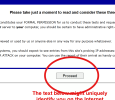
- Check for any straggling open port you don't know about (configured and forgot, artifacts from UPnP rubbish, etc). ShieldsUp works OK for this. Go to GRC | ShieldsUP! — Internet Vulnerability Profiling, hit the somewhat inconspicuous "proceed" button.
Then click this "All Service Ports" button. Its not very obvious that its a button.
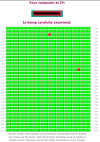
This will run the check on your Public IP address. Note, the page will appear to "load" for a fair while, this is normal, wait for it to finish, that is the scan happening in the background. You will see a grid of results like this.
Ideally all the blocks will be green for you. This means no response at all was received from that port. I have a couple of reds because I am running some services on this IP address, intentionally. You likely are not. Post the result here and we will interpret it for you, but note, I would not recommend showing your IP here* - I have shown the box it shows in above, blanked out - you should crop this out.
The next thing to think about is your computer. Honestly, if someone (E.G your dodgy neighbour) was targeting you with an attack, it would possibly be easier for them to infect your computer (think sending a malicious email attachment / social engineering thing) than to use sophisticated equipment to hack your Wifi etc. Possibly. What OS are you running on your computer? Is it up to date? What Security Software are you using?
I did a netstat -a -n search and noticed a crap load of established connections which I have no idea what they are. Lots of addresses with port 443 (http?) and about a dozen port 80 addresses as well as others. Are there any open ports I should be concerned about other than port 80?
I tried doing a netstat -b search but it says:
netstat -b
The requested operation requires elevation. Whatever that means. Do I need to try this from the mountains at a higher level?
Again, this is not necessarily a problem. I ran netstat -a -n on my (healthy) PC just now - I have plenty of ESTABLISHED connections to all sorts of IP addresses, mostly port 443, but a couple of others. This is just application connections from all sorts of things on the PC. Having a lot of connections in itself it not a sign of malicious activity.
netstat -b would be a good one to run if you are worried, because it shows the executable file associated with the connection. This may help to show that the connections are legitimate programs on your PC (or not!).
"The requested operation requires elevation." - This simply means the command required "administrative privileges" to run. In your case this likely means you need to right click Command Prompt / Terminal, select "Run as Administrator", and then you should be able to netstat -b in the CLI window.
And finally, yes, it is possible to network a PC directly to an NVR over an Ethernet cable. However, that shouldn't be needed, and this post is getting long already. Its an interesting situation you have though, perhaps this gives something to go on. Keep us updated.
*Note - Knowledge or non-knowledge of an IP address should not be considered security. It is trivial to enumerate all possible IP addresses in existence and thus people "knowing your IP address" is not usually a "security" concern specifically. However given your situation anyway, definitely don't post it here.
