Blue Iris Updates (64 bit)

Blue Iris Updates - Official Thread 6.0.5.3

Has something changed with respect to AI flagged alerts? I seem to be getting flagged alerts when my mode is "at home" when they are supposed to be disabled. I have not modified any settings, but I'm seeing this on 6.0.5.0 and 6.0.5.1.
 
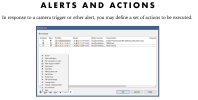
I see that this update added "dynamic alert action sets", but looking through the alerts tab, I don't notice anything new. Am I overlooking something?
I'm not running that update so not saying this is the case, but have you looked in BI's built-in "Help" or under BI's "Action Sets" ?

BI-alerts and actions.jpg
 
I see that this update added "dynamic alert action sets", but looking through the alerts tab, I don't notice anything new. Am I overlooking something?
I'm currently in an email discussion with Ken regarding this feature and it's implications wrt Wait Actions, and Run a Program Actions with setting 'Wait for process to complete'. As far as I understand, it's all under-the-hood stuff.

but have you looked in BI's built-in "Help" or under BI's "Action Sets"
There have been NO updates to the Help PDF since 6.0.3.1.
 
  • Like
Reactions: TonyR
I'm currently in an email discussion with Ken regarding this feature and it's implications wrt Wait Actions, and Run a Program Actions with setting 'Wait for process to complete'. As far as I understand, it's all under-the-hood stuff.


There have been NO updates to the Help PDF since 6.0.3.1.
This is actually a fairly significant update that came about though some long (over a month+) back and forth discussions I had with Ken: in typical fashion, he undersold it in the update notes posted for 6.0.5.0/6.0.5.1. In a nutshell, it allows Action sets (think Push/Pushover alerts) to continuously "loop" during the entire length of an Alert (while triggers are still happening) and add any additional trigger/AI Memos found during that Alert event. I believe it has the potential to (in many cases) eliminate the need for clone cameras that are setup to trigger and/or Alert on "alternate" trigger situations. For example: you want to create what BI terms an Alert (ie: switch to mainstream from sub-stream recording) on every person walking past your house on the Sidewalk (using motion Zones or with multiple ONVIF labels for different regions), BUT you only want to be notified with an Action set notification (Push/Pushover) when that person starts entering your property (again, with a different motion Zone or ONVIF label that corresponds to that new region). Previously, the workaround was to create a long Action set "Wait timer" that would allow for this by adding additional labels/sources/zones, but it delayed any notification from coming through for the entire duration of that wait timer, and in some cases that still wasn't long enough (a difficult balancing act).

It will undoubtedly create some situations that will require some adjustment to the manner of thinking about alerts, but as far as I can tell it is an amazing improvement. Now one "real-world" event can correspond to one Alert and one Notification (if justified by zone crossing/ONVIF change of label). Previous solutions would have broken this one "Event" up into multiple short Alerts (although he did still allow for that if you absolutely require it by using the new checkbox for "Generate multiple alerts per trigger" and the even less common "Reset trigger sources and zones", but many people wont need these somewhat esoteric solutions (possible exceptions for PTZ positioning as before with Additive/Exclusive options). I might also add, it could in many cases eliminate the need for clone cameras if the sole purpose they served was to act on these "alternate" Alert situations for notification purposes.

Sadly, he did not present me with any preview versions before finally rolling this out, so I am still getting used to it, but it seems like a massive improvement from my perspective.

Edit: Yes, it is unfortunate that the Help file PDF has not been updated in quite some time.
 
Last edited:
Blue Iris 6.0.5.x – Dynamic Action Sets and "Run Program" behavior

After a few rounds with Ken, I think the following summarizes how the new Dynamic Action Set behavior works with 'Run a Program' Actions and 'Wait' Actions.

Please post if your experience is inconsistent with the following.

Bottom line:
  • Dynamic Action Sets don't change how scripts/programs run
  • "Run a Program" is still asynchronous unless you enable "wait for process"
  • WAIT only works if BI is actually tracking the running process

Practical takeaway:
  • Fire-and-forget scripts -> no Run "wait", no WAIT needed
  • If something later depends on your program/script finishing -> use both
  • Be careful placing WAIT early -- it now pauses everything (see GOTCHA below)

What "dynamic" really means...
Before:​
* The Action Set ran once per alert
Now:​
* The Action Set keeps looping and checking actions while the camera is still triggered​
* Each action still runs once per alert (for now)​
What didn't change​
* 'Run a Program' is still asynchronous by default​
* Multiple alerts can launch overlapping program/script instances​
* 'Wait for process to complete' just controls whether BI keeps that Run action active until the program/script exits​

How WAIT actually behaves...

This is the part that I misinterpreted.​
WAIT doesn't directly wait for your program/script -- it waits on BI's internal action queues:
If Run doesn't use 'wait for process'
-> BI thinks it's done immediately​
-> WAIT ('action queues empty') continues right away
-> your program/script may still be running ... therefore any subsequent Actions that use its output may not be executed
If Run does use 'wait for process'
-> BI keeps that action active​
-> WAIT will block until the program/script exits

Here's a new GOTCHA with Dynamic Action Sets...

WAIT now pauses the entire action set loop, not just a single pass.
So while WAIT is active:​
* No other actions are evaluated
* Nothing new will fire, even if conditions are met
This can bite you if WAIT is near the top of the list.

 
Last edited: