Older BI Key

c hris527

Known around here
Oct 12, 2015
1,847
2,222
NY
Hi All, Hope everybody here is well.

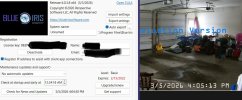
I'm doing some security system conversions(Including my Personal) starting with mine first. I decided to go with blue iris, I had played around with the demo a few times, I purchased a key like 5 years ago but never activated it. So here we are 5 years later and the BI program took the key just fine. In the "About tab" It says in red Level Basic and Expires 2/15/2022. The watermarks are still on the cams. I actually have the download receipt that says it never expires. Underneath the expired date it says "Upgrade renew".
If I have to buy again so be it, any options from you all would be great. BTW, I'm sure I will need more hand holding getting into the thick of this. Is there some place I'm suppose to activate this?

Thanks Chris
 
What is the version of the demo? Is it a file you just downloaded?
 
If you emailed Blue Iris support and explained the situation, they would probably extend the expiration date for you given the circumstances.

Otherwise you would have to install a version of Blue Iris 5 that was released before February 15, 2022 in order to not have it remove the watermarks! That is positively ancient but the upgrade files for BI 5 from that era are pretty well archived here.
The alternative is to pay $45 for a support extension subscription, but that seems silly if you have not actually activated your license until now only to find it expired 4 years ago.
 
If you emailed Blue Iris support and explained the situation, they would probably extend the expiration date for you given the circumstances.

Otherwise you would have to install a version of Blue Iris 5 that was released before February 15, 2022 in order to not have it remove the watermarks! That is positively ancient but the upgrade files for BI 5 from that era are pretty well archived here.
The alternative is to pay $45 for a support extension subscription, but that seems silly if you have not actually activated your license until now only to find it expired 4 years ago.
Thanks for that, In my Purchase e mail(I still have it) it clearly says Expires, underneith it says NEVER
 
Thanks for that, In my Purchase e mail(I still have it) it clearly says Expires, underneith it says NEVER

Technically the version you bought NEVER expires. If you upload the version that was available the day you bought it up until one year later it would be a perfectly working BI without the watermark.

But you didn't do that, you uploaded a version that is newer than yours.

Here are the older versions - find one within the year of your purchase and you are game on with no watermark.

 
@c hris527 So the license never expires—for any version of Blue Iris released earlier than a year after purchase. If you download a version of Blue Iris released before 2/15/2022, the Demo watermark should go away and it should work in perpetuity. You however have downloaded a much newer version than your license paid for (which isn't your fault, it being the only download available on the Blue Iris website). Being a member here, you can easily download an appropriate previous version from the archives on this site. Or you can email Blue Iris support and given your situation, they may move the expiration of the support period of your current license up to a year from now.

When the support period of your license (typically a year from purchase) ends, your Blue Iris will stop updating itself past that point, but it will stay activated with no watermark ("never expires"). However, if you manually update it, it will go out of activation because the version you're running is beyond the support period of your license. Your options at that point are to go back to a version of Blue Iris released within your license's support period, or to renew your license so you can continue to receive updates past that point. You just have to decide if the new features are worth the extra money to renew.

It's a clever way of implementing a subscription model without actually forcing all users to pay a subscription fee to use the software.
 
Thank you all for your Thoughts. I have been pretty much out of the Camera end of my business since 2020 other than some maintenance and a few add on to existing systems I still manage. All of the equipment were dahua NVR's and most of the systems were closed so I never had to pay much attention to remote access. Well Times have changed, New managers want remote access, and looking to me for a solution. I Can't say I stalled on this project but I feel it been on the back burner for too long If you know what I mean. I tried a few options first even a New Gen 7 Sonic wall is now a nightmare because they are Nudging everybody off of ssl-vpn's and want to up sell you with their new Cloud Secure edge. My goal here is using Zero Tier with BI at these locations.
I can tell you with the Dahua app plus the sonic wall vpn, these guys Wont be happy nor Do I like it myself. That is why I'm heading in this direction. This project had slapped me back at every turn of the corner, I had to laugh today when the BI key thing came up and I was like thinking how fitting this set back is, Ya know I do not mind paying for a new key , Its Business and I believe when I bought it, it was like $39 or something. I will e-mail them and see what they can do. I did see the links for the updates, I think I do have the version I downloaded someplace also.
Technically the version you bought NEVER expires. If you upload the version that was available the day you bought it up until one year later it would be a perfectly working BI without the watermark.

But you didn't do that, you uploaded a version that is newer than yours.

Here are the older versions - find one within the year of your purchase and you are game on with no watermark.

So If I find a version earlier, It will downgrade my current version?
 
Yes, it will downgrade what you installed and rollback to whatever version you select.
 
  • Like
Reactions: c hris527
Yes, it will downgrade what you installed and rollback to whatever version you select.
Well, there is that nasty little detail about going from version 5 to version 6. If he has version 6 installed already (as I am led to believe by post #4), I believe any version 5 installer will install a second copy beside version 6—with many of its files stuck referencing version 6, which will probably cause compatibility issues (and then break if he uninstalls version 6).

If Blue Iris 6 is already installed, I believe the correct rollback procedure would be to first uninstall Blue Iris 6, go to C:\Program Files and rename the "Blue Iris" folder to something else, and then run the Blue Iris 5 installer. Once on Blue Iris 5, one should be able to roll forwards or backwards to any version of Blue Iris 5 just by running normally through the installation process.
 
Last edited:
  • Like
Reactions: SpacemanSpiff
Well, there is that nasty little detail about going from version 5 to version 6. If he has version 6 installed already, I believe any version 5 installer will install a second copy beside version 6—with many of its files stuck referencing version 6, which will probably cause compatibility issues (and then break if he uninstalls version 6).

If Blue Iris 6 is already installed, I believe the correct rollback procedure would be to first uninstall Blue Iris 6, go to C:\Program Files and rename the "Blue Iris" folder to something else, and then run the Blue Iris 5 installer. Once on Blue Iris 5, one should be able to roll forwards or backwards to any version of Blue Iris 5 just by running normally through the installation process.

I believe OP is finally getting around to installing BI 'for the first time' for his own system, but using the key he purchased a while back. So there is very little time/content invested/captured in the BIv6 he just installed.

You noted some good points on the extra steps for removing BIv6 before installing the older ver associated with OP's key. I cannot remember the last time I encountered a window "uninstaller" that truly removed everything.
 
  • Like
Reactions: TonyR
Well, there is that nasty little detail about going from version 5 to version 6. If he has version 6 installed already (as I am led to believe by post #4), I believe any version 5 installer will install a second copy beside version 6—with many of its files stuck referencing version 6, which will probably cause compatibility issues (and then break if he uninstalls version 6).

If Blue Iris 6 is already installed, I believe the correct rollback procedure would be to first uninstall Blue Iris 6, go to C:\Program Files and rename the "Blue Iris" folder to something else, and then run the Blue Iris 5 installer. Once on Blue Iris 5, one should be able to roll forwards or backwards to any version of Blue Iris 5 just by running normally through the installation process.
No Issues doing any of it, It looks like I can just upgrade for $45, I built the PC from spare parts and knowing things might not work out, I cloned the drive, Its a I-5 7400 with a Fly-by version of 11 pro, Good enough right now to demo my 4 camera system so my clients can see how it would look on their phones. I have not done anything yet but will be messing with it today at some point, I'm sure I will have more issues to throw out to the gang here, Thanks all for the replies
 
Hi All, Hope everybody here is well.

I'm doing some security system conversions(Including my Personal) starting with mine first. I decided to go with blue iris, I had played around with the demo a few times, I purchased a key like 5 years ago but never activated it. So here we are 5 years later and the BI program took the key just fine. In the "About tab" It says in red Level Basic and Expires 2/15/2022. The watermarks are still on the cams. I actually have the download receipt that says it never expires. Underneath the expired date it says "Upgrade renew".
If I have to buy again so be it, any options from you all would be great. BTW, I'm sure I will need more hand holding getting into the thick of this. Is there some place I'm suppose to activate this?

Thanks Chris
Just a Quick update, Spent the $45 and updated, no issues, I'm good with that, no more watermarks and 1 year of updates.
 
One More update, after some back and forth with the BI settings, Bi Android app and Zero Tier, Its up and running, I think I watched like 5 hours of setup videos on the net, most of them were really good and helpful however, the versions were different from the modern version, A few things I might point out that got me stuck was setting a password for the remote user, the user name is case sensitive,(That cost me at least a hour) another was for some reason ZeroTier decided to stop working on my phone, said it was running I could ping out with it. I had another shop pc in my zerotier network and was able to log in to the bi server no issues. Ended up restarting the phone and that was that. Really liking this and wonder why I never adopted it before. I think my clients will really like it. Lots of polishing up to do on the alerts and motion but I would say I'm well on my way here. Once again ..thank you all for the help.
 
  • Like
Reactions: looney2ns