Machman
n3wb
Long time lurker, but guess it's time to maybe help in some way..
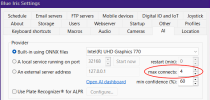
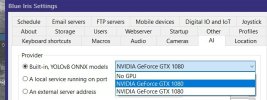
Short version: Built-in ONNX AI GPU selection aparently not working correctly. If you have a multi-GPU system (such as iGPU / GPU), try selecting the "wrong" one to get the "right" one to work.
Long, drawn out version:
System:
i9-9900K on a SuperMicro X11SCA-F w/ 64GB DDR4, 1.6 TB SSD primary (New, Alerts, etc. on this), 8 TB HDD for Stored
10x cameras: 2 LPR HD, 2HD P/T interior, 1 HD Doorbell, 5x 4K All using H.264
Process:
Read through all the relevant posts here and other places. (Thank you all for your contributions! It's been a massive help to me in the past!)
Updated all drivers and CUDA toolkit.
Shut down BI 5 and CPAI.
Installed BI 6, confirmed BI 6 up and running, so uninstalled BI 5 and CPAI. Manually deleted CPAI leftover folders.
Made sure to block Antivirus scanning of changed BI 6 folders.
Did the deed to get the files for ONNX, set up using defaults. Confirmed set for NVIDIA RTX A2000.
And boy, howdy.. Look at that CPU pegged at 100%. And the iGPU.
The RTX A2000? ~15% (And that may be due to it being the GPU that outputs to the monitor..)
Hmm..
MANY things tried / changed later and it was somewhat better, but still not right. Went through all the usual CPU optimization suspects: Direct-to-disk (already set), Limit Decode, HW decode settings, Dual-stream, etc. All to no avail.
Downloaded / installed intially 6.0.2.7. Went to 6.0.1.30 when I saw it was actually the latest "critical or highly-stable" (which is usually what I always ran with in 5). No change. AI working (though LPR maybe not so much).
What DID get it down to what I'll call functional but nowhere near optimal was changing the AI settings on the cameras for Peiodic AI Scan. Set that to max 10 mins and min 5. And then I was able to see it...
With good ol' Task Mangler up I noticed that without anything happening, no motion and just sub-stream recording, CPU was ~15%, iGPU ~20%, and the A2000 ~15%.
But anytime motion triggers for AI to look at things? CPU spiked and iGPU went to 100% and held there until all the AI processing of alerts was completed. RTX A2000 just sitting there at ~15% the whole time.
Tried the set to no GPU, restart, reset to A2000, restart, etc. loop.. Nope.
Then had one of those "I wonder.." thoughts and changed the setting for AI to the iGPU. And didn't even have to restart BI for things to take effect.
Watched the iGPU climb to 29% and just stay there (which is about what it used to be, using Intel+VPP HW decode), CPU ~20% at idle and maxed about 70%, and NOW the A2000 shows usage spikes / activity concurrent to motion activation / AI processing. And that processing is MUUUCH faster.
Oh, and while I didn't mention it before, total memory use came down from 40+GB to just around 20GB. (Which makes sense, as the iGPU uses system memory in leiu of dedicated VRAM, so if you're running AI on it, it's gonna need space.)
And just for giggles, changed it back to the A2000. CPU and iGPU go nuts on any movement again, RAM usage by iGPU quickly climbs to the 32GB limit. System non-responsive whilst this is playing out, too. (And my neighbors are probably wondering why I keep remote locking my car, which flashes the lights.. Well, it triggers motion detection for many of my cameras without me having to walk out into the rain that's desperately trying to change over to snow!)
Switch back to the iGPU selection, and it's happy mode again.
This is probably just a different presentation of the same thing others encountered encountered with GPU selection where they cycled between GPU and No GPU until it worked.
Short version: Built-in ONNX AI GPU selection aparently not working correctly. If you have a multi-GPU system (such as iGPU / GPU), try selecting the "wrong" one to get the "right" one to work.
Long, drawn out version:
System:
i9-9900K on a SuperMicro X11SCA-F w/ 64GB DDR4, 1.6 TB SSD primary (New, Alerts, etc. on this), 8 TB HDD for Stored
10x cameras: 2 LPR HD, 2HD P/T interior, 1 HD Doorbell, 5x 4K All using H.264
Process:
Read through all the relevant posts here and other places. (Thank you all for your contributions! It's been a massive help to me in the past!)
Updated all drivers and CUDA toolkit.
Shut down BI 5 and CPAI.
Installed BI 6, confirmed BI 6 up and running, so uninstalled BI 5 and CPAI. Manually deleted CPAI leftover folders.
Made sure to block Antivirus scanning of changed BI 6 folders.
Did the deed to get the files for ONNX, set up using defaults. Confirmed set for NVIDIA RTX A2000.
And boy, howdy.. Look at that CPU pegged at 100%. And the iGPU.
The RTX A2000? ~15% (And that may be due to it being the GPU that outputs to the monitor..)
Hmm..
MANY things tried / changed later and it was somewhat better, but still not right. Went through all the usual CPU optimization suspects: Direct-to-disk (already set), Limit Decode, HW decode settings, Dual-stream, etc. All to no avail.
Downloaded / installed intially 6.0.2.7. Went to 6.0.1.30 when I saw it was actually the latest "critical or highly-stable" (which is usually what I always ran with in 5). No change. AI working (though LPR maybe not so much).
What DID get it down to what I'll call functional but nowhere near optimal was changing the AI settings on the cameras for Peiodic AI Scan. Set that to max 10 mins and min 5. And then I was able to see it...
With good ol' Task Mangler up I noticed that without anything happening, no motion and just sub-stream recording, CPU was ~15%, iGPU ~20%, and the A2000 ~15%.
But anytime motion triggers for AI to look at things? CPU spiked and iGPU went to 100% and held there until all the AI processing of alerts was completed. RTX A2000 just sitting there at ~15% the whole time.
Tried the set to no GPU, restart, reset to A2000, restart, etc. loop.. Nope.
Then had one of those "I wonder.." thoughts and changed the setting for AI to the iGPU. And didn't even have to restart BI for things to take effect.
Watched the iGPU climb to 29% and just stay there (which is about what it used to be, using Intel+VPP HW decode), CPU ~20% at idle and maxed about 70%, and NOW the A2000 shows usage spikes / activity concurrent to motion activation / AI processing. And that processing is MUUUCH faster.
Oh, and while I didn't mention it before, total memory use came down from 40+GB to just around 20GB. (Which makes sense, as the iGPU uses system memory in leiu of dedicated VRAM, so if you're running AI on it, it's gonna need space.)
And just for giggles, changed it back to the A2000. CPU and iGPU go nuts on any movement again, RAM usage by iGPU quickly climbs to the 32GB limit. System non-responsive whilst this is playing out, too. (And my neighbors are probably wondering why I keep remote locking my car, which flashes the lights.. Well, it triggers motion detection for many of my cameras without me having to walk out into the rain that's desperately trying to change over to snow!)
Switch back to the iGPU selection, and it's happy mode again.
This is probably just a different presentation of the same thing others encountered encountered with GPU selection where they cycled between GPU and No GPU until it worked.