Review- EmpireTech IPC-T54IR-ZE-S3 4mp Varifocal Turret

I only have experience with the Tendelux IR units so keep that in mind with what I tell you. I have found that the Tendelux units create a hotspot no matter how you mount the darn things. So what I did was install the camera where I wanted it, and then install the IR unit behind/before the camera so any hot spot is out of view of the camera. The Tendelux units provide plenty of IR further out beyond the hot spot they can produce so have your camera aiming out past the hot spot.

Here's a quick sketch to illustrate.
View attachment 233864

Have you tried applying some frosted/etched glass window film to diffuse the beam, might well diffuse it too much but I use this on camera IR with good results, I have a post somewhere with a sample, will dig it out. See image below. Available on Amazon/eBay etc. Might need to experiment by adding some to the centre area rather than edges, depending on the config of the illuminators within the unit,.
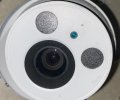
Frosted Film.jpg
 
  • Like
Reactions: samplenhold
Have you tried applying some frosted/etched glass window film to diffuse the beam, might well diffuse it too much but I use this on camera IR with good results, I have a post somewhere with a sample, will dig it out. See image below. Available on Amazon/eBay etc.

View attachment 233866
Funny you mention that. I bought some diffusing panels earlier this summer to tone down a couple LED accessory lights for a couple cameras that are full time color. I may do some testing after dark with a piece of it. Thanks!!
 
  • Like
Reactions: CamCrazy
Where do you mount the IR booster in relationship to the camera?
My experience is as close as possible to the camera. Otherwise you end up with big shadows that show nothing, because there's no light at all in them. On the hotspotting, with wide angle cameras I've gone to using two aimed-apart smaller illuminators which better cover the edges of the FOV, and distribute the hotspots.
 
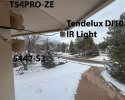
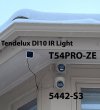
In answer to the question of where I mounted the Tendelux DI10 IR light, a picture is worth a thousand words.

Having said that, if you look carefully, you'll see a "triangle" pattern of holes drilled a little further back from the edge of the roofline. There is where I originally put it ... but as you'll see in the images in the next post, the "upper" T54PRO-ZE field-of-view captures a little bit of the roofline ... so when it is in IR mode, the DI10 illuminator "lights up" that roofline ... so I had to move it right to the edge to try to prevent that ... and even there, you will still see a tiny bit on the top right of the captured image. I don't think the DI10 is "that wide-angle" ... but the white shell reflects some of the IR light.

2025_12_04_IR_Light.jpg

2025_12_04_IR_Light-Closeup.jpg
 
Last edited:
So @wittaj asked the very good question of (basically) what is the existing light at a "reasonable" shutter speed of 1/120s ... since the first thing photographers do is look at what we have to work with ... and then decide how much "light we want to bring to the party"

This is a DARK SCENE ... it is BEYOND the capability of the camera to capture moving images ... so not really a "fair test" ... because people will just say "they suck" ...as it needs a larger/better sensor with larger/better lens to have any hope of capturing movement without light assistance.

BTW, the garage and upper porch lights we on - it gets even DARKER when they are off! ;-)

But lets see what we can do with the Tendelux DI10 IR light.

Both cameras were set to identical settings of 1/100s, 70 gain, 100 iris, 50/50 NR with AI-ISP/SSA toggled off.
Yes, I know those are unsat parameters to capture motion ... but what else can I "push" to get a lit up image ... besides "bring light to the party"
Area Focus in the middle of the driveway was done multiple times and hardly varied.
NEITHER camera has their on-board IR illuminator turned on ... since I wanted them to see the "same" light from the external one.

As I've said earlier, we are reasonable confident that 1/100s and 100 iris is the "same" for both camera's ... but who knows on the gain scale ... and ditto the NR/processing ... so all we can do is try to match the parameters.

Having said that, the one difference is that the T54PRO-ZE has BackLight set to HLC=1 (just ONE) which makes a noticeable difference in brightness/dynamic range versus BL=OFF. I've talked about this before - very puzzling to see what should be just a small adjustment make such a big change. The 5442-S3 has BL=OFF ... but if there is a difference with HLC=1, I can't see it in the snapshot.

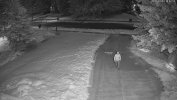
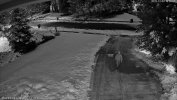
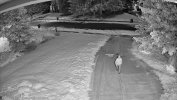
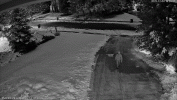
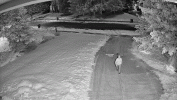
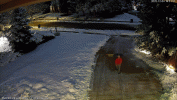
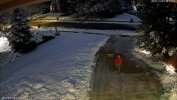
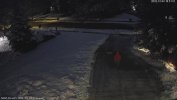
All of that is a topic for other discussion (but something that @EMPIRETECANDY should really talk to the Dahua Engineers about - something squirrly is going on with the processing) ... but here, I'll just present images from the T54PRO-ZE and 5442-S3 with those same parameters (taken at the same time) with the Tendulux DI10 IR Light OFF and ON.

In my testing (which included Color BTW), I tried to walk an identical path ... so I'm WALKING up the driveway and am about 40 feet from the cameras ... so you'll see some motion blur in the images. I may post the videos in the other thread ... as I think they reinforce what I've said that the static content is better with the T54PRO-ZE ... but I think the (inter-frame) 3D NR doesn't handle moving objects well so the blur is increased. In the NEXT post, I'll do a side-by-side comparison of the T54PRO-ZE and 5442-S3.

So ... having written all that ... and given that you can never have enough light(!), I'm thinking another DI10 and/or DI20 might help me out here ... since even with the unsat paramaters, the DI10 is not providing enough light to reasonably capture a walking object.


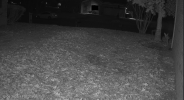
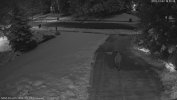
2025_12_04_5442-Z3_IR_NOlight_10_70_100_50_50.jpg


2025_12_04_5442-S3_IR_Light_10_70_100_50_50.jpg

2025_12_04_T54PRO-ZE_1127FW_IR_NOlight_10_70_100_50_50.jpg

2025_12_04_T54PRO-ZE_1127FW_IR_Light_10_70_100_50_50.jpg
 
Last edited:
Looking at your photos in post #336, that looks a lot higher than 9 feet.

ipc-t54ir-ze-s3-settings-1-png.233765


Assuming the lower wall with the railings on is at least 6 feet, and looking at the side with the red gas bottle on it, it looks more like 10 feet, that position looks more like 20 feet.

I usually mount about 6.5-7 ft ie virtually eye level - cameras rarely get attacked and if they ever do, usually you get a very good facial of the person attacking it as they have to walk straight up to it and look directly at the camera to damage it, by which case you have them for criminal damage if nothing else.

The height your at is good for over view but you'll struggle to get a good facial unless anyone looks up and isn't wearing a baseball cap or similar. The coverage close in also looks poor with most of the picture being the garden some way from the house. Again fine, if you have another camera at @6-7 feet, watching the actual home itself, but if not there oculd be too issues - 1. focal point / dof, 2. the fact any break in won't be covered as the home isn't covered, so you'll only capture someone walking across your lawn which isn't an offence in many jursidictions!
 
Looking at your photos in post #336, that looks a lot higher than 9 feet.

ipc-t54ir-ze-s3-settings-1-png.233765


Assuming the lower wall with the railings on is at least 6 feet, and looking at the side with the red gas bottle on it, it looks more like 10 feet, that position looks more like 20 feet.

I usually mount about 6.5-7 ft ie virtually eye level - cameras rarely get attacked and if they ever do, usually you get a very good facial of the person attacking it as they have to walk straight up to it and look directly at the camera to damage it, by which case you have them for criminal damage if nothing else.

The height your at is good for over view but you'll struggle to get a good facial unless anyone looks up and isn't wearing a baseball cap or similar. The coverage close in also looks poor with most of the picture being the garden some way from the house. Again fine, if you have another camera at @6-7 feet, watching the actual home itself, but if not there oculd be too issues - 1. focal point / dof, 2. the fact any break in won't be covered as the home isn't covered, so you'll only capture someone walking across your lawn which isn't an offence in many jursidictions!

I did think that myself, at a guess I would have said 20-25 feet, it looked high. As above I tend to go 8-9 feet, in my mind I think these are less likely to get hit with a hammer or paint ball device :wow: :lol:

Normally you can never have enough damn cameras, overview, then tigher angle on pinch points, entrances, the list goes on. Overview cameras are nice to have though, suddenly losing sight of a suspect when they move between narrow angle cameras can be annoying. Sometimes it is hard to cover an entire site, unless budget and cameras are unlimited, depending on size of course.
 
Since we are currently talking about IR illuminators in this thread, I'm kinda reluctant to post a T54PRO-ZE versus 5442-S3 comparison (maybe more appropriate in the other one) ... but here are the images above combined into an animated GIF without and with IR light.

Please read the explanation/disclaimers about this REALLY DARK scene in my earlier post ... where I closed with "I think they reinforce what I've said that the static content is better with the T54PRO-ZE ... but I think the (inter-frame) 3D NR doesn't handle moving objects well so the blur is increased."


2025_12_04_5442-S3_and_T54PRO-ZE_1127FW_IR_NOlight_10_70_100_50_50.gif


2025_12_04_5442-S3_and_T54PRO-ZE_1127FW_IR_Light_10_70_100_50_50.gif
 
Last edited:
Last edited:
BTW, back to the Tendelux IR Illuminators, I agree with others that the light distribution seems pretty even.

In fairness, my situation is "best case" ... as it is mounted at the top of the house ... so it's a "long" distance to the target which reduces "distance squared" issues ... and looks to me like just normal light falloff the farther you get some it.

A better test would be have it light up a wall less than 10' away.
 
  • Like
Reactions: tigerwillow1
Since we are currently talking about IR illuminators in this thread, I'm kinda reluctant to post a T54PRO-ZE versus 5442-S3 comparison (maybe more appropriate in the other one) ... but here are the images above combined into an animated GIF without and with IR light.

Please read the explanation/disclaimers about this REALLY DARK scene in my earlier post ... where I closed with "I think they reinforce what I've said that the static content is better with the T54PRO-ZE ... but I think the (inter-frame) 3D NR doesn't handle moving objects well so the blur is increased."


View attachment 233908


View attachment 233909


I would submit that IMHO the 5442 beats the 54PRO in the shot with IR ON. The target is more clear.
But the 54PRO is a prettier more rich image

Of course in the first comparison with NO IR they both suck and nobody would run them that way.
I know you know this, just pointing it out

Same applies to the videos. With NO IR both suck as expected
 
Last edited:
BTW, back to the Tendelux IR Illuminators, I agree with others that the light distribution seems pretty even.

In fairness, my situation is "best case" ... as it is mounted at the top of the house ... so it's a "long" distance to the target which reduces "distance squared" issues ... and looks to me like just normal light falloff the farther you get some it.

A better test would be have it light up a wall less than 10' away.

What about testing the difference between just the onboard IR vs just the Tendelux which you just did?
 
  • Like
Reactions: JDreaming
What about testing the difference between just the onboard IR vs just the Tendelux which you just did?

I did look briefly at the on-board IR ... but I'm very confident that it's not as powerful as the 10-Watt Tendelux DI10 ... and for THIS SCENE, I need all the light I can get ... plus widely dispersed. Obviously for close-in-work, you want the onboard light to "work with" the camera ... but I'm not able to test that here.

Also, I do NOT like about on-board lighting as by definition, it's right along the optical axis ... so you are going to get bright reflections. I.e. if you ever want to try to spot cats/owls/etc. at night, use a flashlight and put it "close" to your eyes ... versus if you have off-camera lighting (or hold the flashlight off to the side), you won't get near as much reflection. Ditto why you see red-eye in flash pictures.

From what I've read, it sounds like the 54PRO has "better" on-board lighting than the 5442-S3 (which would make sense - more of it plus newer generation) ... but I think the "processing" messes with the image ... but again, not my area of hands-on expertise.
 
I would subnmit that IMHO the 5442 beats the 54PRO in the shot with IR ON. The target is more clear.
But the 54PRO is a prettier more rich image

Of course in the first comparison with NO IR they both suck and nobody would run them that way.
I know you know this, just pointing it out

Same applies to the videos. With NO IR both suck as expected
What do you think of the COLOR video?
Below is a GIF of them with the two JPEG's pulled from the video.

The 54PRO blows away the 5442 - especially in static content. Not just brightness/color, but look at the sharpness of the shirt/bag in the driveway, the trees to the right and across the street, the window of the house in the top left, etc. Also, you may notice the fine-grained noise on the darker side of the lawn. You don't see this as much in the 5442 ... because it's just a dark/smeared mess (and much more gawdawful purple blotches)... but if you boosted that to the same brightness level, I bet it would be wayyy more noiser than the 54PRO.

HOWEVER, as noted, while the gain/NR is set to the same numbers, I don't know if they are the same scale ... but regardless, the 5442 is at it's "limit" ... whereas the 54PRO is still "hanging in there" ... and as I mentioned earlier, once you got above gain=65 with the OLD firmware, the 54PRO got OMG noisy ... but that's not the case now - LOL they may have just re-scaled it.

BTW, if you look at the IMAGE of me walking up the driveway, you'll see a "shadow/cloud" behind me ... which you can see in the video - LOL I'm like PigPen from Peanuts! ;-)
You can also see this with the car that goes by in the 2nd half video ... as you can literally see the algorithm re-mapping the tones in the snow/street over a few seconds.

I see these visual artifacts all the time when I'm "pushing" the camera ... and is is what I'm calling the "(inter-frame) 3D NR doesn't handle moving objects well so the blur is increased."

This is what I think Dahua needs to work on since I think it manifests itself even in daytime where people are (rightfully so) WTF is there a blur at pretty fast shutter speeds.

2025_12_04_5442-S3_and_T54PRO-ZE_1127FW_Color_10_70_100_50_50.gif
 

Attachments

  • 2025_12_04_T54PRO-ZE_1127FW_Color_10_70_100_50_50.jpg
    2025_12_04_T54PRO-ZE_1127FW_Color_10_70_100_50_50.jpg
    915.7 KB · Views: 3
  • 2025_12_04_5442-S3_Color_10_70_100_50_50.jpg
    2025_12_04_5442-S3_Color_10_70_100_50_50.jpg
    413.8 KB · Views: 3
Last edited:
What do you think of the COLOR video?
Below is a GIF of them with the two JPEG's pulled from the video.

The 54PRO blows away the 5442 - especially in static content. Not just brightness/color, but look at the sharpness of the shirt/bag in the driveway, the trees to the right and across the street, the window of the house in the top left, etc. Also, you may notice the fine-grained noise on the darker side of the lawn. You don't see this as much in the 5442 ... because it's just a dark/smeared mess (and much more gawdawful purple blotches)... but if you boosted that to the same brightness level, I bet it would be wayyy more noiser than the 54PRO.

HOWEVER, as noted, while the gain/NR is set to the same numbers, I don't know if they are the same scale ... but regardless, the 5442 is at it's "limit" ... whereas the 54PRO is still "hanging in there" ... and as I mentioned earlier, once you got above gain=65 with the OLD firmware, the 54PRO got OMG noisy ... but that's not the case now - LOL they may have just re-scaled it.

BTW, if you look at the IMAGE of me walking up the driveway, you'll see a "shadow/cloud" behind me ... which you can see in the video - LOL I'm like PigPen from Peanuts! ;-)
You can also see this with the car that goes by in the 2nd half video ... as you can literally see the algorithm re-mapping the tones in the snow/street over a few seconds.

I see these visual artifacts all the time when I'm "pushing" the camera ... and is is what I'm calling the "(inter-frame) 3D NR doesn't handle moving objects well so the blur is increased."

This is what I think Dahua needs to work on since I think it manifests itself even in daytime where people are (rightfully so) WTF is there a blur at pretty fast shutter speeds.

View attachment 233942

I think as Ive said before comparing them with the same fixed unrealistic values is well, interesting, but both can be dialed in. Id dial them in and then compare.

Ive done this already with them on the Z4, posted on the Z4 thread, and dispute that there's as much difference when properly tuned as inferred by that test.

5442 S3
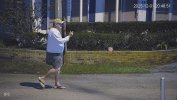
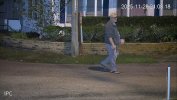
a-192.168.1.110_StreetE-5442-Z4-S3_main_20251201204851_@1.jpg
54PRO
192.168.1.110_IPC_main_20251128210818_@1.jpg
 
Last edited:
Yea, your examples have been great ... for instance, LOL that you too are "Pigpen from Peanuts with a dust cloud" behind 'ya! ;-)
Plus your stuff and others are much more representative of typical use cases versus my "scene" shots.
And LOL I obsess over the Pixel-Peeping! ;-)

I wasn't clear that what I meant by IR compensation is adjusting the strength of the light itself. I.e. if something in the foreground becomes over-exposed, rather than dropping the overall exposure (which effects everything), the camera could maintain the exposure (so you have some detail in the dark/far-away areas from ambient light) but reduce the power of the light. That's not an option with an external IR unless you hook it up somehow.

With an external IR, when something moves into the foreground, the camera has to decide (quickly!) if it should leave the exposure as-is ... so everything is good except that foreground is blown out ... or reduce exposure, darkening everything, but providing good detail what showed up close to the camera ... which yea, is probably what you want the vast majority of the time.

i.e. who cares if the background goes dark as long as you get a good face shot of the dirtbag ... or someone driving by in their golf cart! ;-)