New Reolink Wired POE Doorbell Cam ?

There is a web interface to make setup changes.
But you will need to use the app at least once, to turn on HTTP and other services. Or at least I did with mine, a year+ ago, as it came OOtB without HTTP enabled.

But I haven't needed it since.
 
But you will need to use the app at least once, to turn on HTTP and other services. Or at least I did with mine, a year+ ago, as it came OOtB without HTTP enabled.

But I haven't needed it since.
I wonder if this is just on the wifi version. Seems kinda dumb it would need the app for that, but I have seen stupider things.
 
Absolutely required on the POE version as well. They do have a Windows app as well as mobile apps. I chose the Windows app on an old laptop plugged into the VLAN the cameras are on to initilize the camera and get HTTP turned on. Then you can use the Web UI from there.
 
  • Like
Reactions: TonyR
Absolutely required on the POE version as well. They do have a Windows app as well as mobile apps. I chose the Windows app on an old laptop plugged into the VLAN the cameras are on to initilize the camera and get HTTP turned on. Then you can use the Web UI from there.
OK, that is good to know. Thanks. I have a Windows VM I can use.
Any other features you know of that are missing if I don't use the app?
 
I just bought a Reolink WIFI doorbell cam for my parents. I just wanted to confirm that I can get it setup without using a mobile device and app? I assume I can get it setup with their windows client installed on a Windows PC?
 
  • Like
Reactions: David L
I just bought a Reolink WIFI doorbell cam for my parents. I just wanted to confirm that I can get it setup without using a mobile device and app? I assume I can get it setup with their windows client installed on a Windows PC?
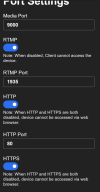
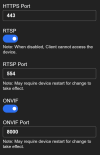
That is correct. You don't have to use the Phone App. All you are basically doing is turning on HTTP/HTTPS and any other protocols you may need. For whaterever reason they are defaulted to Off

On the Windows Client - Network/Advanced/Port Settings:

1764333141056.png
1764333390424.png

HTH
 
  • Like
Reactions: Spooling
Okay I need a little help finding the door bell cam on my vlan.
My setup 192.168.50.1 and a switch on a different network card set a 192.168.2.1.

The cam works with BI on my public network. When I move it to the 192.168.2.1 vlan I can not find it. Using Wireshark finds my other cams on the vlan, but not the Reolink cam.

EDIT: This is an all poe vlan.
 
  • Like
Reactions: David L
Okay I need a little help finding the door bell cam on my vlan.
My setup 192.168.50.1 and a switch on a different network card set a 192.168.2.1.

The cam works with BI on my public network. When I move it to the 192.168.2.1 vlan I can not find it. Using Wireshark finds my other cams on the vlan, but not the Reolink cam.

EDIT: This is a all poe vlan.
Does the 192.168.2.1 network have a DHCP server or are you setting static IP's? And wireshark to see cameras? Never heard of that. I always use Angry IP scanner or a SADP tool.
 
  • Like
Reactions: David L
Okay I need a little help finding the door bell cam on my vlan.
My setup 192.168.50.1 and a switch on a different network card set a 192.168.2.1.

The cam works with BI on my public network. When I move it to the 192.168.2.1 vlan I can not find it. Using Wireshark finds my other cams on the vlan, but not the Reolink cam.

EDIT: This is an all poe vlan.
Is this an initial/first setup you are trying to do on the Doorbell? If so, you won't find it until you configure the Doorbell first.

When I first got my DB I tried to find if it had a default IP, like most devices do. Found nothing so I went the hard route of powering the DB with a POE Injector (you can also use a DB transformer) and setting up a virtual DHCP server on my laptop.

After resetting it up a few times on bench, playing with it, I found 192.168.0.3 to be the default IP.

So you have a few options, you can do like I did and use a laptop, connect power to the switch via POE Injector, use a Doorbell transformer or a spare POE switch. Set your laptop's Ethernet IP port to 192.168.0.2 or 0.1 just anything other than 0.3

Launch the Reolink client software...


You will then be able to setup a Static IP

Be sure to turn On HTTP/HTTPS and any other RTSP type protocols you may use...

 
^^^ opps, nevermind, I see you already did setup the DB

The cam works with BI on my public network.
 
Okay I need a little help finding the door bell cam on my vlan.
My setup 192.168.50.1 and a switch on a different network card set a 192.168.2.1.

The cam works with BI on my public network. When I move it to the 192.168.2.1 vlan I can not find it. Using Wireshark finds my other cams on the vlan, but not the Reolink cam.

EDIT: This is an all poe vlan.
 
Does the 192.168.2.1 network have a DHCP server or are you setting static IP's? And wireshark to see cameras? Never heard of that. I always use Angry IP scanner or a SADP tool.
Static.
Here is a better detail of my setup.
I have a NUC Intel ultra 5 125H with 32Gb ram.(over kill. Lol.)
The wifi is setup as my main gateway to my router,: 192.168.50.1.
I also have an cable from the router to a switch, If remember it has 24 ports.

I am using the built in lan adapter setup as 192.168.2.1 and it is hooked to an 8 port POE switch.
(no internet access. Good.)

The problem, I can run the doorbell cam on the main network (192.168.50.1) using a power supply and network cable. The cam has an address of 192.168.50.127. And it works great, using BI or the Reolink app.

When I move the doorbell cam to the POE switch with poe power I can not find it on the gateway 192.168.2.1 network. The doorbell powers up and rings the paired chime when the button is pressed.

I have tried using Dahua ip config to find the address and wireshark.
It's crazy, I cam see all my other cams on the poe network using ip config and wireshark.
 
It's crazy, I cam see all my other cams on the poe network using ip config and wireshark.
These "other cams".....what subnet is their IP's on: 192.168.50.XXX or 192.168.2.XXX?

Have you ever tried Fing to locate cams and open ports? They have desktop, Android and iOS versions. :cool:
 
  • Like
Reactions: David L
These "other cams".....what subnet is their IP's on: 192.168.50.XXX or 192.168.2.XXX?

Have you ever tried Fing to locate cams and open ports? They have desktop, Android and iOS versions. :cool:
All ip cams use the vlan subnet 192.168.2.xxx.
Maybe I was not clear enough on my setup.

I am using a nic port on a Windows 11 machine. That nic port goes directly to an 8 port poe switch and nothing else. This setup is known as a vlan that can not be accessed outside of Windows. That means anything connected to my router will not be able to touch my ip cams from the outside world.

Just for the hell of it, I have a second poe switch that I hooked up to my router and plugged in the doorbell cam. And it works. I do not want to use this setup. Because it defeats privacy.
 
Are you saying that the doorbell camera with a static IP of 192.168.50.127 cannot be seen by a PC on a VLAN of 192.168.2.XXX when the cam is moved to that same VLAN?
 
Is your POE Switch a Layer 2 managed switch? Did you setup VLAN on your NIC in Windows under advanced settings and assign a VLAN ID#? If yes to these questions then you have a VLAN, if no then you just have a separate Subnet...

VLAN is virtual networking, subnet with a second NIC in a PC is physical networking.

If you know all this, please ignore, just chiming here...
 
  • Like
Reactions: vandyman
Is your POE Switch a Layer 2 managed switch? Did you setup VLAN on your NIC in Windows under advanced settings and assign a VLAN ID#? If yes to these questions then you have a VLAN, if no then you just have a separate Subnet...

VLAN is virtual networking, subnet with a second NIC in a PC is physical networking.

If you know all this, please ignore, just chiming here...
It is not technically a vlan.
It is a Built in NIC adaptor connected directly to a poe switch. I changed the subnet to a static subnet using Windows adapter settings. So the subnet is setup at 192.168.2.xxx and it works great as a private network for my cameras.
As I said before, all of my other cameras work on this setup.

This kind of reminds me of the Wyze bullshit.....

My main pc subnet 192.168.50.xxx is connected via wifi to my router and the world.
The only way the two subnets can talk to each other is via Blue iris.

Side note: I use to have a HP 28 port switch with vlan support.
But it finally bit the dust.

 
  • Like
Reactions: David L
It is not technically a vlan.
It is a Built in NIC adaptor connected directly to a poe switch. I changed the subnet to a static subnet using Windows adapter settings. So the subnet is setup at 192.168.2.xxx and it works great as a private network for my cameras.
As I said before, all of my other cameras work on this setup.

This kind of reminds me of the Wyze bullshit.....

My main pc subnet 192.168.50.xxx is connected via wifi to my router and the world.
The only way the two subnets can talk to each other is via Blue iris.

Side note: I use to have a HP 28 port switch with vlan support.
But it finally bit the dust.

When I first was looking into setting up my network I read about adding a second NIC to my BI PC, which I did. But also ended up buying Managed Switches and created a VLAN network with pfSense as my Router.

Having two separate Subnets on the PC works, Except if the PC is hacked, they will have access to both Subnets. What I do on my BI PC is keep the PC totally Off the Internet. One NIC is connected to my CAMERA VLAN on one of my Managed Layer 2/3 switches, which that VLAN does not have Internet access via my pfSense Router Rules...the router blocks the "outside world" your quote :)

My second NIC is also connected to a Managed Switch which 'Can' have Internet access, but Only to update BI. I control this at the managed switch by turning On the gateway. So my switch would have to get hacked in order for someone to get to my BI PC and the Cameras.

I know this is an extra step, but only takes a minute for me to turn On/Off, plus how often do we update anyway? I will also update Windows too when I do this every few months.

I allow Home Assistant access to the BI PC to get notifications of triggered events, which I get on my Home Assistant Phone App. Again just another Rule set in the pfSense Router. I can see Live fed also through Home Assistant.

The above works for me...if anyone has a better way, please chime in, I am all ears...
 
  • Like
Reactions: vandyman
Static.
Here is a better detail of my setup.
I have a NUC Intel ultra 5 125H with 32Gb ram.(over kill. Lol.)
The wifi is setup as my main gateway to my router,: 192.168.50.1.
I also have an cable from the router to a switch, If remember it has 24 ports.

I am using the built in lan adapter setup as 192.168.2.1 and it is hooked to an 8 port POE switch.
(no internet access. Good.)

The problem, I can run the doorbell cam on the main network (192.168.50.1) using a power supply and network cable. The cam has an address of 192.168.50.127. And it works great, using BI or the Reolink app.

When I move the doorbell cam to the POE switch with poe power I can not find it on the gateway 192.168.2.1 network. The doorbell powers up and rings the paired chime when the button is pressed.

I have tried using Dahua ip config to find the address and wireshark.
It's crazy, I cam see all my other cams on the poe network using ip config and wireshark.
Are you setting the DB cam up with a static IP in the 2.X range before you move it over to the other switch? If the DB cam is defaulting to DHCP (which it sounds like it is considering the 50.127 address) then when it moves to the new LAN it won't get an IP and it won't be connectable.

Maybe try the reolink app on the NUC with the camera on the 2.X lan and see if that picks it up.

I just saw the edit to your original comment, are you actually using vlan or just physically separated lans, ie two NIC's in the NUC, one NIC connected to the router through a switch and one NIC connected to the 8 port POE switch with the cameras on it?