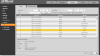
I am still having issues with the auto tracking only working for a few days so I was taking a look at the log and found some interesting things.
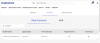
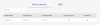
I had some illegal login attempts and it lists the ip addresses attempting to login and they came back as being from Ukraine and Russia. It appears they weren't succecful in logging in.
Found another entry for a Login and Logout at an unusual time and the ip adresss was from Malaysia, city being Petaling Jaya So a google search of Petaling Jaya and Dahua reveals Dahua has a location there. Log shows they were logged out exactly 4 mins after the login so Im guessing it was an auto logout but still looks like a succesful login.
I had some illegal login attempts and it lists the ip addresses attempting to login and they came back as being from Ukraine and Russia. It appears they weren't succecful in logging in.
Found another entry for a Login and Logout at an unusual time and the ip adresss was from Malaysia, city being Petaling Jaya So a google search of Petaling Jaya and Dahua reveals Dahua has a location there. Log shows they were logged out exactly 4 mins after the login so Im guessing it was an auto logout but still looks like a succesful login.
Are you forwarding ports through your firewall/router to the camera? I'm curious to understand how someone might have external access to your camera to ensure I don't have the same exposure.
I have two network ports/cards on the PC(one for Windows-updates, and the other no internet access-just for cameras), use Asus router OpenVPN and on the phone, I use UI3. P2P disabled on the router and on the cameras.
I have two NICs on my server so Ill move the cameras over to a different range and see if it still happens. I had them on the same range for time synchro purposes. They logged in again this morning.
I would change the password of your admin account as well.
EDIT - you also need to make sure all the extra services are turned off on all your cameras (Settings -> Network) - things like UPnP, Bonjour, Multicast, P2P, etc, etc, etc.
I would change the password of your admin account as well.
EDIT - you also need to make sure all the extra services are turned off on all your cameras (Settings -> Network) - things like UPnP, Bonjour, Multicast, P2P, etc, etc, etc.
Changed the pw and already had those settings off months ago but Ill double check them
I did have have this camera ip port forwarded for webcam purposes from a previous camera so I turned that forwarding off last night. Still getting the Russia attempts on it but haven't seen Malaysia logins yet.
Neither of the firmware versions match "DH-SD49225XA-HNR". How does one know which firmware is for which device?
Also, do you have any recommended firmware websites?